

March 13, 2024
Question

No checkbox for Tax-exempt customer

  • March 13, 2024
  • 1 reply
  • 0 views

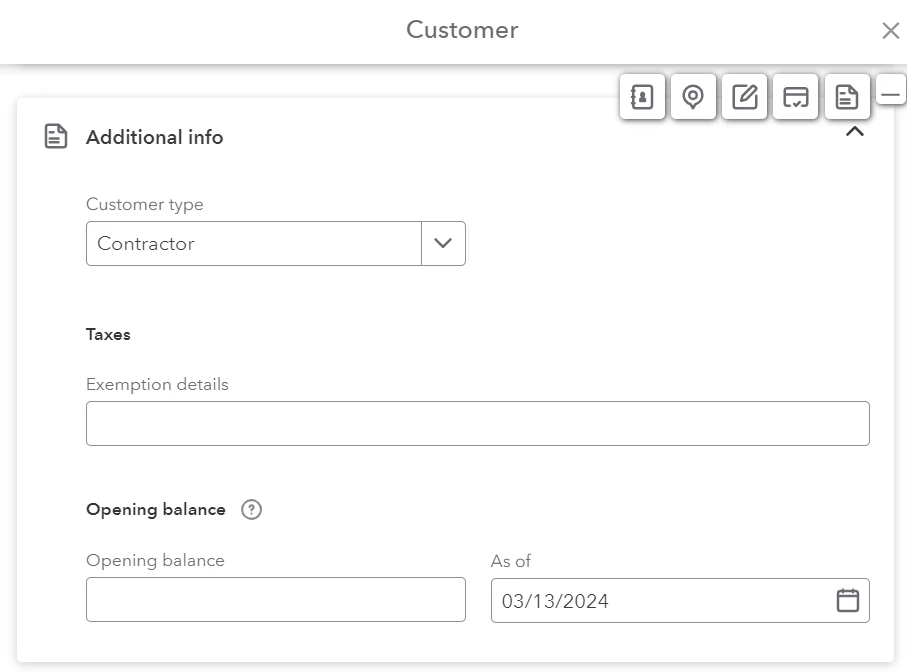
In the instructions for creating a customer, there says there is a checkbox to mark a customer as tax-exempt. In my screen, I don't see a check box, but instead a text field. There is an address for the customer. What am I missing here?

Add and manage customers in QuickBooks Online 
1 reply

Bryan_M
March 14, 2024

I'm glad to have you here, @guitarthrower.


Let me guide you on how to have the Tax-Exempt checkbox.


First, you'll need to turn on the Automatic Sales Tax and set it up in the Taxes tab. Here's how:


  1. In the left panel, select Taxes.
  2. Click the Use Automatic Sales Tax
  3. Then, follow the on-screen steps.


Once done, let's go back to add a customer and check the Additional info area where Taxes can be managed for that customer. 


You might want to learn how QuickBooks Online calculates your taxes. Check out this article: Learn how QuickBooks Online calculates sales tax.


For additional questions about managing your customer taxes, leave a reply below. I'll answer you as soon as possible. Keep safe always.