April 5, 2019
Solved

Online equivalent of credit memo and credit card refund

  • April 5, 2019
  • 1 reply
  • 0 views

In Desktop, I created an invoice and applied a payment - invoice is marked Paid.  Then I needed to issue a Credit Memo for the full amount and issued a Credit Card Refund so Credit Memo is marked Refunded.  Customer balance is zero.

 

In QB Online, I created an invoice and applied a payment - invoice status is Paid and payment status is closed.  Now I want to do the functional equivalent of what I did in Desktop so the original invoice and payment are kept intact, a credit memo and refund are issued and the Customer balance is zero.  How to do this?


 

Best answer by JaneD

Welcome to the Community, RJBreneman.


I'm here to help mark the credit memo as refunded in QuickBooks Online (QBO).


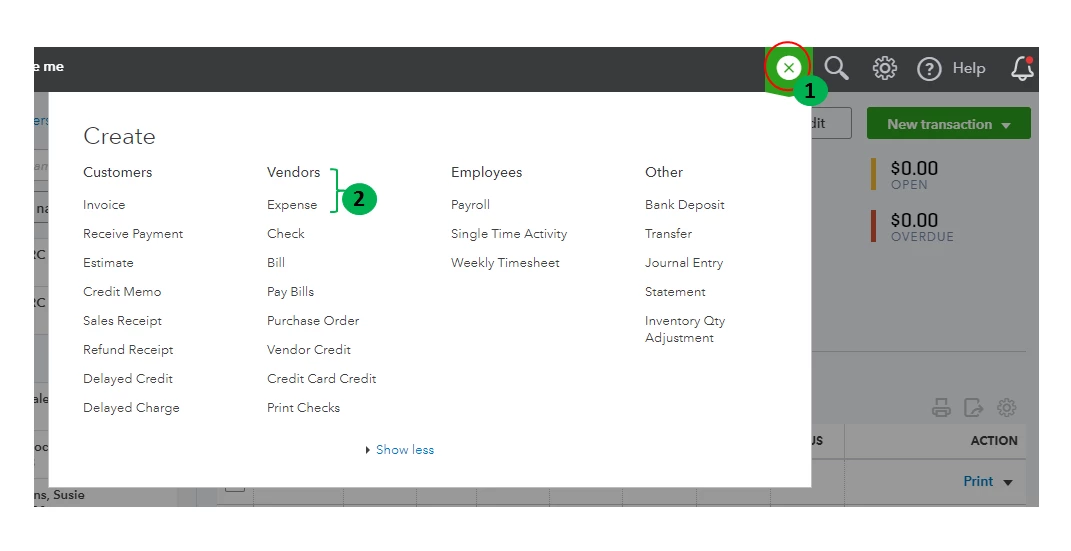
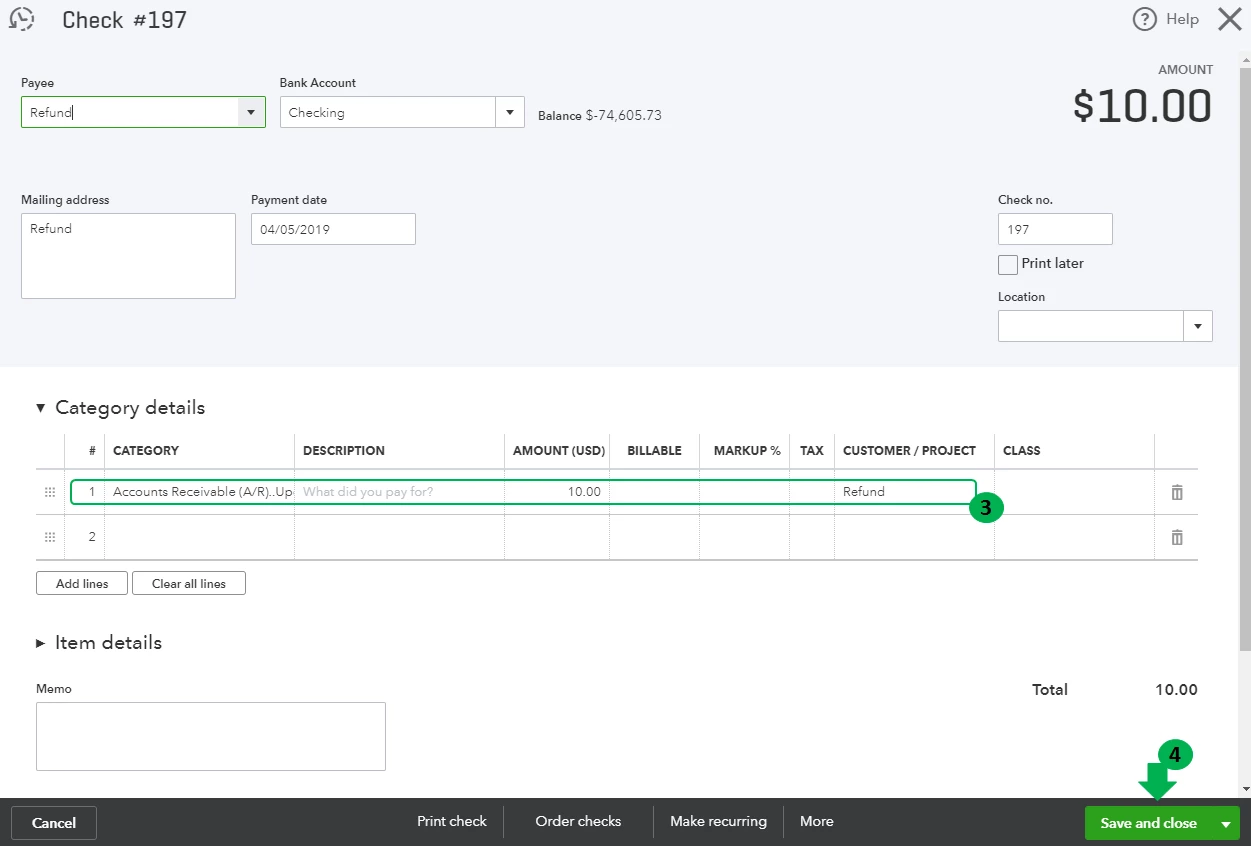
You should create a check or an expense transaction to offset customer's open credit. To do so, please follow these steps:

  1. Click on the + New button.
  2. Under Vendors, choose Check or Expense.
  3. In the Account column, choose Accounts Receivable.
  4. Enter the credit in the Amount column.
  5. In the Customer column, choose the customer.
  6. Select Save and close.


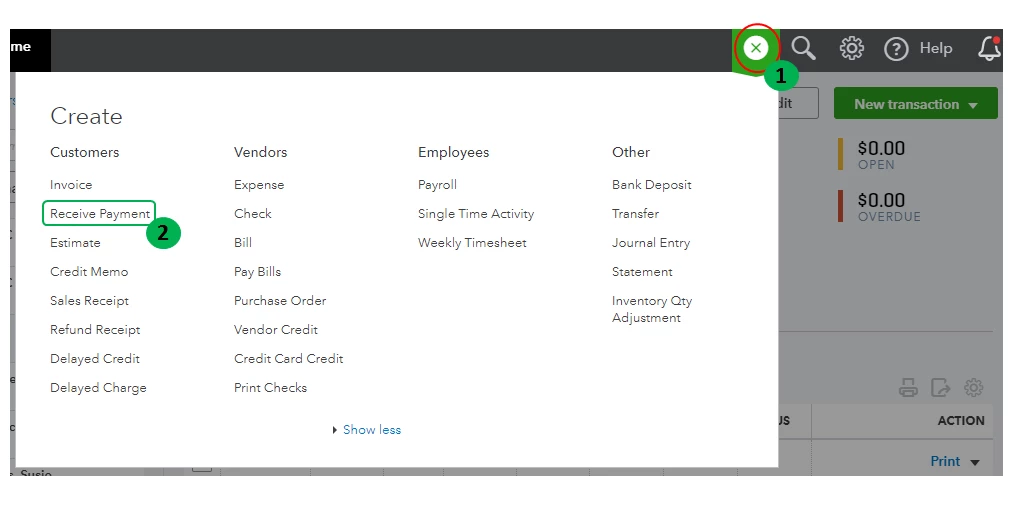
Then, let's link the check or expense with the credit memo:

  1. Click on the + New button.
  2. Under Customers, choose Receive Payment.
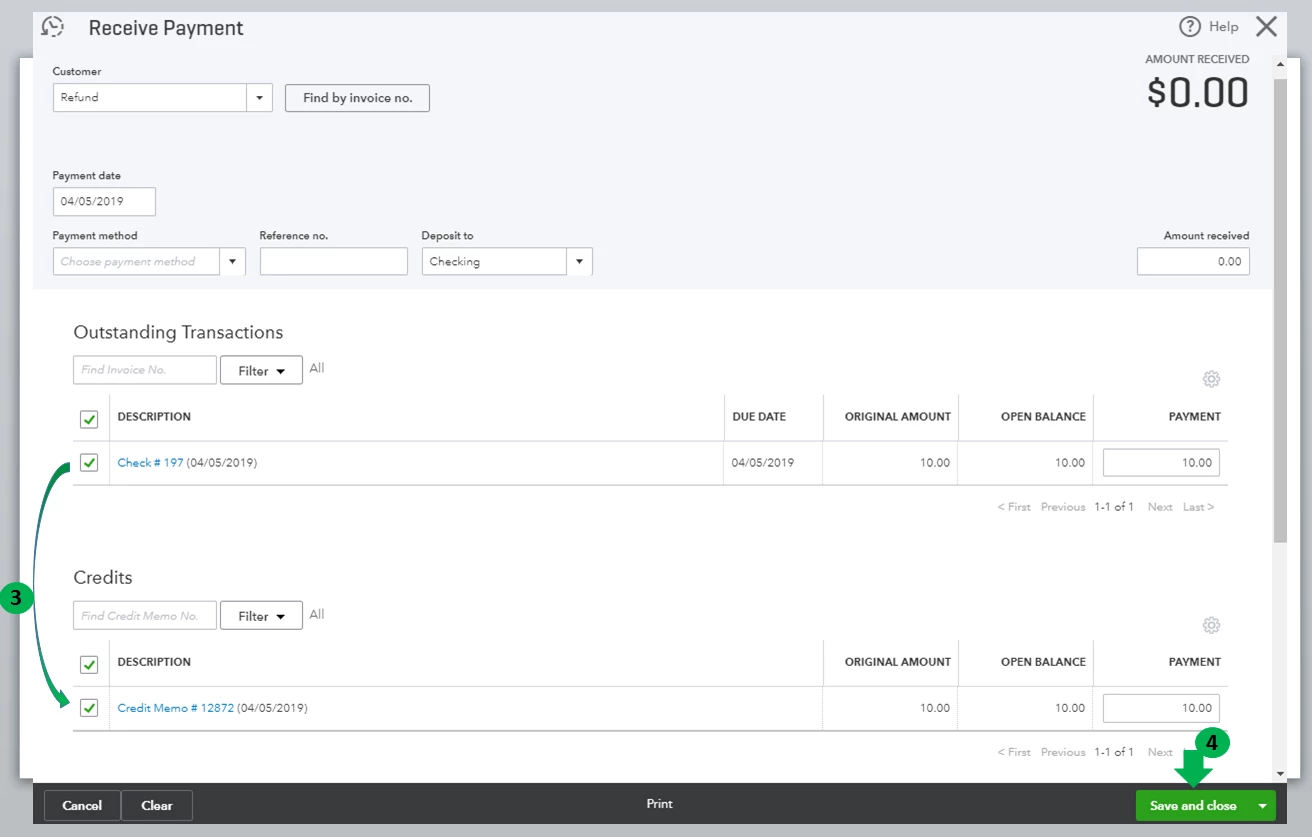
  3. Fill out the following fields:
    • Customer
    • Date
    • Payment Method
    • Reference No.
    • Deposit To
    • Memo (Optional)
  4. Under Outstanding Transactions, select the Check or Expense that you created.
  5. Under Credits, select the unapplied payment.
  6. Make sure Amount Received is zero.
  7. Click on Save and close.


For further guidance, you can also check this article: Record a customer refund.


This should point you in the right direction. If you have additional questions, you can always reach back to me. I'll be around. Have a great weekend.

1 reply

JaneD
JaneDAnswer
April 6, 2019

Welcome to the Community, RJBreneman.


I'm here to help mark the credit memo as refunded in QuickBooks Online (QBO).


You should create a check or an expense transaction to offset customer's open credit. To do so, please follow these steps:

  1. Click on the + New button.
  2. Under Vendors, choose Check or Expense.
  3. In the Account column, choose Accounts Receivable.
  4. Enter the credit in the Amount column.
  5. In the Customer column, choose the customer.
  6. Select Save and close.


Then, let's link the check or expense with the credit memo:

  1. Click on the + New button.
  2. Under Customers, choose Receive Payment.
  3. Fill out the following fields:
    • Customer
    • Date
    • Payment Method
    • Reference No.
    • Deposit To
    • Memo (Optional)
  4. Under Outstanding Transactions, select the Check or Expense that you created.
  5. Under Credits, select the unapplied payment.
  6. Make sure Amount Received is zero.
  7. Click on Save and close.


For further guidance, you can also check this article: Record a customer refund.


This should point you in the right direction. If you have additional questions, you can always reach back to me. I'll be around. Have a great weekend.

April 8, 2019

JaneD thanks for the response.  I was able to follow your instructions and resolve the issue.  I had to make one minor adjustment.  Under the

let's link the check or expense with the credit memo


5. Under Credits, select the Unapplied Payment.

there was no Unapplied Payment.  I checked the unapplied Credit Memo instead and that worked.  Everything is paid/closed and their balance is zero.  Here is a screenshot of the complete transaction list. 


Thanks again!


JaneD
April 8, 2019

You're always welcome, RJBreneman.


A credit memo is also called as unapplied payment in QBO. I'm glad I was able to help you with your concern. Well done!


Just in case, I've added an article that will guide you step-by-step on how to do various tasks in QBO. Here's the link for you reference: Getting Started.


That should do it. I'm always around if you have any other concerns. Have a great week ahead!