

February 11, 2019
Solved

Owner's Draw on Self Employed QB

  • February 11, 2019
  • 2 replies
  • 0 views

Hello,

I am a sole proprietor using QuickBooks Self-Employed and would like to set up Owner's Draw. I'm new to this, so unfortunately I've just been writing myself checks from my business account and depositing in my personal account. In other posts in the QB Community, I see that I should set up an equity account in the 'Chart of Accounts' in the gear icon.  However, I don't have a Chart of Accounts there. All I have are my Bank Accounts where I sync with my business checking and my business credit card.   All that shows up there is an option to connect another account.

So, how do I set up that elusive equity account?

Thanks in advance!
Best answer by JenoP

Hi there, KLPABE.


QuickBooks Self-Employed (QBSE) does not have a Chart of Accounts where you can set up equity accounts unlike QBO. This product is designed to track business income and expenses to help with your estimated taxes and Schedule C. 


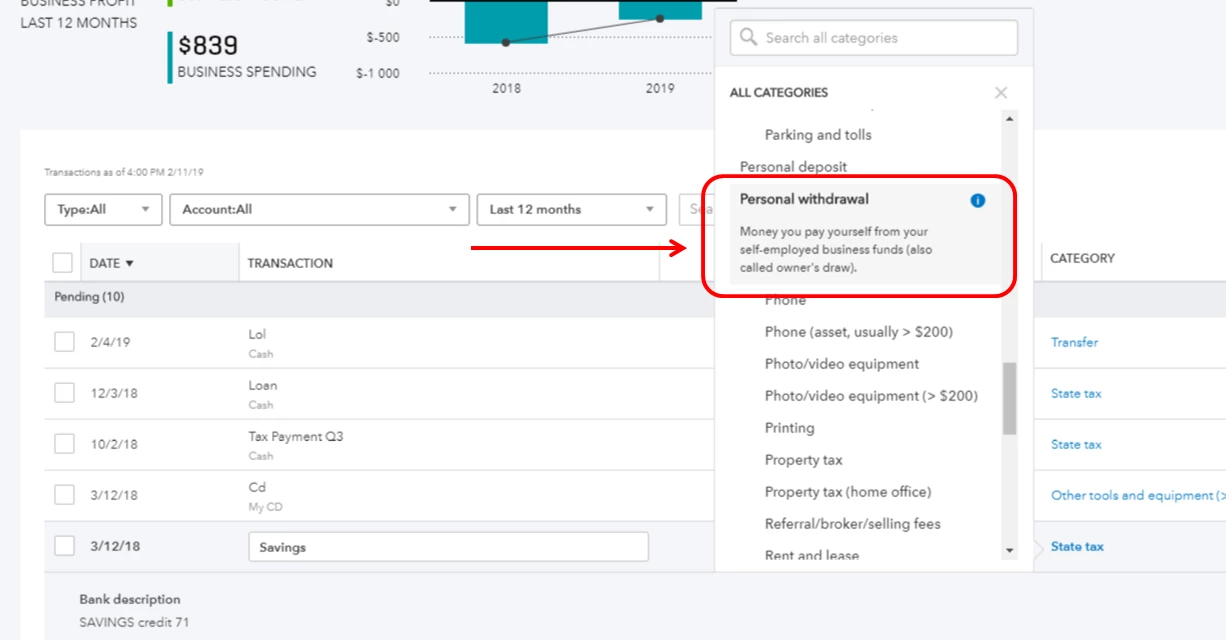
You might want to select Personal withdrawal as a category for QBSE to track the transaction accordingly. Check out this article for more details: Transfers Owner's Withdrawal.


You can also get back here and add a reply below in case you need anything else. 


2 replies

JenoP
JenoPAnswer
February 11, 2019

Hi there, KLPABE.


QuickBooks Self-Employed (QBSE) does not have a Chart of Accounts where you can set up equity accounts unlike QBO. This product is designed to track business income and expenses to help with your estimated taxes and Schedule C. 


You might want to select Personal withdrawal as a category for QBSE to track the transaction accordingly. Check out this article for more details: Transfers Owner's Withdrawal.


You can also get back here and add a reply below in case you need anything else. 


KLPABEAuthor
February 12, 2019

Thank you very much for your help!

February 12, 2019

You’re always welcome, @KLPABE.


I’m glad you found the solution given by my colleague helpful.


If you have additional questions or concern, please don’t hesitate to let us know. The Community is here to help. Have a good one!

October 14, 2019

Thank you so much for posting this with a screen shot! Migrated from QB desktop Retail version to simpl QBSE and couldn't figure this out. Your explanation came up in community help and made fixing this super simple. And you saved me money too boot! I was just aboput to upgrade to get a Chart of Accounts.

Much thanks! 

Alisa

Veautiful Gatherings