October 23, 2023
Solved

pagos hechos a la tarjeta

  • October 23, 2023
  • 1 reply
  • 0 views

Buenos dias

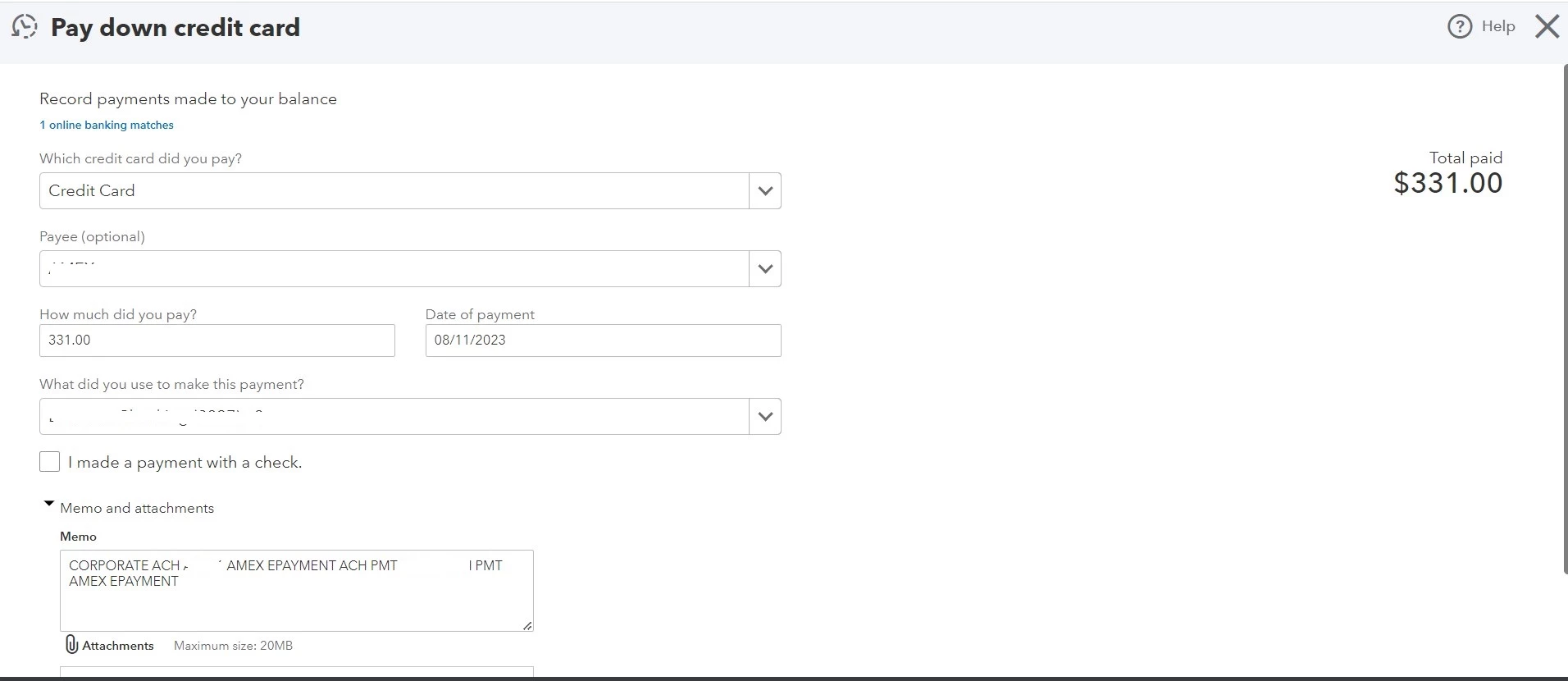
De antemano muchas gracias por su valioso apoyo en navegar en este mundo de QBO y para hacer uso eficiente del mismo, tengo a bien consultar acerca de esta imagen y preguntarles que me mensaje me quiere dar dicha imagen:

Best answer by AbegailS_

muchas gracias por su valioso apoyo.

En referencia a que me indicaron ya puede igualar en la pagina banca, que significa eso?


Gracias por respondernos, @arkvalleyinfo Galán. Estoy aquí para aclarar a qué se refiere mi colega sobre la coincidencia en la página bancaria.


En QuickBooks Online (QBO), cuando "empareja" una transacción, significa que ha encontrado una transacción correspondiente en su cuenta QBO que coincide con la transacción importada de su extracto bancario.


Las transacciones coincidentes son un paso importante para garantizar la exactitud de sus registros financieros. Al comparar transacciones, puede verificar que las transacciones registradas en QBO se alinean con las transacciones procesadas por su banco. Esto ayuda a conciliar sus cuentas e identificar cualquier discrepancia o error.


Para comparar transacciones en la página bancaria de QBO, normalmente revisa las transacciones bancarias importadas y las compara con las transacciones existentes en su cuenta QBO. Si encuentra una coincidencia, puede seleccionarla y confirmarla, lo que conciliará la transacción y la marcará como "coincidente" en sus registros.


Consulte el artículo a continuación para obtener más detalles sobre cómo comparar transacciones: Agregar y combinar transacciones bancarias descargadas


También se recomienda realizar el proceso de conciliación periódicamente para garantizar que el saldo de su cuenta coincida con su extracto bancario real.


Si tiene otras preguntas o inquietudes bancarias, no dude en hacérnoslo saber. Estaremos aquí para ayudarte.


Thanks for getting back to us, @Norma Galan. I'm here to provide clarification about what my colleague is referring to about matching on the banking page. 


In QuickBooks Online (QBO), when you "match" a transaction, it means that you have found a corresponding transaction in your QBO account that matches the transaction imported from your bank statement.


Matching transactions is an important step in ensuring the accuracy of your financial records. By matching transactions, you can verify that the transactions recorded in QBO align with the transactions processed by your bank. This helps in reconciling your accounts and identifying any discrepancies or errors.


To match transactions on the banking page in QBO, you typically review the imported bank transactions and compare them with the existing transactions in your QBO account. If you find a match, you can select and confirm the match, which will reconcile the transaction and mark it as "matched" in your records.


Check out the article below for more details about matching transactions: Add and match downloaded banking transactions


It's also recommended to perform the reconciliation process regularly to ensure your account's balance matches your real-life bank statement. 


If you have other questions or banking concerns, please don’t hesitate to let us know. We’ll be here to assist you.


Please note that the initial response was in English, and the Spanish translation was generated using Google Translate.


1 reply

Clark_B
October 23, 2023

Gracias por comunicarte con la comunidad, @arkvalleyinfo.


Permítanme compartirles algunas ideas sobre cómo pagar tarjetas de crédito en QuickBooks Online (QBO).


La imagen que publicó muestra que está utilizando la función de pago inicial de la tarjeta de crédito. En QuickBooks, esto le ayuda a registrar sus pagos con tarjeta de crédito.


Además, la información que ingresa en los campos es correcta. QuickBooks reconoce que hay una transacción bancaria en línea que coincide con su entrada. Después de registrar esta tarjeta de crédito de pago, ahora puede igualarla en la página Banca.


Agregaré este artículo que le ayudará a cotejar y evitar cuentas duplicadas: Coteje transacciones bancarias en línea en QuickBooks Online.


Manténganos informados si necesita ayuda adicional para pagar una tarjeta de crédito. Siempre estamos aquí para ayudarte.


Tenga en cuenta que la respuesta original está escrita en inglés y la respuesta está traducida al español mediante Google Translate.


.........


Thank you for reaching out to the Community, @arkvalleyinfo


Let me share some insights about paying down credit cards in QuickBooks Online (QBO).


The image you posted shows that you're utilizing the pay-down credit card feature. In QuickBooks, this helps you record your credit card payments.


Moreover, the information that you input in the fields is correct. QuickBooks recognizes that there's one online banking transaction that matches your entry. After you record this pay-down credit card, you can now match it on the Banking page.


I'll add this article that helps you to match and avoid duplicate accounts: Match online bank transactions in QuickBooks Online.


Please keep us posted if you need additional assistance in paying down a credit card. We're always here to help you out.


Please note that the original answer is written in English and the answer is translated into Spanish using Google Translate.

October 23, 2023

Pero ese pago inicial no es como una apertura de balance?

October 23, 2023

Hola, @arkvalleyinfo.


El pago inicial no tiene que ser su saldo inicial. Cuando conecta sus cuentas bancarias y de tarjetas de crédito a QuickBooks Online (QBO), descarga automáticamente su historial de transacciones hasta una fecha específica. También calculará e ingresará su saldo inicial, incluida la fecha. Su saldo inicial es un punto de partida para que QBO realice un seguimiento de las transacciones en su cuenta. Resume sus transacciones anteriores hasta esa fecha, lo que le permite realizar un seguimiento de sus finanzas a partir de ese momento.


Puede ingresar manualmente el saldo inicial si no desea conectar su cuenta. Así es cómo:


  1.  Vaya a Configuración y seleccione Plan de cuentas.
  2. Haga clic en Nuevo y luego configure su cuenta.
  3. En la sección de saldos abiertos, elija la fecha a partir de la cual desea comenzar a realizar un seguimiento de sus finanzas.
  4. Luego, ingrese el saldo de la cuenta para esa fecha.
  5. Haga clic en Guardar.


Si está conciliando una cuenta por primera vez y el saldo inicial no está disponible, consulte este artículo para ayudarle a solucionarlo: Solucione problemas la primera vez que concilia una cuenta.


No dude en comunicarse con nosotros si tiene más preguntas sobre sus transacciones en QBO. Estaremos aquí para ayudarte. ¡Mantente a salvo!


Tenga en cuenta que la respuesta original está escrita en inglés y traducida al español mediante el traductor de Google.


Hello there, @arkvalleyinfo


The initial payment doesn't have to be your opening balance. When you connect your bank and credit card accounts to QuickBooks Online (QBO), it automatically downloads your historical transactions up to a certain date. It will also calculate and enter your opening balance, including the date. Your opening balance is a starting point for QBO to track transactions in your account. It summarizes your previous transactions up to that date, allowing you to keep track of your finances from then on.

You can manually enter the opening balance if you don't want to connect your account. Here's how:

  1. Go to Settings and select Chart of accounts.
  2. Click New, then set up your account.
  3. In the open balances section, pick the date you want to start tracking your finances from.
  4. Then, enter the account balance for that date.
  5. Click Save


If you're reconciling an account for the first time and the beginning balance is off, check out this article to help you fix it: Fix issues the first time you reconcile an account


Feel free to reach out to us if you have further questions regarding your transactions in QBO. We'll be here to help you. Keep safe! 


Please know the original answer is written in English and translated to Spanish using the Google translator.