July 28, 2023
Solved

Payment as a credit from a Vendor

  • July 28, 2023
  • 2 replies
  • 0 views

I have a Vendor that I get a participator payment from and they send it as a credit. I did not receive any money to my bank. How do I enter that into QB to use toward items I purchase from them? 

Best answer by BigRedConsulting

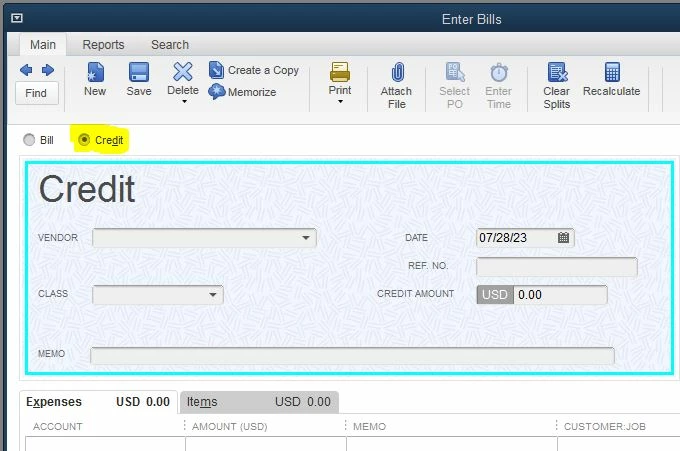
Enter a Bill Credit. To do this, start on the Bill form and pick the Credit option at the top of the form. Once recorded, then you can use the credit to apply it to a bill using the Pay Bills feature.


2 replies

July 28, 2023

Hello, @WESNV. I hope you're doing well! I'm here to assist you in recording this credit in QuickBooks.


To record the credit from your vendor, you can utilize the Credit feature in the program. Let me show you how:


  1. From the Vendors menu, select Enter Bills.
  2. Click the Credit radio button to account for the return of goods.
  3. Enter the Vendor name.
  4. Select the Expenses tab and enter the Accounts on the original bill.
  5. In the Amount column, enter the appropriate amount for each Account (the amounts may have to be prorated).
  6. Click Save and Close.


For more detailed information, you can refer to this article: Enter vendor credits and refunds in QuickBooks Desktop.


After successfully creating the Vendor credit, you can apply it to any open or future bill using the Pay bills feature.


In QuickBooks, Accounts Payable is the record of outstanding bills for your business. If you'd like further guidance on handling vendor-related transactions in QBDT, you can check out our Account Payable Workflow.


If you have any questions about the process or need additional details, please don't hesitate to ask. Feel free to provide more information about your concern below. Stay safe and have a wonderful day!

WESNVAuthor
July 28, 2023

I believe you are giving an answer for someone that has QB online? I have the desktop version.

BigRedConsulting
July 28, 2023

Enter a Bill Credit. To do this, start on the Bill form and pick the Credit option at the top of the form. Once recorded, then you can use the credit to apply it to a bill using the Pay Bills feature.


WESNVAuthor
July 28, 2023

I completely forgot about the credit under bills! Now do I put it as an income account?

BigRedConsulting
July 28, 2023

I don't know about the accounting.  It probably depends on what the discount is, exactly. If it's a kickback on what you purchased, perhaps use the same (expense?) account as the account used for the purchase. Or, if Inventory, then a use your COGS account.