Solved
PDFs
How can you get PDFs created in QuickBooks desktop to appear in Recent Items? I am using QB Desktop Pro 2021 and Windows 10. Thank you.


How can you get PDFs created in QuickBooks desktop to appear in Recent Items? I am using QB Desktop Pro 2021 and Windows 10. Thank you.
Thank you for getting back, @RoyKG.
If I got you correctly, it seems that you’re referring to the Recent Items located on your computer desktop. Worry less. I can guide you on how you can locate these PDF files in that section.
Suppose that you’re about to download the transactions to your computer. You’ll want to check the file location before proceeding. To see these downloads in the Recent Files section, you will need to open them first. After that, these files will be visible in the recently accessed or Recent Files portion.
I also add the following guidelines to walk you through about locating recently accessed files:
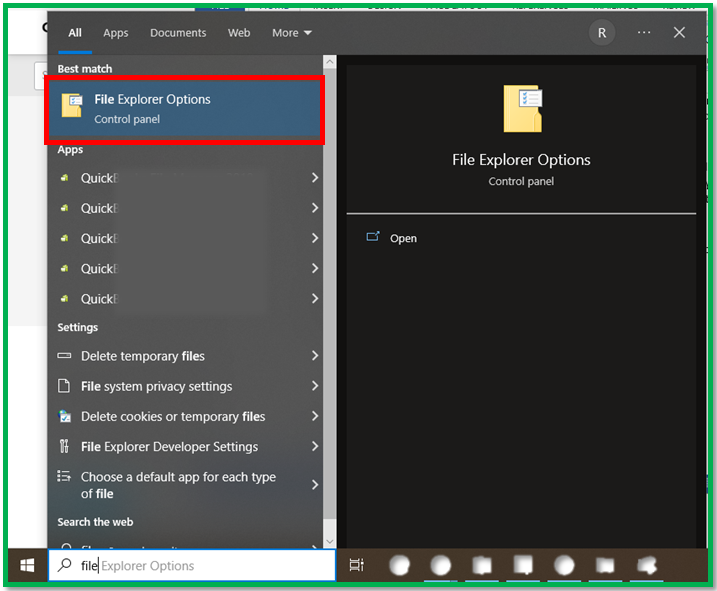
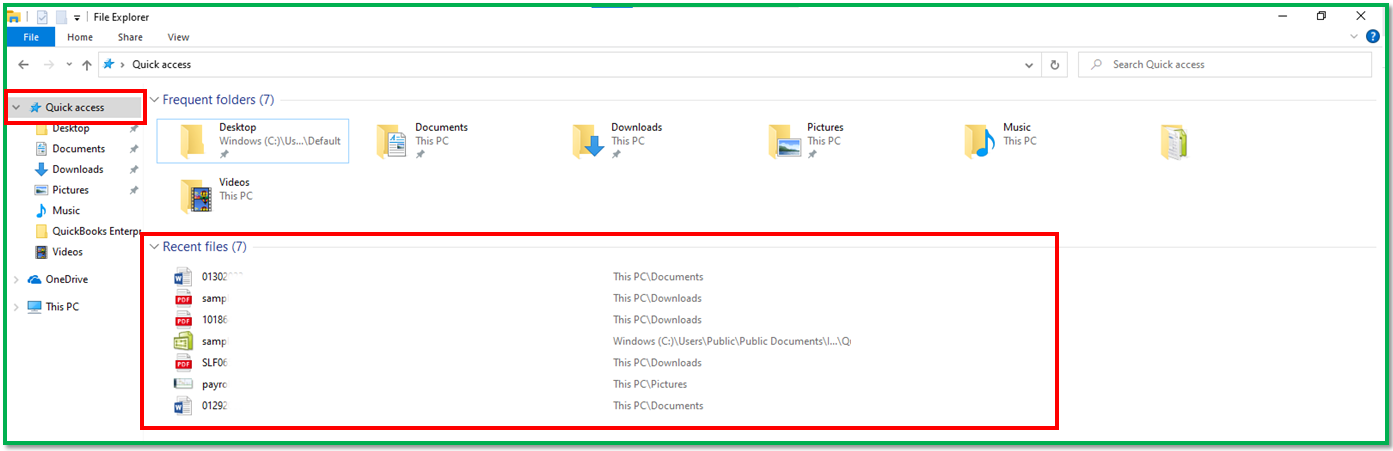
That’s all, @RoyKG. You should be able to see the following PDFs in the section. For future assistance, you can check out this article to help you close out your previous year and prepare for a new one: Year-end guide for QuickBooks Desktop.
Let me know if you need more assistance with any QuickBooks-related matters. I’m here 24/7 to assist you. Have a good one!
Enter your E-mail address. We'll send you an e-mail with instructions to reset your password.