AZEmbroiderer
April 23, 2019
Solved

QB consistant crashing/freezing

  • April 23, 2019
  • 10 replies
  • 0 views

Ever since I did the upgrade to 2019 I have not yet  'Exited'  QB's.  When I'm trying to shut down, the program freezes for 3, 4, 5 min and then crashes.

Doesn't matter what I'm working on during the day, it will freeze and crash.

Took me 10 min to sign into Support.  I'd try to Sign In and I get the Registration window.

Once I upgraded I've been having trouble with the Desktop Manager crashing and blipping and I'm having to wait until it gets done so I can continue working.

Is anyone else having these issues?  This is seriously cutting into my work production.


This was not a problem before the 2019 upgrade.

I have Desktop Pro


Thanks -


Best answer by Anna S

Thanks for joining the thread @jmeyer4RVC,


At this time, we currently have an investigation INV-24741 on this know issue. Our product team is diligently working on this concern, we highly appreciated your patience.


I recommend contacting our QuickBooks Support to add your account in the list of affected users. Rest assured, you will be notified about the updates of the investigation. Here's how to contact support:


  1. Go to the Help menu, then select QuickBooks Desktop Help.
  2. Click Contact Us.
  3. Type your concern, and click Continue.
  4. Choose the Start messaging or Get a callback button.
  5. Fill up all the information needed.
  6. Click Submit or Confirm my call.


Fill me in if you need more help by leaving a comment below. I'll be around in the Community to help. Take care and have a great day!


Good evening, all.


I wanted to drop in and give you guys an update on the Employee Center crashing in QuickBooks Desktop.


Our Engineering team has been working on this and were able to partner with Microsoft to find the solution to the error. There was an update released on April 21st, and it helps repair the Windows 10 versions 1809, 1903, and 1909. The steps below will show you how to check what Windows 10 version you have:


  1. On your computer, click the Start menu and type About your PC.
  2. Choose About your PC and scroll down to find your version number (reference screenshot below).
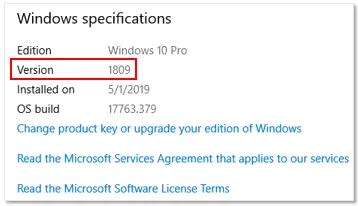
 

Now you can install the Microsoft update on your computer. Here's how:


  1. Go to the Start menu and click Settings.
  2. Choose Windows Update and press Check for Updates.
  3. Follow the on-screen instructions to install the latest Windows update.
  4. Verify the update is installed by pressing View Update History from the update window.


I've also included these Microsoft articles that explain the changes and give you further information about the update:


I'm only a post away if you have any other questions.

10 replies

JaneD
April 24, 2019

Hi there, AZEmbroiderer.


I've got some information and troubleshooting steps to share with you. 


To single out this issue, let's run the Refresher tool to end QuickBooks processes running in the background. Please follow these steps to perform a mini repair on your software:

  1. Close QuickBooks. 
  2. Download the Refresher tool.
  3. Save the file on your desktop.
  4. Run the QBRefresher tool.
  5. Re-open QuickBooks Desktop.

If the issue persists, you can follow the additional steps outlined in this article: Solutions for when QuickBooks stops working.


From there, you shouldn't have any further issues after running the tool.


Keep me posted how this turns out. I want to ensure this matter gets resolved.

AZEmbroiderer
April 27, 2019

Hi Jane

I'll touch base with you next week to let you know if this has worked.  I want to give this a few days.

Thanks

July 26, 2019

I have been having the same crashing/freezing problem for about a month now in QB 2019 Accountant version. I have uninstalled/reinstalled several times, had the IT guy update Windows 10 which took 1.5 hours, run the QB Desktop Install Diagnostic Tool multiple times, and made several calls to support. 

I am hoping this tool will finally fix the problem.

August 27, 2019

My QB also consistently froze since the update. It froze with every attempt to open a register. It froze when attempting to edit a transaction. It froze when opening the window to see what version of QB is being run. It was useless.  Luckily, the QB Refresher mentioned in this thread fixed. 

August 27, 2019

Hi @branes,


Thanks for letting us know that the resolution from this thread fixed the performance issue you're getting.


If you experience this unusual behavior again, consider checking your computer hardware, and operating system if it meets the minimum system requirement. You can check out this article to know more about the QuickBooks 2019 requirements: System requirements for QuickBooks 2019.


You can also follow the troubleshooting steps found in this article: QuickBooks Desktop won't open, has stopped working, or not responding.


However, if it still doesn't work, I'd recommend getting in touch with our Technical Support Team. One of our specialists can use tools like screen sharing and can double-check what’s causing the slow action inside QuickBooks. Here's how to contact us:


  1. Click the Help menu at the top of your QuickBooks screen.
  2. Choose Quickbooks Desktop Help.
  3. Hit the Contact us button.


Please know that the Community doors are always open for you and I'm here if you need further assistance. Have a good one!

AZEmbroiderer
August 27, 2019

Thanks for the info Jen.  I think I have seen it before, just haven't had the time to go thru it.


Let me ask you this...

When I go to:

Start, All Programs, Quickbooks

     - 2015, 2016, 2017, 2018, and 2019 are all listed.

Can I uninstall 2015-2018?  I have books in 3 different years due to some issues before I got to this company.  I ended up having to work with a gentleman to save the previous years books and then setup the company again (twice - in different versions) because of the nightmare messes left by my 2 predecessors.

When I open one of the previous companies, do I still need these previous software versions installed?  Or will my current 2019 version suffice?  And would this have anything to do, in addition to whatever else is going on, with the constant freezing and crashing.

If I can uninstall any previous software, I'd like to declutter my hard drive.


Thanks

Kim

September 6, 2019

I just downloaded 2019 Desktop pro.  It crashes every time I try to import my backup file.   

September 6, 2019

Hello there, Lkfitch78.


Your old QuickBooks file may be corrupted, reason why it crashes every time you’re trying to restore it. To get this resolved, you'll want to go back to your previous QuickBooks version and fix the damage by running the verify rebuild data. The Verify Data utility can detect issues within the company file, while the Rebuild data resolves all issues found. You'll find the instructions for doing so below:


To Verify Data:

  1. Go to File  at the top.
  2. Choose Utilities  from the drop down option.
  3. Select Verify Data.

To Rebuild Data:

  1. Go to File and select Utilities from the drop down option.
  2. Choose  Rebuild Data.

Once done, you can create a backup copy of your QuickBooks file then restore it again in QuickBooks 2019.


If the issue continues, I’d suggest contacting our QuickBooks Care Team for further assistance. They have tools capable of taking a deeper investigation behind this QuickBooks behavior.

  1. Click Help at the top menu and select QuickBooks Desktop Help.
  2. In the Have a Question? window, click Contact us.
  3. Enter the details of your concern and click Continue.
  4. Choose how you want to reach them and enter the needed information.​

Should you have additional questions about the process, please let me know as I'm always here to answer them for you.

AZEmbroiderer
September 9, 2019

Hi Charies,

I've followed the directions, so now it is a wait and see if this takes care of the problem.  By the end of the week, I will know and be able to get back you to.

Thanks!

January 8, 2020

I am now having freezing issues since I upgraded. Trying to do my W-2's and everytime i go to employees it freezes. Ugh.


Michael K
January 8, 2020

Hey there, @TAJ60. Thanks for reaching out to the Community.


I'm happy to help you get back to business. Try following my colleague GlinetteC's troubleshooting steps and see if you can determine which employee is causing QuickBooks to freeze. Once that is determined, you will need to create a new employee and merge it with the damaged employee by following these steps. Make sure you backup your file before proceeding.:


  1. Take note or copy the name of the employee that you would like to keep.
  2. Right-click the name of the employee that you would like to merge, then select Edit Employee.
  3. Replace the employee's name with the one you took note of or copied, then select OK.
  4. A prompt will appear, select Yes to proceed with the merge.


That's it! The Community will always have your back. Wishing you and your business continued success in all that you do.

AZEmbroiderer
February 10, 2020

I'd like to thank everyone for their directions to fix this.  Have done some of them, but reading thru the many posts, I didn't try them all.

Just did the Clean install after other attempts.  Lasted all of 2 days and then same ole thing.

Had my tech guy go thru the computer to make sure I didn't have any corrupted files anywhere that would affect QB's.  Didn't have any.


Unfortunately, the computer is just old enough that I am not able to update to Windows 10, so QB's won't let me update to 2020.  Believe me, we've tried numerous times.  So I will have to wait for my boss to fork out some $$'s to upgrade to a new computer and hopefully that will take care of the problem.


I hope everyone else was a bit more lucky getting their problem resolved.

May 23, 2020

I am using QuickBooks Pro 2020 for Desktop on a Surface Pro X.  Although at first when installed the program worked great. Then after 20-30 minutes QB would freeze and the only thing to do was to go to Task Manager and stop the program.  This happened continually and all the questions and answers in these forums AND calling QB support did NOT fix the problem. 


I then called my IT company we use from time to time (most IT work we handle ourselves, but there are times when we need outside assistance).  The IT person set up a remote session and got into my computer, checked the install and it was fine.  There was an issue with Office 365 but my IT guy fixed it.  However, the fix did NOT fix the "freezing" of the QB software.

The IT person realized the issue was something to do with ARM, 32 and 64 Bit software. QuickBooks is on a 32 Bit, so that was ok and it installed correctly. HOWEVER, with an ARM based processor (and I will not even begin to explain what the heck it is - an IT person knows what it is) - anyway, with this ARM situation and QB 2020 and Surface Pro X, it is WISE to get an experienced IT person involved, for he then knew the fix, which was to set up (or install, I am not sure) an X86 emulator.  Understand that an x86 emulator, ARM chips can run 32-bit apps, but not all 64-bit versions. The Surface Pro X can natively run 64-bit apps but only those that have been ported to ARM64, an evolution of ARM that supports 64-bit processing.  


It is beyond confusing to me. I am well-versed in tax law and accounting FASB rules and regs...but when it comes to IT I must rely on an experienced IT person for issues such as this.

I am posting this for there is so much FALSE information about the Surface Pro X and QuickBooks 2020 for desktop.   With the right IT person, set up that emulator and the desktop software works beautifully.

I have a fantastic IT company I use and I would love to give their name a shout out here, but I am not sure if that is allowed.  Should anyone need assistance please drop me an email and I can give you the company's name and telephone number. They are located in Woodstock, GA but service remote customers as well.

My contact is [email address removed]

September 1, 2020

Unrecoverable Error on my 2020 Gold Enterprise when requesting a Physical inventory Worksheet Report!!!!! Been going on for couple of days even though I reinstalled QB 2020 Enterprise today . WHY!!!! When Will this be fixed? Is there a workaround? QB just crashes! Error Code 16695 48322. I can see the beginning of the report behind the pre0crash window. I feed this daily into an Excel Spreadsheet to reconcile website inventory. AT LEAST I USED TO FOR SEVERAL YEARS!!!!!!   HELLLPPP! please

November 1, 2021

Having likely problem with QB 2019 Pro.  Takes long time to open up and then freezes on Home Page.  Only way to unfreeze is to invoke the Task Manager.  This provides no solution as when attempt to start up it opens and then instantly freezes on the Home Page.   HELP !!!

DivinaMercy_N
November 1, 2021

Hi there, @redrover1947. I've got here a few troubleshooting steps to help you access your QuickBooks Desktop (QBDT) Pro 2019. 


Let's start with running the Quick Fix my Program option from the QuickBooks Tools Hub. This will help resolve common program issues. Here's how:


  1. Close your QBDT program.
  2. Then, download the most recent version (1.5.0.0) of the QuickBooks Tool Hub. Save the file somewhere you can easily find it.
  3. Next, open the file you downloaded (QuickBooksToolHub.exe).
  4. Follow the on-screen steps to install and agree to the terms and conditions.
  5. When finished, double-click the icon on your Windows desktop to open the tool hub.
  6. Then, from the QuickBooks Tools Hub, click Program Problems.
  7. Choose Quick Fix my Program.
  8. Start QuickBooks Desktop and open your data file.


If the steps above do not work, let's now suppress your QBDT application. This process will help us determine if the issue is with QuickBooks or your data file. Let me guide you how:


  1. Double-click the QBDT icon while holding down the Ctrl key.
  2. Unless QuickBooks freezes or gives you an error, don't let go of the Ctrl key until you see the "No Company Open" window.
  3. Then, select a company file, and click Open.


If the same thing happens, you can proceed to Solution 3 of this article: QuickBooks Desktop doesn't start or won't open. 


However, if the issue persists after performing the troubleshooting steps above, I suggest reaching out to our technical support team. They have specific tools to further help you fix the problem when accessing your QBDT program. You can contact them outside of your QBDT program using this link: Contact QuickBooks Desktop support.


In case you'll need helpful links and guides to assist you in doing QuickBooks tasks, you can visit our QuickBooks Help page. From there, you'll find a number of help articles and even video tutorials based on the QuickBooks feature you've searched. You can also bookmark them in your browser for easy access and use them as your future reference.


Feel free to post here again if you have any other QuickBooks Desktop concerns. I'm always around to help. Have a good one. 

May 23, 2023

This was not solved for me i have QB 2022 pro and it was up to date and i have tried this and several others ,not fixed i have been at my pc for 2 days now and not able to get anything done ,and QB is so hard to get a live person , I wished I never knew QB.


May 23, 2023

Thanks for getting involved with this thread, mnolandscaping.


To verify my understanding, are you encountering any error messages when QuickBooks crashes?


Windows 10 v1809, v1903, and v1909 were all updated by Microsoft in April 2020 to resolve this issue with QuickBooks crashing.


You'll initially want to confirm your version of Windows is up-to-date with Microsoft's latest releases.


Here's how:
 

  1. Go to the Start menu, then type in "About your PC"
  2. Click About your PC.
  3. Scroll down and find your version number.


If Microsoft updates need to be installed, you'll want to install them:
 

  1. From the Start menu, go to Settings.
  2. Choose Windows Update and hit Check for Updates.
  3. Follow your on-screen instructions to install the latest Windows update(s).
  4. You can verify you're up-to-date by selecting your View Update History option. If you're using 1809, the update which fixes this is KB4550969. In the event you're using 1903 or 1909, the update which fixes QuickBooks crashing is KB4550945.


If you're able to keep QuickBooks open long enough without it crashing, I'd also recommend confirming your books are up-to-date with our latest release.


In the event QuickBooks continues crashing while you have all of your necessary updates, you'll want to get in touch with our Customer Care team and reference the investigation's case number (INV-24741). They'll be able to pull up your account in a secure environment, conduct further research with you, and reopen the investigation or create a new one if necessary.


I've also included a detailed resource about QuickBooks crashing which may come in handy moving forward: While working in QuickBooks, QuickBooks closes unexpectedly (crashes with or without an error)


If there's any questions or additional information you'd like to provide, I'm just a post away. Have an awesome Tuesday!

May 24, 2023

My windows version is Windows 11 Pro version 22H2 (up to date as of today @ 10:30am).  I already downloaded the software update of the QB program last week. This has been an ongoing issue for the past year with my QB 2022 Pro version.  No error messages nothing to warn that it is closing down, It just hangs with the cursor spinning then "poof" it's gone.  I have to reopen the program to continue working.  Most times it shuts down when i try to email pay stubs to our employees or when I am trying to print checks.  I have made several calls to your customer service reps but I don't have hours to try to pinpoint issues.  One Rep didn't know as much as I do about the program, i've been using it for almost 20 years.  He was thumbing through some pages when i was explaining what was happening then gave me a few things to try which did nothing.  I did use the QB Desktop File Doctor several times and i use the QB tool hub very often, especially when the shut downs are more frequent.