September 22, 2020
Solved

QBO Failed to Include Category of Billed Expense

  • September 22, 2020
  • 1 reply
  • 0 views

Our first QBO recurring invoice with a client-billable expense was sent. The billable expense showed as a separate line item on the invoice with the correct amount. But it was showing the bank's data (from the Description) field, did not include the Memo and had no value in the Product/Service field. It did correctly attach the bill for the expense.


Apparently I must revise the draft recurring invoice to add this information to the invoice before the recurring invoice is sent. Is that right?


There is no programming reason whatsoever that this information can't be captured before, at the time the expense is booked as a billable expense, other than that QBO has chosen not to provide that capability. As a simple matter of logic and workflow, it should be.


What am I missing?

Best answer by jeffbean

Let me clear things out for you, jeffbean.


The option to associate a billable expense to a recurring invoice isn't available. What we're going to do is manually add the billable expense to your customer's invoice.


Just a heads up, we'll have to manually send the transaction to your customer.


Let me guide you with these steps:


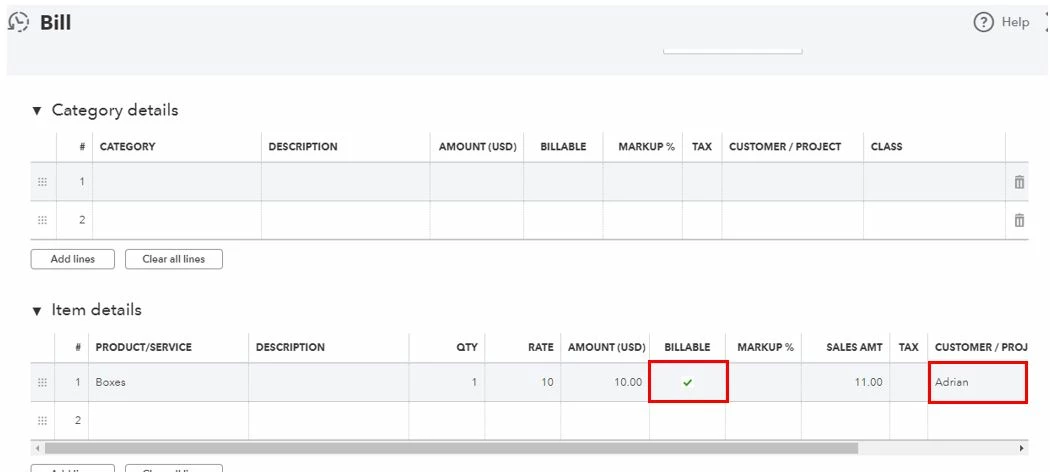
  1. From the + New button, select Bill.
  2. Go to the Item details section.
  3. Add a PRODUCT/SERVICERATE, and AMOUNT.
  4. Tick the BILLABLE column.
  5. Select a customer in the CUSTOMER / PROJECT field.
  6. Click Save and close.


Afterward, you're good to link it to an invoice.


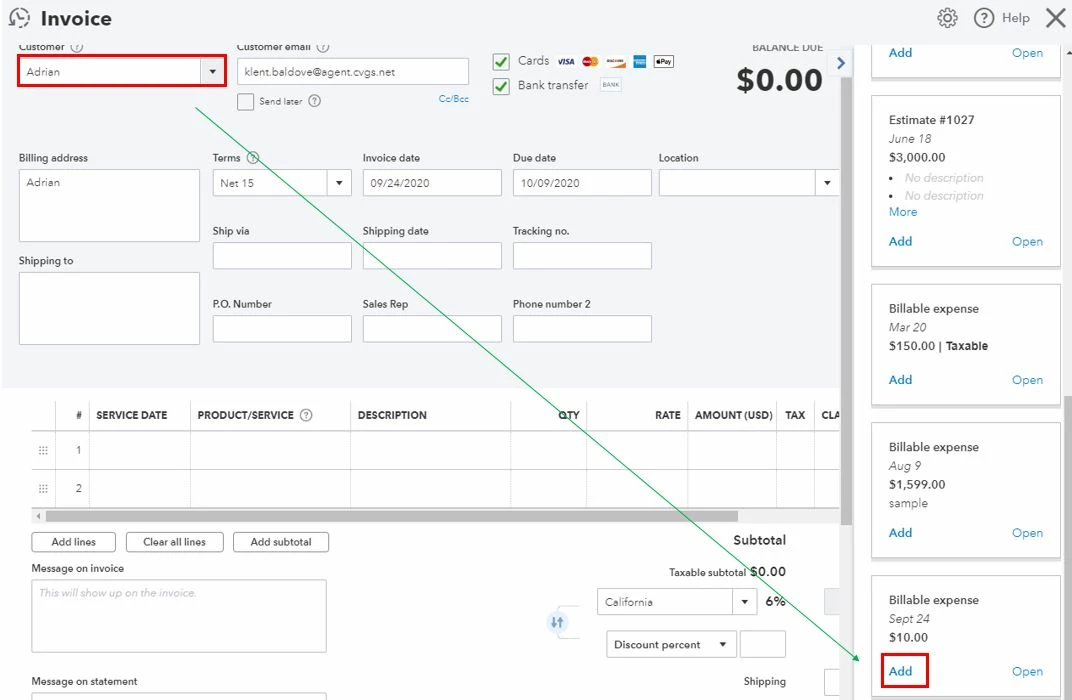
  1. Click Invoice from the + New button.
  2. Select the same customer in the Customer drop-down.
  3. Enter your Customer email.
  4. In the Add to invoice page, find the billable expense we've created earlier.
  5. Click Add.
  6. Select Save and send.


In case your customer wants to pay the invoice online, you can send an online invoice. Here's an article for more information: Take and process payments.


Feel free to get back to me if there's anything that I can help. Keep safe!


@Adrian_A thank you for the response.


You've said that "The option to associate a billable expense to a recurring invoice isn't available." If you mean to say a billable expense can't be automatically placed on a recurring invoice, that's wrong. QBO did automatically add the billable expense to the invoice generated by the recurring invoice. In that sense, QBO did, in fact, "associate" the billable expense with a recurring invoice.


The problem is that QBO added the billable expense to the invoice without providing me the opportunity to enter other information that is necessary (most importantly, a Product/Service description). As was established earlier in this thread, QBO could allow me to enter that information when the billable expense is initially booked, but it doesn't.


What I then asked is if there's a way I can get to the invoice to add that necessary information to the billable expense before the invoice is sent? In response, it appears your solution is to create yet another invoice, separate from the recurring invoice and, presumably, send it before the recurring invoice. That's simply not a satisfactory solution. It requires that I either a) send the client two invoices that could/should be one, or b) send them just one manually, and somehow cancel the recurring invoice. Either way, the recurring invoice function becomes worse than useless because it creates more process in my workflow and also a significant source of error.


Am I missing something?


At this point it appears that, though QBO's Recurring Invoice function is able to associate billable expenses, it is unable to do so correctly, thereby creating extra work and a source of error. It's not ready for prime time. The solution is not to use it.


1 reply

September 22, 2020

You're right, @jeffbean.


Since when creating an invoice transaction, there's no way to select a category. Thus, your suggestion is right to revise the recurring invoice so the information will be added to the invoice. 


I know how the feature you want would be helpful in the program. The Community recognizes feedback and suggestions from customers like you which can help us improve our product and services to our customers' delight.


While we continue to make your experience with us even better, I recommend visiting our QuickBooks Blog to get the recent news, information about the latest features, and updates. 


Please know that I'm always here to help you if you any other questions about QuickBooks, just leave a comment below. Have a nice day.

jeffbeanAuthor
September 23, 2020

So I need to manually revise the invoice before it is sent to add a value to the Product/Service field (it's not a Category). Okay. That's just nuts, but that's what QBO requires. I'm getting used to "It doesn't make sense, but that's what QBO does" as a common answer.


Next question: But how do I revise the invoice before it is sent? It's generated from a Recurring Invoice transaction, but I don't see anywhere how to edit the next month's invoice that will be sent the one that will include next month's Billable Expenses. It hasn't been generated. It doesn't even exist yet.


(And to anticipate the easy and wrong answer, editing the Recurring Invoice template itself is not a solution, because it doesn't include any billable expenses yet so there are no transactions to edit.)

DivinaMercy_N
September 23, 2020

Thanks for getting back here, @jeffbean.


I'm here to help you edit your recurring invoice that includes next month's Billable Expenses. Here's how:


  1. In QuickBooks, go to the gear icon and select Recurring transactions
  2. Select the recurring template you want to change and click Edit.
  3. Once the transaction is opened, update the necessary info.
  4. Hit Save template when done.

To know more about managing your recurring invoice in QBO, please visit this article: Create recurring transactions in QuickBooks Online.


Also, you may consider reading helpful articles that can guide you in managing your books in QuickBooks Online: QBO help articles. This includes topics such as setting up and connects apps, track employees' time, set up online payments, etc. 


You can always get back here if you have other concerns or questions about invoices in QBO. I'll be here to help you. Stay safe.