I'm here to guide you as to how you can download a QBW document in QuickBooks Desktop (QBDT), @sclark78.
Before we start, I'd like to verify how you open or download the QBW document (working company file) that you have? Any additional details are much appreciated so I can provide the appropriate fix to your concern.
First, make sure you're selecting the appropriate file type when downloading your company file to your computer where QBDT is installed. Please see the screenshot below for your reference.

Once you're done, open the company file (.qbw) in QBDT. Make sure to run the program with admin privileges when performing the said task. To do that, right-click on the QuickBooks icon and then select Run as administrator. Then, follow the steps below:
- From the File menu, select Open or Restore Company.
- Select Open a Company File, then choose Next.
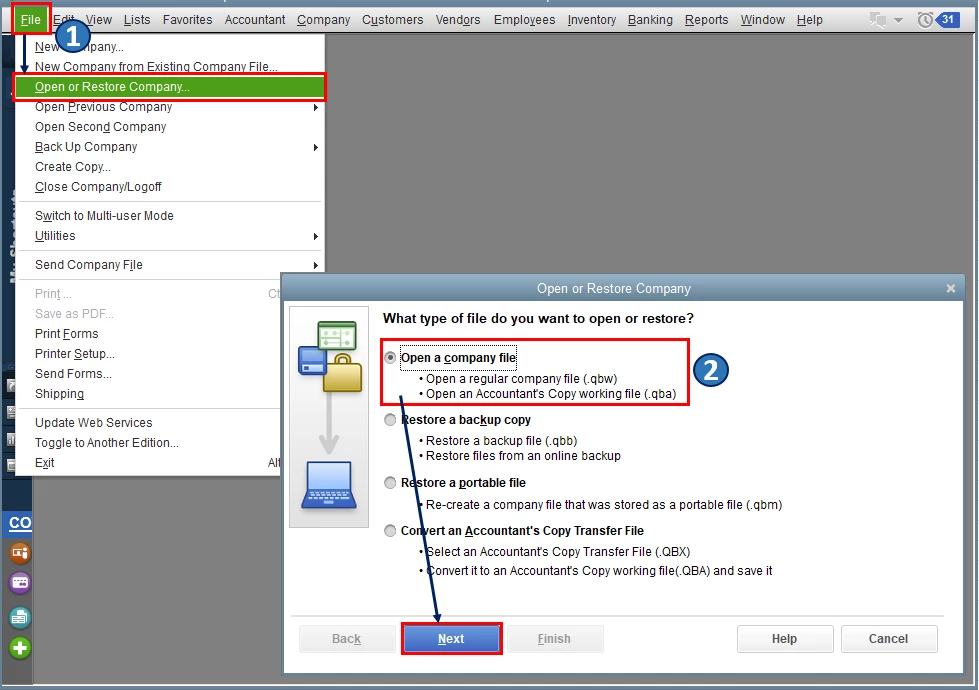
- Choose the company file.
- Click Open.
In case you have the backup copy (.qbb), you can restore your company file instead. Please refer to this article for the complete details: Restore a backup of your company file.
Also, QBDT uses different types of files to store data (i.e., main company files (QBW) and backup data files (QBB)). To know the common file types and extensions you may see in the program, I'd recommend checking out this article: File types and extensions used by QuickBooks Desktop.
Please keep me posted on how it goes in the comments below. If you have other concerns about downloading and opening your company files in QBDT, I'm always around to help. Keep safe always, @sclark78.

