

August 20, 2024
Question

Quickbook cheking acount

  • August 20, 2024
  • 1 reply
  • 0 views

Buen día

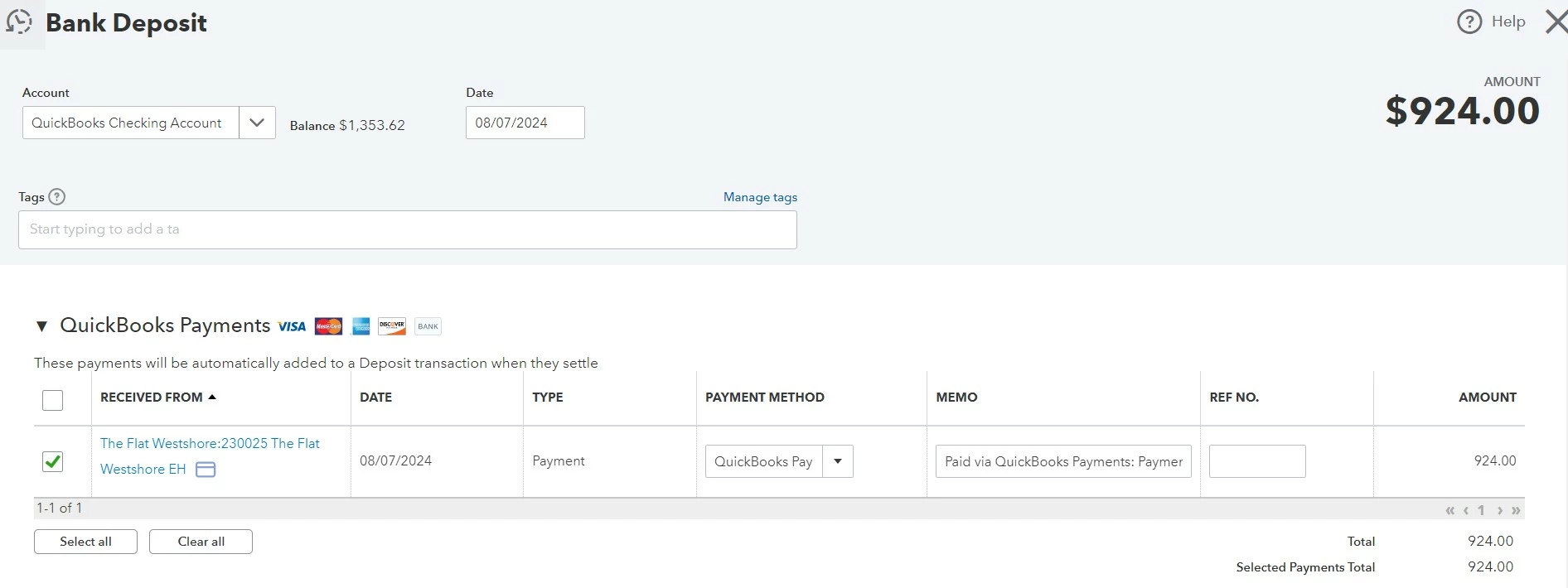
Estimados tengo una pregunta la cual es por qué razón aparece la cuenta QuickBooks Checking Account en mi balance general, al seguir el historial veo que el sistema lo creo, quisiera conocer la razon por la cual lo creo, muestro imagen de la transacción:


1 reply

August 20, 2024

Una vez que configure una cuenta corriente de QuickBooks (QB), aparecerá en sus registros financieros, especialmente si hay transacciones vinculadas a ella, Norma. Estoy aquí para abordar su inquietud y explicarle por qué es visible y forma parte de los datos de su balance general.


El sistema genera la cuenta QB Checking después de que usted la haya configurado y sea elegible para usar su función. Cuando su cliente paga en línea, los pagos se transfieren a esta cuenta. Además, sus datos en QuickBooks se clasifican automáticamente.


Dado que el balance general es una instantánea de sus datos financieros, la cuenta QB Checking y sus transacciones asociadas están disponibles en sus registros. Va junto con sus pasivos y el capital contable.


También puede revisar estos recursos para obtener más información sobre QB Checking y los informes y datos del balance general:


Mantendré este hilo abierto en caso de que tenga más inquietudes sobre su balance general, su cuenta corriente QB u otras funciones y menús en QuickBooks. Simplemente haz clic en el botón Responder y con gusto te atenderé nuevamente.


Descargo de responsabilidad: Utilicé Google Translator para traducir su consulta al inglés y adaptar mi respuesta al español.


English Translation:


Once you set up a QuickBooks (QB) Checking account, it will appear on your financial records, especially if there are linked transactions to it, Norma. I'm here to address your concern and explain why it's visible and a part of your Balance sheet data.


The system generates the QB Checking account after you've set it up and become eligible to use its feature. When your customer pays online, the payments get transferred to this account. Moreover, its data in QuickBooks automatically gets categorized to it.


Since the balance sheet is a snapshot of your financial data, the QB Checking account and its associated transactions are available on its records. It goes along with your liabilities and shareholders' equity.


You may also review these resources to learn more about QB Checking and the Balance sheet reporting and data:


I'm keeping this thread open should you have more concerns about your Balance sheet, QB Checking account, or other features and menus in QuickBooks. Just click the Reply button, and I'll gladly assist you again.

August 20, 2024

Y como hago para que remover los datos del feed, adjunto imagen:


August 20, 2024

Gracias por unirte a este hilo en la Comunidad, @arkvalleyinfo.

Como se muestra en la captura de pantalla que ha dado, esta transacción es legítima según sus fuentes bancarias entre las cuentas corrientes de QuickBooks, Norma. Permítame proporcionar algunos detalles sobre cómo eliminar esta transacción de su cuenta bancaria.


Dado que hay coincidencias sugeridas en su feed bancario para las dos transacciones según su captura de pantalla, significa que hay un registro de QuickBooks Online (QBO) existente para esas transacciones y solo tendremos que hacer clic en Coincidir y redoblar transferencia para asegurarnos de que estas transacciones se alineen con las transacciones registradas en QBO correspondientes


Para la transacción de la tarifa de transferencia instantánea, asegúrese de revisar su cuenta asociada con las tarifas de procesamiento. De esta manera, la transacción se registrará en la cuenta correcta.


A continuación, te explicamos cómo hacerlo:


  1. Ve al icono de engranaje y selecciona Cuentas y configuración.
  2. Haz clic en Pagos.
  3. Busque la sección Plan de cuentas y revise en qué aparece la cuenta.
  4. Regrese a su fuente bancaria, luego clasifique su cuenta de tarifas de procesamiento que ha configurado en su cuenta de cheques QB y haga clic en Agregar.


Si desea categorizar automáticamente sus transacciones bancarias, puede consultar este artículo: Configurar reglas bancarias para categorizar las transacciones bancarias en línea en QuickBooks Online.


Deje un mensaje a continuación si necesita más ayuda con sus transacciones bancarias o financieras. Siempre estamos disponibles para guiarlo a través del proceso.


--------------------------------------------------------------------------------------------------------------------------------------------------------------------------------------------------

Thanks for joining this thread in the Community@arkvalleyinfo.

As shown on the screenshot you've given this transaction is legitimate based on your bank feeds between QuickBooks checking accounts, Norma. Let me provide some details on removing this transaction from your bank account.

Since there are suggested matches in your bank feed for the two transactions based on your screenshot, it means there's an existing QuickBooks Online (QBO) record for those transactions and we'll only have to click on Match and Record Transfer to ensure that these transactions align with the corresponding QBO-recorded transactions.


For the Instant Transfer fee transaction, make sure to review your account associated with Processing Fees. This way, the transaction will be posted to the right account.


Here's how:


  1. Go to the Gear icon, then select Accounts and settings.
  2. Click Payments.
  3. Look for the Chart of accounts section and review what the account is listed on.
  4. Go back to your bank feed, then categorize your Processing fees account that you've setup on your QB checking and click on Add.


If you want to automatically categorize your bank transactions, you can refer to this article: Set up bank rules to categorize online banking transactions in QuickBooks Online.


Drop a message below if you need further assistance with your bank or financial transactions. We're always available to guide you through the process.