I understand the importance of locating the deposit date and ensuring that your records are complete and accurate, mary. I'm here to share insights about this.
Currently, the option to track the deposit date of sales recorded using a sales receipt is unavailable in QuickBooks Desktop (QBDT). As a workaround, we can run a Deposit Detail report and filter the Transaction type to Sales Receipt. From there, you can check the transactions deposited from undeposited funds to the bank.
Here's how:
- Go to the Reports menu.
- Select Banking from the drop-down menu.
- Choose the Deposit Detail report from the list of reports.
- Click on Customize Report and select the Filter tab.
- Select the Transaction Type from the dropdown list and click Sales Receipt.
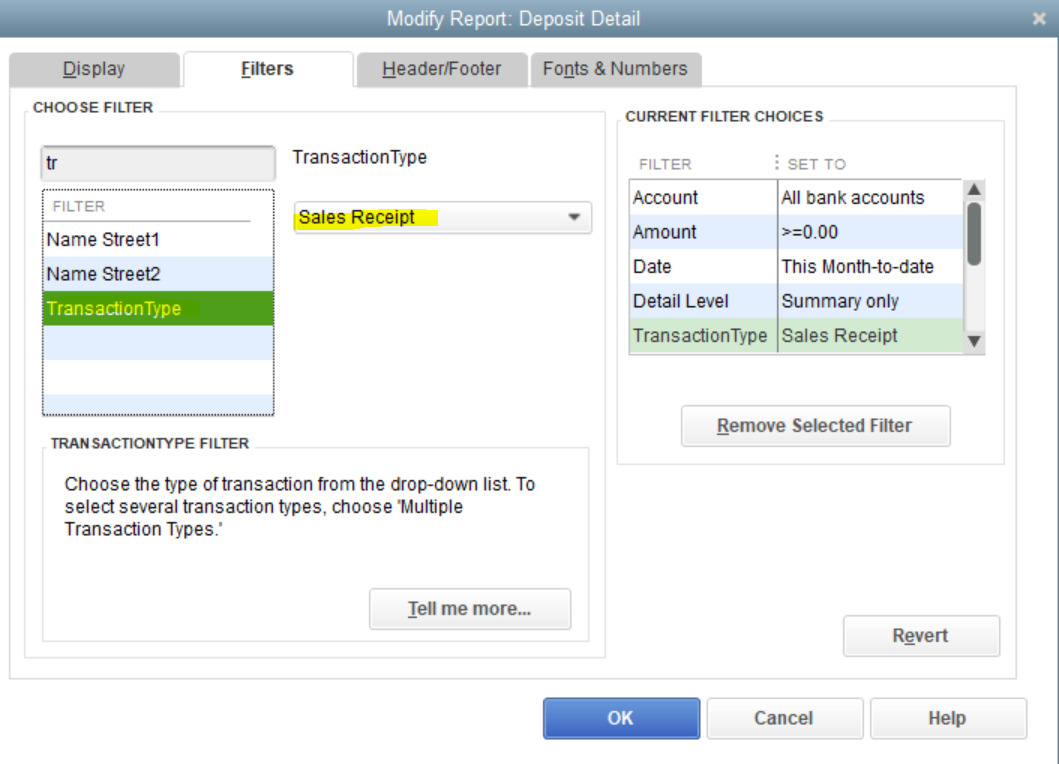
I've also added an article to help you customize to pull up a specific report. Then, memorize it to save the modification settings on your report:
Keep your posts coming if you need further assistance in managing reports in QBDT. I'm always here to help. Have a great day.

