October 2, 2020
Solved

Quickbooks Desktop Inactivity logout?

  • October 2, 2020
  • 1 reply
  • 0 views

Having a hard time finding a definitive answer to this question. Is there a way to set up Desktop so that it logs users out after a period of inactivity? I'm finding lots of information on this for Online, but nothing for Desktop that says either way if it's not available. Not finding it, so I'm assuming it's not there. 


Running Enterprise 2018. 

Best answer by MichelleBh

Hi there, @I-Already-Had-A-Username.


I'll be more than happy to provide you the detailed steps on how to set the timeout duration in QuickBooks Desktop so you'll remain logged in. 


Here's how: 

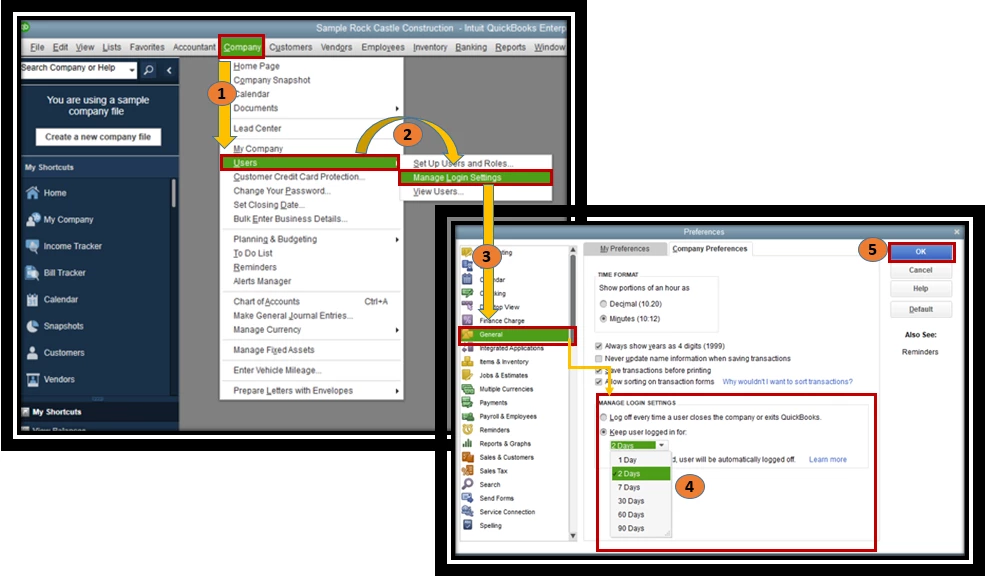
  1. Go to the Company located at the top of the page. 
  2. Select Users, then choose to Manage Login Settings. 
  3. Hit the General tab on the left side. 
  4. Under Manage Login Settings, pick the Keep user logged in for and specify the login period.  
  5. Hit OK.


Users will be automatically logged out of QuickBooks at the end of the login period you configured under this preference. For more information, check out this article: Stay logged in to QuickBooks company file (sign in without entering your password).


I've included an article that you might use in the future about how to reset your QuickBooks Admin password. 


Thank you for reaching out to us here, and please let me know if there's anything else I can do to help.


1 reply

MichelleBh
October 2, 2020

Hi there, @I-Already-Had-A-Username.


I'll be more than happy to provide you the detailed steps on how to set the timeout duration in QuickBooks Desktop so you'll remain logged in. 


Here's how: 

  1. Go to the Company located at the top of the page. 
  2. Select Users, then choose to Manage Login Settings. 
  3. Hit the General tab on the left side. 
  4. Under Manage Login Settings, pick the Keep user logged in for and specify the login period.  
  5. Hit OK.


Users will be automatically logged out of QuickBooks at the end of the login period you configured under this preference. For more information, check out this article: Stay logged in to QuickBooks company file (sign in without entering your password).


I've included an article that you might use in the future about how to reset your QuickBooks Admin password. 


Thank you for reaching out to us here, and please let me know if there's anything else I can do to help.

October 12, 2020

Good answer but it's kind of the opposite of what I was hoping for... I wanted to be able to kick people out of Quickbooks after being idle for an hour.

MichelleBh
October 12, 2020

Thanks for coming back here in the Community, @I-Already-Had-A-Username.


Currently, logging people out of QuickBooks Desktop after being idle is unavailable. I can see that having this feature can help your business needs. I'll make sure to take note of this idea.
 

In the meantime, I'd suggest visiting our QuickBooks Blog regularly. This way, you'll be updated with the latest news and updates, including product improvements.


I'd add an article that you might use in the future about managing your QuickBooks account. 


Please feel free to get me in the loop if you have any more questions about your QuickBooks account. It's my pleasure to help. Take care!