June 12, 2023
Question

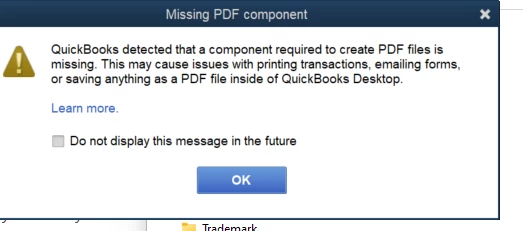
Quickbooks detected PDF component missing
  • June 12, 2023
  • 3 replies
  • 0 views


New WIndows 11 install.  Quickbooks 2023 Desktop Pro.  The REPAIR TOOL does not fix this.  Does anyone know how to fix it?

3 replies

JenoP
June 12, 2023

Hi there, Dawn.


This error can be caused by a number of technical reasons. It includes an outdated version of the Adobe Reader program, a damaged or missing Adobe application, the Microsoft XPS Document Writer being turned off in your Windows settings, and even outdated maintenance for QuickBooks Desktop.


We also have a couple a recommended troubleshooting that can resolve this error. One of which is running the QuickBooks Tool Hub that you already tried. 


Allow me to add more options to help you resolve the issue. 


Start by resetting your temp folders permissions by following these steps:


  1. Press the Windows key + R to open the RUN command.
  2. Type %TEMP% and press Enter.
  3. Right-click an empty area of the temp folder, and select Properties.
  4. Select Security.
  5. Make sure all user names and groups in Security have Full Control.
  6. Once the permissions have been set to Full Control, save as a PDF again in QuickBooks.


Aside from that, please note that you may need to contact your IT professional or Microsoft for help with some of these steps in case you're still getting the error:


  • Make sure XPS services are enabled.
  • Test the XPS Document Writer and print outside QuickBooks.
  • Reinstall Microsoft XPS Document Writer.
  • Edit security software settings.
    • Settings in your security software, like Norton Antivirus or McAfee Firewall, can block the creation of .xps files. Check the settings on your security software to make sure .xps files aren't blocked.
  • Adjust Windows user permissions for the XPS Document Writer.
    • If a Windows user doesn’t have permission to print to the XPS Document Writer, QuickBooks won't be able to convert the file to a .pdf. You may need to sign in with Admin Rights to change these permissions.


You can also read more details about this here: Fix PDF and Print Problems with QuickBooks Desktop.


Feel free to check out this article as well in case you might need it when saving documents in the program: Save QuickBooks Desktop PDF in Legal Size, landscape, or portrait orientation


The Community is always here if you need anything else. 

October 5, 2023

This definitely worked for me. Was about to send out bills and got that message.

New installation of Windows 11

New installation of QB


After getting the Microsoft XPS Document Writer installed I ran Quickbooks Hub Printer PDF fix and all is good.


Thanks!

October 5, 2023

You’re always welcome, @MarcoPolo1.


Well done! I'm glad you were able to get to the bottom of this. We want to ensure our users are on top of their business.


I'll be one message away if you need anything else. I wish you a prosperous rest of the year!

June 15, 2023

Where you able to resolve this issue?


October 26, 2023

I'm still getting the same error as they stated after doing everything it suggested. Anyone finds the solution please share.

DHeraV
October 26, 2023

I appreciate your efforts in following all the troubleshooting steps suggested above. 


However, since the issue persists, I recommend reaching out to our support team. They possess the expertise to conduct a thorough investigation in a secure environment and identify the underlying cause of the issue.


Here's how: 
 

  1. In your QuickBooks Desktop (QBDT) file, go to Help, then select QuickBooks Help.
  2. Select Contact Us.
  3. Enter a brief description of your issue, then select Continue.
  4. Sign in to your Intuit account select Continue, and then Continue with my account.
  5. We'll email you a single-use code. Enter your code and select Continue.
  6. Select to chat with us or Have us call you.


To know our support's availability hours, kindly visit: Contact QuickBooks Desktop Payroll support.


Additionally, you may want to explore this article to learn how to change the format of the PDF: Save QuickBooks Desktop PDF in legal size, landscape, or portrait orientation.
 

It would be greatly appreciated if you could share your progress by adding your response below. I'm fully prepared and accessible to provide any information you may need.
