Solved
Quickbooks point of sale insufficient quantity
Hi Team,
Please advice how to enable Quickbooks point of sale insufficient quantity alert pop up.
Thank you.


Hi Team,
Please advice how to enable Quickbooks point of sale insufficient quantity alert pop up.
Thank you.
Hi Team,
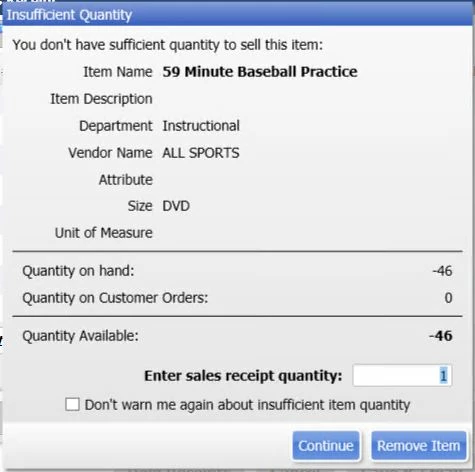
Please see below Insufficient Quantity pop up window screenshot from Quickbooks Point of Sale 19.0 Desktop version not online version. I mistakenly ticked " Don't warn me again about insufficient item quantity". and i don't know how to bring back this pop up Insufficient Quantity window again.
Thank you.
Thanks for the prompt response, @docmartin. I appreciate you including a screenshot in your post, this helps me provide accurate steps to your concern.
Since the pop-up checkbox of Don't warn me again about insufficient item quantity has been accidentally selected, you won't see it prompt again. Nevertheless, there is a user preference in the General section that says Bring back all one time messages. You'll want to activate that to bring back that popup and warnings for some areas in your QuickBooks Point of Sale.
Here's how:

In case you want to verify or connect the on-hand item quantities in your inventory by doing a physical count, please see this article: Perform a Physical Inventory.
Additionally, I've included this reference for a compilation of articles you can use while working with us: QuickBooks Point of Sale (POS) FAQs.
Please get back here in this thread if you have any follow-ups about showing the popups again. I'd also appreciate it if you could share updates on how the steps work out. Keep safe and have a great day ahead!
Enter your E-mail address. We'll send you an e-mail with instructions to reset your password.