Based on your screenshot, @AquaTerra Coaching LLC, it appears that the credit card account isn't disconnected from QuickBooks Online.
To update this connectivity, you must first disconnect your previous credit card in QuickBooks Online (QBO) before you can reconnect it using the new credit card credentials. Ensure that all legitimate transactions have been categorized, added, and matched before unlinking your card.
First, switch your account view to Accountant to follow the steps outlined below. Go to the Gear/Settings icon and click Switch from Business view to Accountant view:
- Navigate Transactions and then go to Bank transactions.
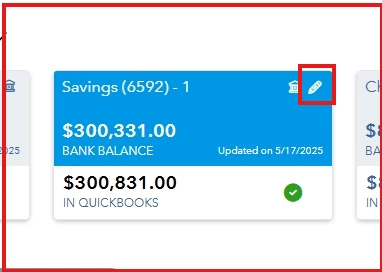
- Select your card/bank and click the Pencil icon.
- Choose Edit account info.
- Tick Disconnect this account on save box and select Yes.
- Hit Save.
Once completed, proceed to reconnect your new card and link it to the same credit card account in QBO. By doing this, the transactions will be placed under the same register as the previous card.
Feel free to post here again if you have further questions regarding your credit card account connection or banking transactions.

