October 11, 2023
Question

QuickBooks update window is cut off

  • October 11, 2023
  • 2 replies
  • 0 views

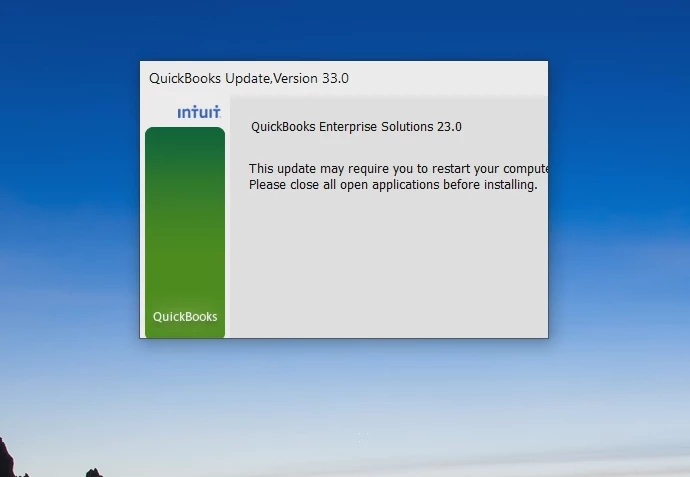
When trying to run QB v33 update, the dialog window is cropped in a way that I can't click anything.

I've rebooted the computer but it still looks like this:

2 replies

Nicole_N
October 11, 2023

I appreciate your effort to reboot your computer in an attempt to resolve the update issue on your end, Shawn. Let me share additional ways to isolate this.


Sometimes, an update won’t advance to the next release number or you may encounter an error during the update installation. However, we have ways to fix this:
 

  1. Close QuickBooks.
  2. Right-click on the taskbar, then select Task Manager.
  3. Under the details tab, look for the following background processes to select and End task for each.

              a. QBW32.exe or QBW.exe
              b. QBCFMonitorService.exe
              c. qbupdate.exe
              d. QBDBMgr.exe or QBDBMgrN.exe
              e. QBMapi32.exe
     
  4. Right-click on the QuickBooks shortcut and select Run as administrator.
  5. Run the update again.


In case you receive specific errors in the future when updating your account, learn how to fix them through this link: Fix QuickBooks Desktop Update Errors.


Feel free to get back to us if you need more help with this. We're open 24/7 to assist you.

BigRedConsulting
October 12, 2023

Looks like the fonts on the window are too large to fit. This happens a lot with QuickBooks, and it seems the installer, if you have fonts scaled up on your display.  If you return the fonts to 100%, then it'll probably display properly.
