

January 12, 2022
Solved

Quickbooks won't show match receipt if bank transaction is lower than the receipts

  • January 12, 2022
  • 2 replies
  • 0 views

I do a lot of ecommerce: eBay, Amazon etc. There are times that the bank transaction is less than the combined receipts. And when you go to find matches it will not find one of them.

As an example: bank transaction - $121.50, the combined receipts are $200.00 when you go to match the receipts it will show some of them, but one is not there.

eBay deducts, ad fees, refunds prior to sending transaction. I think QuickBooks is not showing all the receipts because there is not enough money in the transaction to resolve it.

All the receipts are there just not showing. When you do the reconciliation and separate the fees, taxes etc. you end up short that receipt and there is no way to add it to the transaction. Does anyone have an idea? 
 

Best answer by RoseJillB

Thank you for bringing this to our attention, @Schuwood. I’ll help you with matching your sales receipts in QuickBooks Online (QBO).


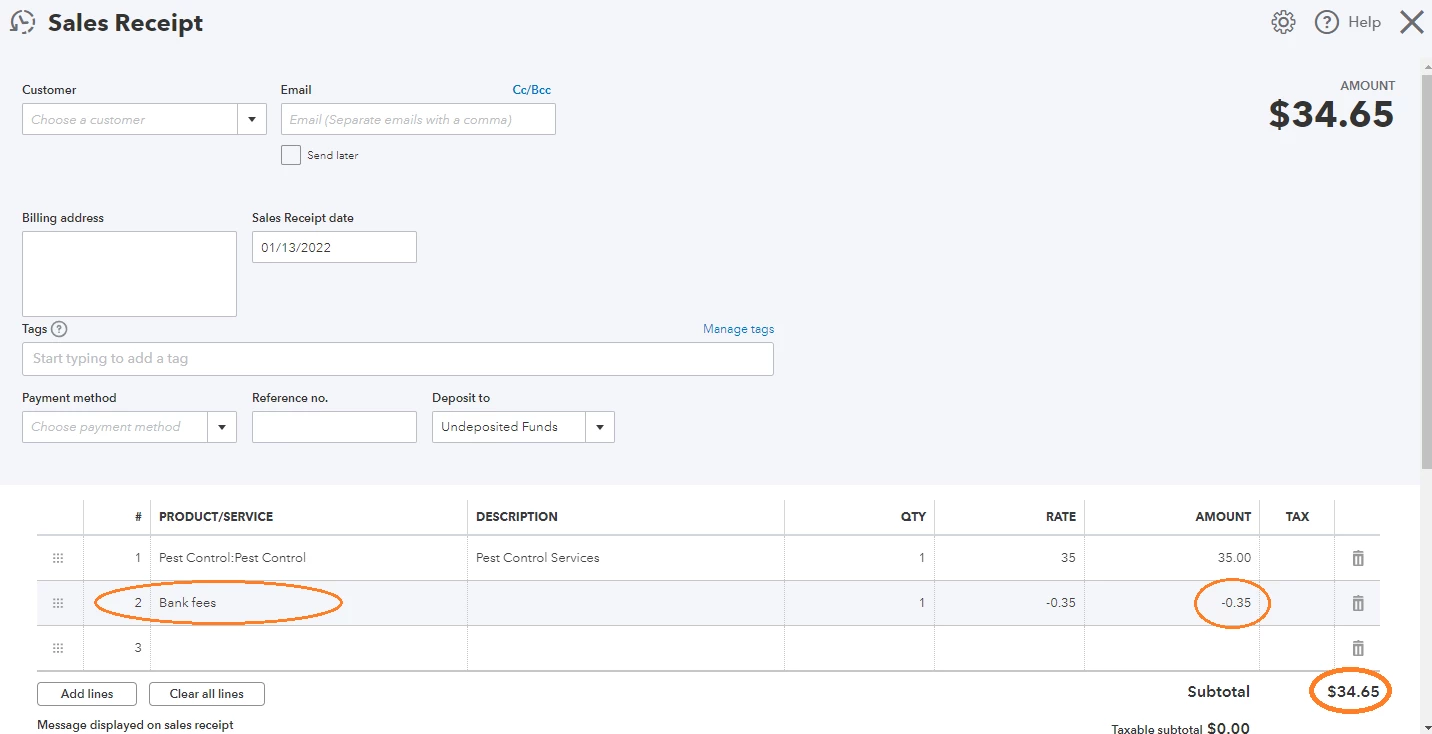
In QuickBooks Online, you can manually record the fees by amending the sales receipt transaction, adding a new line item for the fees, and entering the fees as a negative amount.


Alternatively, you can initiate a deposit transaction and record the fees in a negative amount.


Here’s how:


  1. Click the + New button.
  2. Under Others, select Bank deposit.
  3. Select the payments included in the deposit.
  4. Then, on the Add funds to this deposit field, choose an account.
  5. Enter a negative amount, under Amount.
  6. Click Save and Close.

 
With the steps provided above, you’ll be able to match your sales receipts in QuickBooks Online.


In addition, I added this article to learn more about depositing payments into the undeposited funds account in QuickBooks Online.


Let me know if you need further assistance with sales receipts. I’m just one post away from assisting you. Have a great day!

2 replies

RoseJillBAnswer
January 13, 2022

Thank you for bringing this to our attention, @Schuwood. I’ll help you with matching your sales receipts in QuickBooks Online (QBO).


In QuickBooks Online, you can manually record the fees by amending the sales receipt transaction, adding a new line item for the fees, and entering the fees as a negative amount.


Alternatively, you can initiate a deposit transaction and record the fees in a negative amount.


Here’s how:


  1. Click the + New button.
  2. Under Others, select Bank deposit.
  3. Select the payments included in the deposit.
  4. Then, on the Add funds to this deposit field, choose an account.
  5. Enter a negative amount, under Amount.
  6. Click Save and Close.

 
With the steps provided above, you’ll be able to match your sales receipts in QuickBooks Online.


In addition, I added this article to learn more about depositing payments into the undeposited funds account in QuickBooks Online.


Let me know if you need further assistance with sales receipts. I’m just one post away from assisting you. Have a great day!

SchuwoodAuthor
January 14, 2022

That seemed to work out great - after I put in all the numbers hit save it then said match. There were a few even tho the numbers balanced and I hit save it did not give me the match. But it seemed to still work. 


January 27, 2023

I'm not sure that the issue is fully resolved.  I've been having the same issue and customer support has been unhelpful. The key issue in the original query is that Quickbooks is not showing all of the receipts - it has nothing to do with the adjustments that may be needed.  A full month of receipts can be entered and a match (to the bank deposit) is not there. Then you go to another deposit to match and suddenly a handful of the dates populate (including the one you were previously looking for).  It's haphazard and I tried to see if it was an issue with how the sales receipt is entered, but they are all entered the exact same way (including sales synced from Square). So why are some sales showing at times or none at all? And yes, I've checked the dates 🙂 Any help is greatly appreciated.


MaryLandT
January 27, 2023

I can share some details about why bank deposits won't match with the sales receipts, NatB4.


There are cases where some of the transactions can’t find their match from existing records in QuickBooks. Here are the possible reasons why.


  • The payees don’t match
  • The amounts don't match
  • The dates don't match or aren't close
  • The transaction is older than 6 months.
  • The bank account on the payment is not the same as the bank where the match is located
  • The payment has been reconciled
  • The transaction is already matched to something else.


The following information below is the options to match bank transactions.


  • Match with an existing transaction
  • Confirm paired bank transfers
  • Add a new transaction
  • View and review multiple matches.


I'm adding this link to help you match transactions depending on the process you'll want to choose: Categorize and match online bank transactions in QuickBooks Online. Then, go to Step 2: Review and categorize downloaded transactions and follow the steps for each option.


If everything matches, you know your accounts are balanced and accurate. I recommend reconciling the bank account every month. Here's how to get started: Complete reconciliation guide.


Stay in touch with me if there's anything else you need by commenting below. I'll be right here to help match your bank transactions. Have a good one!

February 8, 2023

Thank you @MaryLandT  for the reply. However, the reasons outlined do not apply.


The question is not that the bank deposit won't match with the sales receipt. The question is why in a scenario where the sales receipts are there (barring all that you've outlined below), what is causing the "Match transactions" module to not pull/show ALL of the receipts - none of which have been previously matched for the prescribed time period and keeping the default "All" transaction types.


 I.e. - If manually input or synced sales receipts for any random time period are never matched to their deposits for that same time period, I expect to see all receipts in the “Match transactions” module. Regardless of the amount - the dates should be there.

I'm questioning the coding behind the query, because the query is not behaving logically.  I think you'd need to work with a real/test data set to see what's happening to offer an applicable response.