Welcome to the Community, @Ellie Meyer11. I'm here to guide you through entering the expenses and reimbursements to your LLC's owners in QuickBooks Online (QBO).
First, let's create a journal entry to record the expenses you've paid for the start-up costs out of your own pockets.
Before that, you'll have to set up an expense account for the costs. Also, add a bank account to use to reimburse the personal funds. I'd suggest consulting your accountant to determine the appropriate types for these two accounts. They can also help you assist when creating the journal entry. Please make sure to switch from a Business view to an Accountant view. Once verified, proceed with the steps below.
- Go to the + New button from the left menu.
- Select Journal entry under Other.
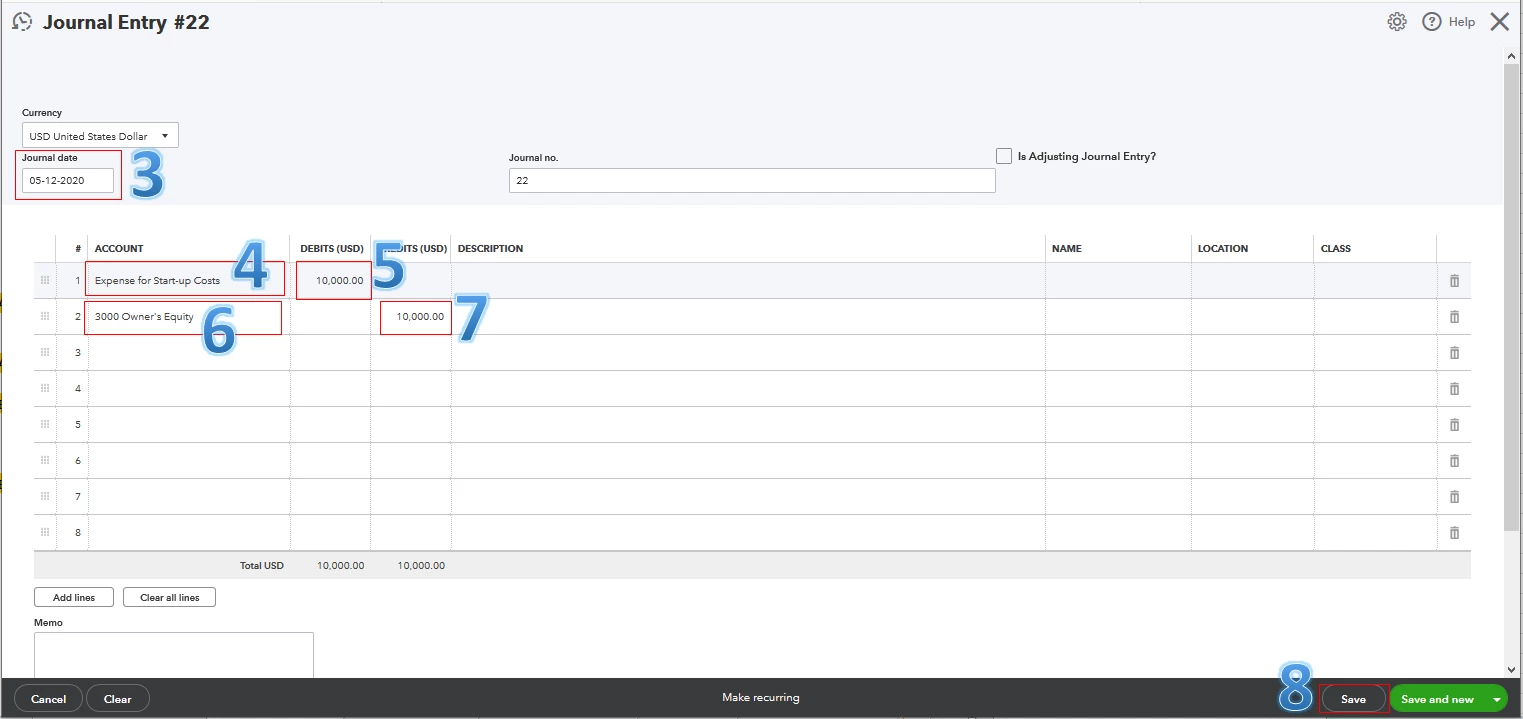
- Set the Journal date.
- Choose the expense account you've created for the costs on the first line.
- In the Debits column, enter the amount.
- Select Partner's equity or Owner's equity on the second line.
- In the Credits column, enter the same amount.
- Hit Save.
The screenshot below shows you the last six steps. Just repeat the process above for the other two owners.
Second, let's record the reimbursement through a check or an expense. Please make sure to use the bank account you've created to reimburse the personal funds. Then, repeat the process for the other two owners. For the detailed instructions, see Step 2 through this article: Pay for Business Expenses with Personal Funds.
Once done, you'll be able to pay and file the correct taxes to the appropriate agencies. For more information, visit this article: Tax Basics For Limited Liability Companies (LLCs).
Furthermore, it's a great business practice to avoid mixing business and personal expenses. But there may be times where it's necessary. With this, I recommend visiting this article for more details: Mixing Business and Personal Funds Overview. Also, click the two links to help you pay for personal expenses from a business account and reimburse an employee.
Please know that I'm here anytime you have other concerns. Wishing you and your business continued success while using QBO, @Ellie Meyer11.

