September 30, 2023
Solved

Schedule C & Categories

  • September 30, 2023
  • 1 reply
  • 0 views

Hello

I am pretty new in QBs and business, and I am a little bit confused about categories & schedule C. My question is: 

Under which category should I list my 18 wheeler truck payments? Is it under ( Car & Truck) category?

Noting that I bought it in cash.


Thank you!


Samar [removed]

Best answer by Rasa-LilaM

Let me welcome you first to the Community, Samar.


I recognize how essential for your business to properly classify your truck payment. This ensures they're recorded to the correct line on the tax form. 


You can use the Car and truck category to track the transaction. However, I still advise contacting an accountant first for further guidance. They can provide options on which Schedule C category to use. Reaching out to them ensures your tax information is in order. 


Once you have the complete details, let's go ahead and input the entry. Here's how:


  1. In QuickBooks Self-Employed (QBSE), tap the Transactions menu on the left panel and click the Add transaction menu in the upper right.
  2. This action will expand a line item where you can input the truck payments. 
  3. Fill in the fields with the correct information and click the Select a category link to view the complete list of categories.
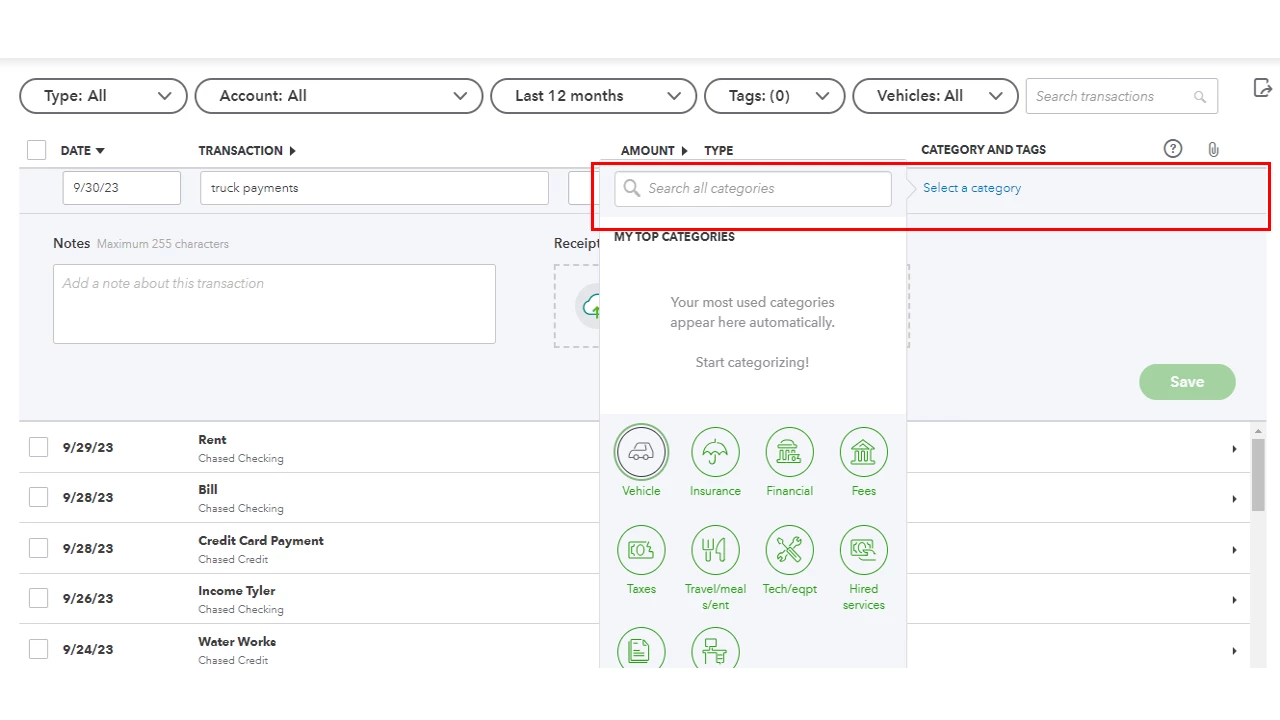
  4. From there, select the one that best fits the transaction. 
  5. Press the Save button to keep the changes.


These resources cover topics on how to enter sales income and expenses as well as the list of categories:


If you require further information on specific QBSE tasks, you can use our online resources. They're grouped according to topic so you can locate the article right away.


Reach out to me again if you have additional questions or clarifications about tracking entries. I'm always ready to respond to them. 

1 reply

September 30, 2023

Let me welcome you first to the Community, Samar.


I recognize how essential for your business to properly classify your truck payment. This ensures they're recorded to the correct line on the tax form. 


You can use the Car and truck category to track the transaction. However, I still advise contacting an accountant first for further guidance. They can provide options on which Schedule C category to use. Reaching out to them ensures your tax information is in order. 


Once you have the complete details, let's go ahead and input the entry. Here's how:


  1. In QuickBooks Self-Employed (QBSE), tap the Transactions menu on the left panel and click the Add transaction menu in the upper right.
  2. This action will expand a line item where you can input the truck payments. 
  3. Fill in the fields with the correct information and click the Select a category link to view the complete list of categories.
  4. From there, select the one that best fits the transaction. 
  5. Press the Save button to keep the changes.


These resources cover topics on how to enter sales income and expenses as well as the list of categories:


If you require further information on specific QBSE tasks, you can use our online resources. They're grouped according to topic so you can locate the article right away.


Reach out to me again if you have additional questions or clarifications about tracking entries. I'm always ready to respond to them. 

October 4, 2023

Thank you so much.

Nicole_N
October 4, 2023

You're welcome, Samar.


It's good to know that the answer shared by my colleague helps you. You can also visit our Help Articles page to browse information that can guide you in completing different tasks in QuickBooks Self-Employed. If you have other questions in mind, feel free to leave a reply. Have a good one!