

June 15, 2022
Question

Shipping Manager

  • June 15, 2022
  • 1 reply
  • 0 views

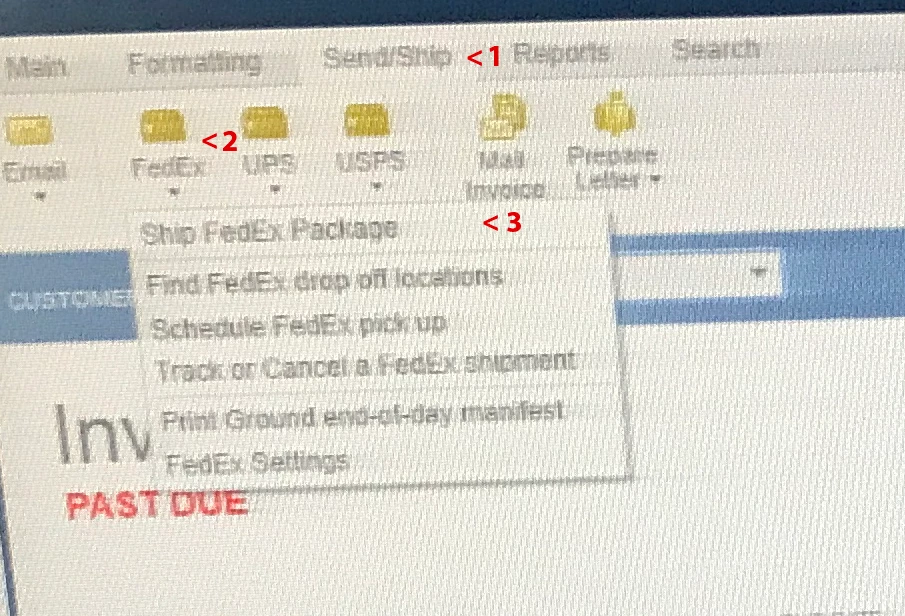
From a customer invoice when I select "Ship/Send" do the FedEx (OR UPS) drop box to select "Ship FedEx Package" the Shipping manage does not open the shipping label on the screen. Instead it flashes the Ship Rush dialog box (Shipping Label) in the taskbar. I then have to click on it in the taskbar to bring it to the front.

The Drop box in step #3 never closes either. I have spent days and multiple "Fixes" and reinstalls to no avail!

This only started happening after I upgraded to QuickBooks Enterprise 2022. See attached image. 
1 reply

June 15, 2022

I appreciate you for performing some troubleshooting steps to fix your concern with the shipping manager in QuickBooks Desktop (QBDT), @Linuxguy2.


I replicated the same on my end and was able to see Shipping Manager without clicking it from the taskbar. Also, regarding the Dropbox you mentioned, this will close if you’ll close the set up wizard or the Shipping Manager.


On the other hand, may I ask what specific troubleshooting steps have you done so far? 


In QuickBooks Desktop, we have multiple ways to fix some errors in the program. With that being said, if you haven’t performed this yet, we can run a QuickBooks Tool Hub. This helps fix common errors. To use the tool hub, you must first close QuickBooks. Then let’s proceed with downloading the program to your computer. Here’s how:


  1. Close QBDT.
  2. Download the most recent version of the QuickBooks Tool Hub. Save it somewhere you can easily find it (like your Downloads folder or your Windows desktop).
  3. Open the file you downloaded (QuickBooksToolHub.exe).
  4. Follow the on-screen steps to install and agree to the terms and conditions.
  5. Double-click the icon on your Windows desktop to open the tool hub once the installation is complete.


Once done, we can then proceed to the steps to fix common errors by running a Quick Fix my program. QuickBooks will shut down any open background processes as a result of the Quick Fix. It will make a quick fix to your program. I’ll show you how:


  1. Select Program Problems from the QuickBooks Tool Hub.
  2. Select Quick Fix my Program.
  3. Open your data file in QuickBooks Desktop.


If something went wrong during the installation of QuickBooks, it may cause issues when you try to utilize it. To resolve typical installation errors, use the QuickBooks Install Diagnostic Tool. You can refer to Solution 2: Run the QuickBooks Install Diagnostic Tool from this article: Repair your QuickBooks Desktop for Windows


Let me know if you have further clarifications with your QuickBooks Desktop preference. I'll be around the corner to help. Stay safe! 

Linuxguy2Author
June 16, 2022

It doesn't happen every time! Open and close the shipping manager from step #3 multiple times and the problem will occur.

No problems what-so-ever when we were running QBDT Enterprise 2021. This problem surfaced after I upgraded to QBDT Enterprise 2022
The setup is a stand alone DELL R330 server only running the Database Manager serving 6 client computers and the problem occurs on all 6 clients.

I am no stranger to troubleshooting QBDT (running QBDT Enterprise for several years now) and have run all the tests suggested by online tech support and the various forums including a 2 hour telephone support call with Intuit.
The tests I have run are too numerous to list including:
1:
Database repair.
2:
A completely new install of the Database Manager on a different computer and a fresh install of QBDT Enterprise on a client computer.
(This should have eliminated any setup issues).
3:
It doesn't happen every time! Open and close the shipping manager from step #3 multiple times and the problem will occur.

Tori B
June 16, 2022

Hey there, @Linuxguy2


Thanks for sharing all the details and troubleshooting steps you've taken. 


Since you've gone through all of the basic troubleshooting steps we take when repairing, I recommend contacting our Technical Support Team again. This way, an agent can use their tools to screen share with you and take a deeper look into the issue. If needed, the agent can send this to our Product Engineers and have it further investigated. You can use the link I've included below to connect with an agent. 


Please let me know if you have any questions or concerns. Take care!