

August 31, 2023
Question

Some products on client invoices are posting to COGS instead of income

  • August 31, 2023
  • 2 replies
  • 0 views

I am having an issue where my sales are not showing on my revenue account. If i pull up my sales report, they are higher than my Revenue account on the P&L. 
I pinpointed the issue - some items are posting to the COGS account instead of revenue and I cannot seem to fix it. 


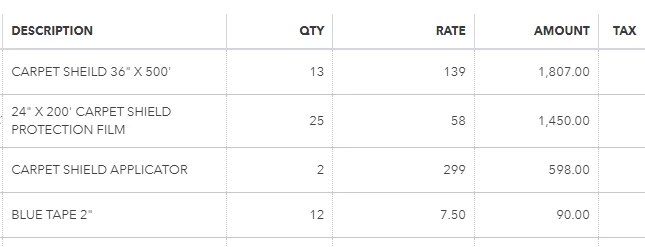
This is the invoice, line item #1 incorrectly posts to COGS while line item #2 correctly posts to Revenue.
 

This is the transaction journal where you can see how they post. 

 

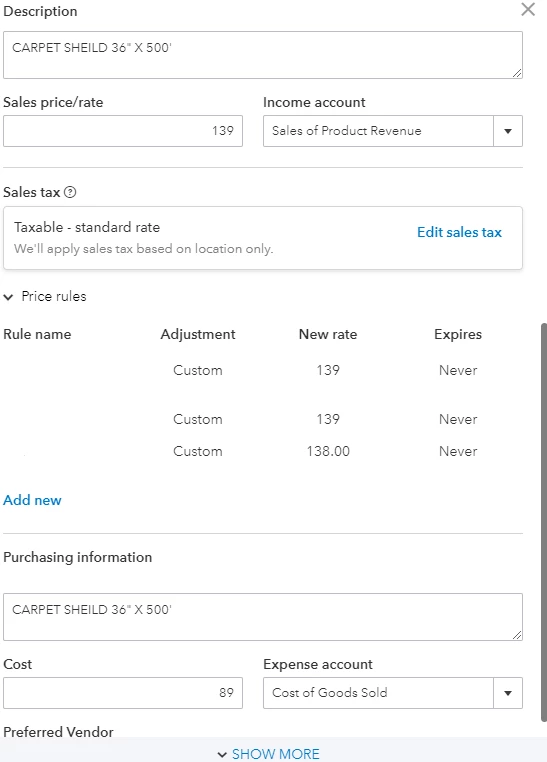
Now, here is the product from #1 and how it is set up correctly in QBO products and services. 
 

2 replies

August 31, 2023

I got your back to ensure to post the items on the revenue account so you'll be able to run the correct report data in QuickBooks Online (QBO), krissenior.

The account where your transactions are recorded depends on the accounts assigned to items listed on the invoice. We can open your customer's invoice and review the item details. Let me guide you on how:


  1. Go to the Sales menu.
  2. Choose the Product and Services tab.
  3. Locate the  Product or Service item used in your customer's invoice.
  4. From the Action column, click Edit.
  5. Scroll down to the Income Account section.
    • If the account is incorrect, click the drop-down Income Account drop-down to change it.
    • If its correct, you can view the Transaction Journal report. 


Now, you can run the Product and Service List to have a better view of all the income account and expense account assigned to all of your Product and Service items.


From here, you can double-click on each incorrect income account and change it. You can read through this article for more detailed information: Change the account for a product/service item. Once, done try running the Profit and Loss report again.


If the same thing happens, let's perform some browser troubleshooting steps to resolve this issue. To start, let's open QBO using an incognito browser. Private browser prevents saving cache and cookies that sometimes cause errors when running frequently visited websites. Here are the shortcut keys:


  • Ctrl + Shift + N for Google Chrome
  • Ctrl + Shift + P for Firefox
  • Control + Option + P for Safari


If it works, return to your default browser and clear the cache. Every so often the cache becomes overwhelmed with older data which can potentially cause viewing and performance issues. Clearing it will refresh the system, and you'll be able to work with a clean slate. Switching to other supported web browsers can also help rectify the issue.


Also, you'd want to check this article for reference in case you want to change your product and service item types. This will guide you through the step-by-step process: Change product and service item types in QuickBooks Online.


Please fill me in if there's anything else I can do to help you run your financial reports. You can click the reply button below to add your response. 

September 5, 2023

Unfortunately, this is not working. 

Rainflurry
August 31, 2023

@krissenior 


Something's off obviously.  QBO is posting a reduction in COGS for that item instead of posting it to revenue.  I suspect that somewhere along the way, this item was not received properly or an adjustment was made.  Can you run an Inventory Valuation Detail Report and post a screenshot just for that item?  It would be great if you could post the report all the way back to the beginning of when you started receiving that item in stock.  

September 5, 2023

What i am finding interesting is that the items are not even showing up on this report until June. The invoice I posted is from January.

Rainflurry
September 5, 2023

@krissenior 


OK, so what I think is happening is that QB is posting that invoice as a reduction in COGS because you are letting inventory go negative.  You should never let your inventory go negative.  In your report (which I understand is subsequent to the invoice in your original post), you were oversold by 13 units on 6-22-23 and again oversold by 6 units on 7-6-23. I would guess you were negative on that item previous to this as well.  When you sell a product that you do not have in inventory, QB still reduces your inventory and increases your COGS by the cost of the items sold.  However, that's an issue because you are expensing the cost of the item sold as of the invoice date but, since you never bought and paid for that item, you should not be recording the expense.  So, QB will make adjustments to reduce your COGS by the amount overstated as a result of overselling the items.  If @BigRedConsulting is lurking on this thread, she/he understands the adjustments that QB makes much better than me.


The only way to prevent this is to make sure you're not letting your inventory go negative.  If you Google 'negative inventory in quickbooks online', you will find all kinds of results talking about why you don't want to let inventory go negative.  If you take pre-orders, you can convert a PO to a bill or, even better, record the customer payment as a credit to be applied to the invoice when you receive the product in stock.  Hope this helps.