

Subclass Issue
A client has about 2 dozen rentals, each with their own class. 8 of these are empty lots, which need to be handled differently, so I set up a class called Lots and am trying to assign the individual Lots 1-8 as subclasses to Lots. Easy, simple, no problem.
Except that for 3 of the 8 lots, it doesn't work. I edit class Lot 5, click the subaccount button, select Lots, verify the screen shows it correctly, click Okay, and BOOM, it adds Lot 5 as a subclass of 1505 Grant St, the bottom class on the list. I have tried this repeatedly with the same problem. I also tried on my coworker's computer, same problem. I have tried this on QuickBooks Accountant Desktop 2021, 2022, and 2023 - same problem.
This is what it does:
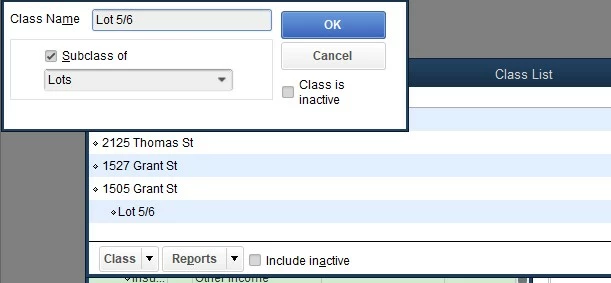
My current workaround is to make Lot 5 a subclass of Lot 2, which is a subclass of Lots just to get this in the right area of my P&L, but that is not really an acceptable solution.
I have had this problem with more than 1 client.
I have also had a similar problem in the Chart of Accounts with various clients - make an account a subaccount of X and it shows X, but actually shows on the COA and reports as a subaccount of Y.
How do I fix this?