

April 8, 2022
Question

Tabbing from one field to another

  • April 8, 2022
  • 6 replies
  • 0 views

Is anyone else having trouble tabbing from one field to another in checks, invoices, etc?


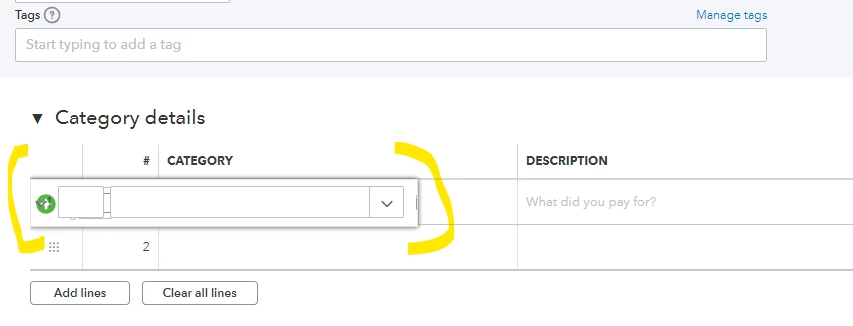
When entering a transaction, as I tab from Tags to Category, there's an GI problem and it also just stops advancing by tabbing. I have to manually click in Category to enter the category and continue (I've included a screenshot). From there it is fine, and if I enter multiple transactions it behaves normally with other transactions going forward. It just happens in the first instance I add a new transaction (but if I close and go back, or close and go to add a different type of transaction, the error recurs).


This is happening both in the QB Desktop App (which I am disappointed is going away, BTW) and the regular browser version and has been happening for a few days now.


If anyone has any suggestions, they would be appreciated!
 

6 replies

Candice C
April 8, 2022

Good afternoon, @Brad-factor110


Welcome to the Community. Let's work together to get this problem handled. 


Utilizing some of our troubleshooting actions could help in this situation. 


Using a private browser or incognito window will assist in eliminating any glitches or errors that can occur in the system. Here's how depending on your browser session: 


  • Google Chrome: Ctrl + Shift +
  • Internet Explorer: Ctrl + Shift + P
  • Safari: Command + Shift + N


If this works, go back to your regular session and clear your browser's history


If not, please come back here on this thread so we can assist you and your business further. I'll be waiting for your response!

April 12, 2022

I'm having the same issue - different accounts & computers. Going incognito didn't help. Any other solutions yet?

April 8, 2022

Hi Candice,


Thank you for the reply. Unfortunately, the issue still occurs in Chrome Incognito mode (see screenshot). I will also add, for what it's worth, we have two users on two separate computers, and we are both experiencing the problem.

April 8, 2022

I appreciate the steps you've tried to resolve the issue, @Brad-factor110.


The steps provided by my colleague must resolve this issue. Since it persists, I recommend reaching out to our Customer Care Support Team. They can further investigate the root cause of why the tab moves to the next line instead of the following field. 


Here's how to contact them:

  1. Go to Help.
  2. Click Contact Us.
  3. Enter getting an error message, managing custom fields option as your concern.
  4. Click Let's talk.
  5. Choose to Start messaging or Get a callback.

You can also check our support hours to guarantee that your issue is dealt with quickly.


If you have any other questions, click the Reply button below. I'll get back here as soon as I can to help you again. Thanks for coming, have a good one!

April 16, 2022

I am seeing it too. . . the steps quoted do not resolve the issue. I am using Google Chrome. It happens on both a laptop and on a desktop; I initially thought it was something to do with the screen size on the laptop but it's not. I have a huge monitor on the desktop and there's plenty of room. Here's a movie - tabbing into the field, then if you look closely you can see the tabbing happen through the funky box that does no good. Then I tab through the second line, and back-tab up and it's fine. To whoever is looking at this - and I sure hope QB people are - I suggest going full screen and focusing on the first line of the itemized portion of the receipt to see the behaviour.

April 19, 2022

Myself and 3 other colleagues are having the same problem. We have tried Chrome, Fire Fox and Edge, All are doing the same. This has been going on for 3 weeks.

April 19, 2022

We have had the same issue.  QB was made aware of it at least 2 weeks ago, but refuses to acknowledge that there is an issue.  

April 19, 2022

They emailed me. "We sincerely apologize for any inconvenience this has caused you.
We have listed your account as one of the affected Quickbooks Online Accounts affected by the ongoing issue.

Rest assured our Engineering team is already working on this and once a resolution has been rolled out, we will make sure to let you know immediately."

I hope they find a fix for this soon. This issue has doubled the time it takes for me to make an entry, always reaching over to the mouse.

April 25, 2022

I have the same issue.  I have called support three times on this.  Same issue with Chrome, Chrome incognito, and Microsoft Edge.  THIS IS A PROGRAM ISSUE, not a browser issue.  This started about a month ago, and it's extremely difficult to enter a batch of invoices or checks quickly.  

April 25, 2022

Hi bevbaf ... Thanks! Just curious, what is support saying when you call? I haven't had a chance to call yet. But everyone at our company who uses QBO as well as our accountant (who is located elsewhere) is having this issue. I can't imagine why something like this would only affect certain users, so I'm surprised there are not more people complaining about it. It's a small but frustrating issue!


April 25, 2022

Every time I have called about this they say the same thing.  "Clear your cache and cookies" (Hello! we are not dumb - it's not the browser)  

Then they say, "let me share your screen - and take a screenshot of what is happening",

But nothing ever gets resolved because they say they can't send up the chain to engineering unless I stay on the phone, and by the time we get to this stage it's already been 40 minutes and I need to get work done.


Intuit needs to allow their customer service reps to send tickets to engineering without the customer staying on the phone for hours.

May 28, 2022

I have the same problem. It is yet another roadblock which prevents any chance of having an efficient work flow.

RenjolynC
May 28, 2022

Thanks for chiming in on this thread and for sharing your situation. 


Let me route you to our support for this problem.


The investigation is still open for the Tab function. You'll want to check out the suggestion shared by my colleague Divina_N here. Then, reach out to our Customer Care Team, so your company details will be added to the affected user list. This way, you will be notified when the issue is resolved.


Please take note that our support hours for QuickBooks Online Plus, Essentials, and Simple Start starts from M-F 6 AM to 6 PM PT and Saturday 6 AM to 3 PM PT. For the Advanced version, we're available any time, any day.


Here's how you can reach out to us:


  1. Click the Help icon located in the upper right-hand corner.
  2. In the Search window, click the Contact Us button located at the bottom.
  3. Enter your question and click Let's talk.
  4. Choose either Chat with us or Have us call you.


If you have the new QuickBooks Assistant help update, you can follow these steps:


  1. In your QuickBooks Online account, go to the Help > Assistant.
  2. Type Talk to a human and enter what do you need help with.
  3. Click No if none of the articles shared are helpful and select Chat with us or Have us call you.


You can also get our direct phone number through this link: QuickBooks Online Support.


Should you have any additional questions or need help with other concerns, please let me know the details in your reply. We're always available to assist you. 

June 7, 2022

This was reported over two months ago - and there seems to be zero movement on this issue.  Instead of fixing the problem, now when you click on the Category field with the mouse, it does not fill in after typing a few letters of the category.  It is EXTREMELY time consuming now to enter bills, that used to take a few seconds.


WHEN WILL THIS BE FIXED?????

May 6, 2024

Only in Journal Entries. So far, other transaction types work with the Tab function.