

December 21, 2020
Solved

There's a new quickBooks software update waiting for you - but now the prompt has no way to "not" install

  • December 21, 2020
  • 6 replies
  • 0 views

QB Enterprise 21. Used to be when an update was available, user got prompt to "install now" or "install later".  Now we get this:
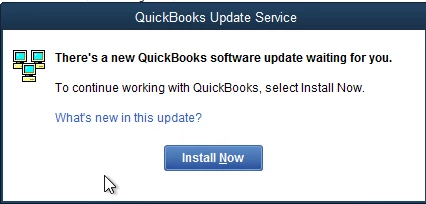


and there is no way to bypass it. We have this on terminal server farms with users that do not have rights to install the update, and besides we always do updates off-hours and not in the middle of the day. So now we have a bunch of people that cannot use QB.


I did temporarily find a way around it, we renamed "C:\ProgramData\Intuit\QuickBooks Enterprise Solutions 21.0\Components\DownloadQB31" folder and it lets us in.


Are we now being forced to install updates when Intuit wants them installed with no way for a user to bypass?

Best answer by BigRedConsulting

@John_A_D 


Try this :)


Defeat Forced QuickBooks Patches « Big Red Consulting


.

6 replies

JasroV
December 21, 2020

I can imagine the situation you’re in right now, @John11.


To ensure you get the most recent improvements of QuickBooks Desktop (QBDT), I recommend installing the new updates for the program. This way, we can ensure your software is equipped with the latest security features and fixes. 


If you still receive the prompt message after updating it, I recommend uninstalling and reinstalling it. A clean install fixes issues that keep you from opening your company file and a few other situations in QBDT.


Let me show you how:


  1. Go to the Windows Start menu. 
  2. Search for “Control Panel”, then open Control Panel.
  3. Select Programs and Features or Uninstall a Program.
  4. From the list of installed programs, select the version of QuickBooks Desktop you're having problems with.
  5. Select Uninstall/Change and then Remove
  6. Then select Next
  7. Once done, reinstall QBDT.

You can also read through this link for more details: Clean install QuickBooks Desktop.


In case you run through some errors reinstalling the software, check out this article that can guide you in handling the situation accordingly: Fix QuickBooks Desktop install errors.


Keep me posted if you have other follow-up questions about updating QBDT, you’re always welcome to share them with me. I’m always around ready to help and back you up. Keep safe, and have a good one.

BigRedConsulting
December 22, 2020

@JasroV 

The OP's question is: "Are we now being forced to install updates when Intuit wants them installed with no way for a user to bypass?"


You didn't answer that question.

December 28, 2020

This presented a real downtime this morning for our 3 companies.    It forced us to update over 53 workstations and Servers resulting in about 2 hours of downtime for my Enterprise Organizations.   We've been with QuickBooks for over 10 years and it's the first time this was "forced" down our throat.   As an IT Professional I expect to be notified if it is going to happen so I can plan.   I'm very disgruntled about this forced Update.   John

BigRedConsulting
December 28, 2020

RE: "As an IT Professional I expect to be notified if it is going to happen so I can plan."


Intuit used to do that, too, specifically for Enterprise customers.  Seems they've lost a lot over the years.

December 30, 2020

We also do not appreciate this update being forced on us right as we began year end prep.

Please tell us how to get around this update.

Do not tell us to install it and delete it.

Just tell us how to open the program without updating.

Hurry.

January 6, 2021

I'm no longer getting the pop up box that this thread originated on.  Now I'm getting this:


I can no longer even open QuickBooks.  HELP!!

January 6, 2021

Hey there, Holly Eldridge. 


Thanks for dropping by the Community and providing me with that screenshot of what's going on. I'm happy to help. What you're going to want to do is reach out to our support team outside of the program. You can Contact Us and we'll get you up and running again.


I'm also including a helpful article for you to checkout below.

Thank you for your time and if you have any other questions, feel free to post here anytime. Thanks again and have a lovely afternoon.

January 7, 2021

Spent some time with support and issue now rectified.  Thanks!!

January 26, 2021

The message I am receiving is " There's a new Quickbooks software update waiting for you"

"looks like you don;t have the required permissions" Option is to close quickbooks


January 26, 2021

Thanks for coming here, kimrayburn.


Running updates in QuickBooks Desktop requires admin permission. The reason why you're receiving the message is that you need to log in as an Admin. To do that, look for the QuickBooks Desktop icon and right-click. Then, choose Run as the Administrator


Once done, try manually updating the software by following the steps below:

  1. Go to the Help menu.
  2. Select Update QuickBooks Desktop.
  3. Click the Options tab.
  4. Select Mark All and then click Save.
    undefined
  5. Go to the Update Now tab.
  6. Select the Reset Update checkbox.
  7. When you're ready, select Get Updates.
    undefined

To give you more insight and a visual guide on how to update QuickBooks Desktop, please check out this article: Update QuickBooks Desktop to the latest release.


If this doesn't work, let's try downloading the QuickBooks Tool Hub. This tool is designed to automatically diagnose and fix common issues within the software.


Below are the instructions on how to do it:

  1. Close QuickBooks.
  2. Download the most recent version (1.4.0.0) of the QuickBooks Tool Hub. Save the file somewhere you can easily find it.
  3. Open the file you downloaded (QuickBooksToolHub.exe).
  4. Follow the on-screen steps to install and agree to the terms and conditions.
  5. When the install finishes, double-click the icon on your Windows desktop to open the tool hub.
  6. Once the  QuickBooks Tool Hub is open, select Program Problems.
  7. Select Quick Fix my Program.
  8. Start QuickBooks Desktop and open your data file.

Feel free to visit this article for future tips and guides while working with QuickBooks Desktop: Help articles for QuickBooks Desktop.


Be sure to check back in with me here and let me know how this goes. I'm always around to help you in any way I can. Have a good one. 

November 1, 2021

Thank-you Charies!!!!!  logged in as administrator for office server and followed prompts, be sure to close authentication error dialouge box first!

November 1, 2021

The software update will not Install it go's blank

November 1, 2021

I'm here to address your concern about installation, actvezr2.


Since updating the software didn't work for you, you can try downloading the  QuickBooks Tool Hub. You can refer to the steps shared above.


Otherwise, you can check out this article for additional troubleshooting options on how to fix an installation problem: Fix QuickBooks Desktop install errors.


If all the above mentioned doesn't work, I’d recommend contacting our technical support team, so they can add you to the list of our affected users. This way, you’ll be notified once an update becomes available


Here's how:

  1. Open QuickBooks or this sample file
  2. Go to Help, then select QuickBooks Desktop Help.
  3. Select Contact Us.
  4. Give a brief description of your issue, then select Let's talk, and then choose a way to connect.

Please take note our operating hours for chat support depend on the version of QuickBooks that you're using. See this article for more details: Support hours and types.


In case you're unable to open any of these sample files, I'd recommend following the suggested steps in this article: How to fix general problems when your company file won't open.


You might also want to visit these articles so you'll be guided on how to get started with the program. 


Feel free to browse this link here if you need help with other tasks in QBDT. It'll route you to our general topics with articles. 


I'm always here if you have follow-up questions about deposits or other concerns. Have a good one.