Solved
Transferring information from PCLAW to Quickbooks
I am switching from our old software to QuickBooks. Do I need to manually enter each account name and type? Or will the transfer duplicate accounts that I have entered manually?


I am switching from our old software to QuickBooks. Do I need to manually enter each account name and type? Or will the transfer duplicate accounts that I have entered manually?
Thank you for choosing QuickBooks to help you manage your business and accounting tasks, mkjwlex.
Let's import your (PCLAW) chart of accounts from a spreadsheet so you can add them to the online program.
Before we proceed, please know that QuickBooks Online (QBO) automatically creates certain accounts when you set up your company. Also, some of them can’t be changed (default accounts).
For more details, you can go over this article: Manage default and special accounts in your QuickBooks Online chart of accounts.
To transfer the information stated above, use a spreadsheet in Excel, Google Sheets, or a CSV file. Let's make sure to follow the correct format so you can successfully import your chart of accounts.
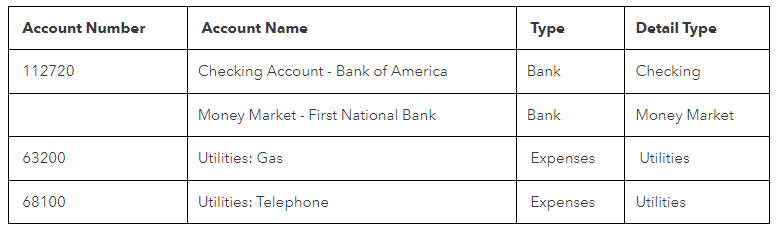
If you organize your accounts by number, add an Account Number column. Or skip this if you don’t use them. If you have a sub-account, add it in the Account Name column in this format: Main account: sub-account. For example, Utilities: Gas.
If it looks good, save your spreadsheet in Google Sheets, Excel, or CSV format. Next, upload the file to QBO. For detailed instructions, proceed directly to Step 2 in this article: Import your chart of accounts to QuickBooks Online. Also, perform Steps 3 up to 5 to complete the process.
Once done, connect your bank or credit card accounts to the online program. QBO will download and categorize your transactions so you can review and approve them easily.
To help you get started in QBO and acclimated with the tasks and features, feel free to browse these links:
Leave a comment below if you need further assistance transferring your data (PCLAW) to QuickBooks. I'll get back to help you the best that I can.
Enter your E-mail address. We'll send you an e-mail with instructions to reset your password.