


jecalderon
February 28, 2023
Question

Trouble understanding the difference between COST, LANDED COST and AVERAGE COST

  • February 28, 2023
  • 1 reply
  • 0 views

I have been troubled with the  issue of COST . I have called support several times and there seems no one answering the phone with a straight  answer. They all look just as confused as I am!!


Looking at QuickBooks Enterprise Advance Inventory. I need help in definition of  COST, SALES PRICE , LANDED COST and AVERAGE COST.


Please, can anyone confirm if AVERAGE COST is the same as LANDED COST?  It looks to me that these terms are use interchangeably. ALL QBD reports only deliver report of AVERAGE COST.  I find no report pointing to  LANDED COST. 


 From inspection of the purchased Inventory Item dashboards, the COST  field is populated with the price from the vendor Invoice at Receiving. At the same time, QuickBooks allows to determine  LANDED COST from relationship of expenses associated with inventory purchases such as container shipment, taxes, etc... This number shows after adding landed cost..


The main Inventory windows reads AVERAGE COST and this is where things get al  confusing. 


From the detail Inventory Item information windows looks like this:
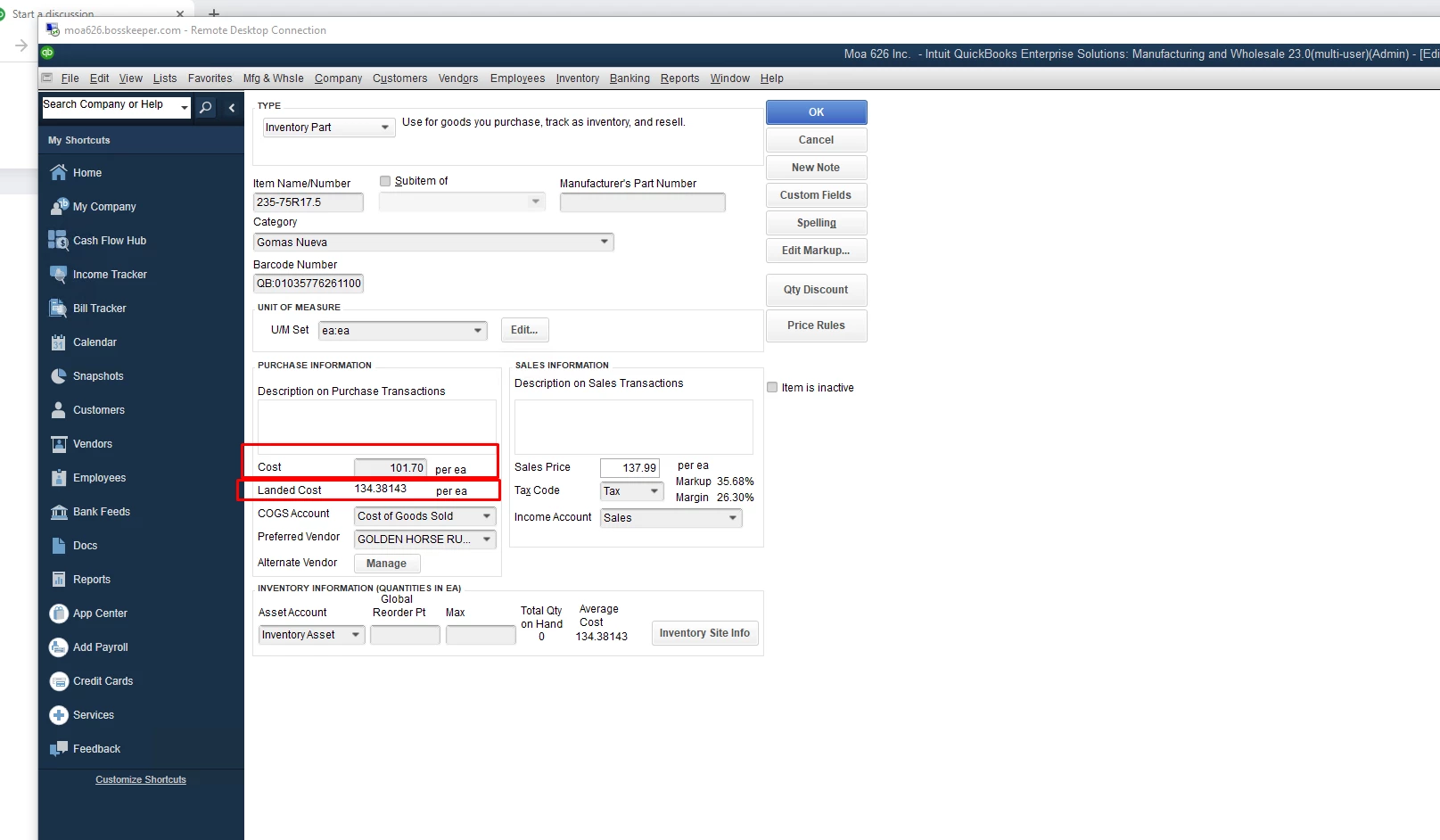
 

The main Inventory windows reads AVERAGE COST and this is where things get al  confusing.
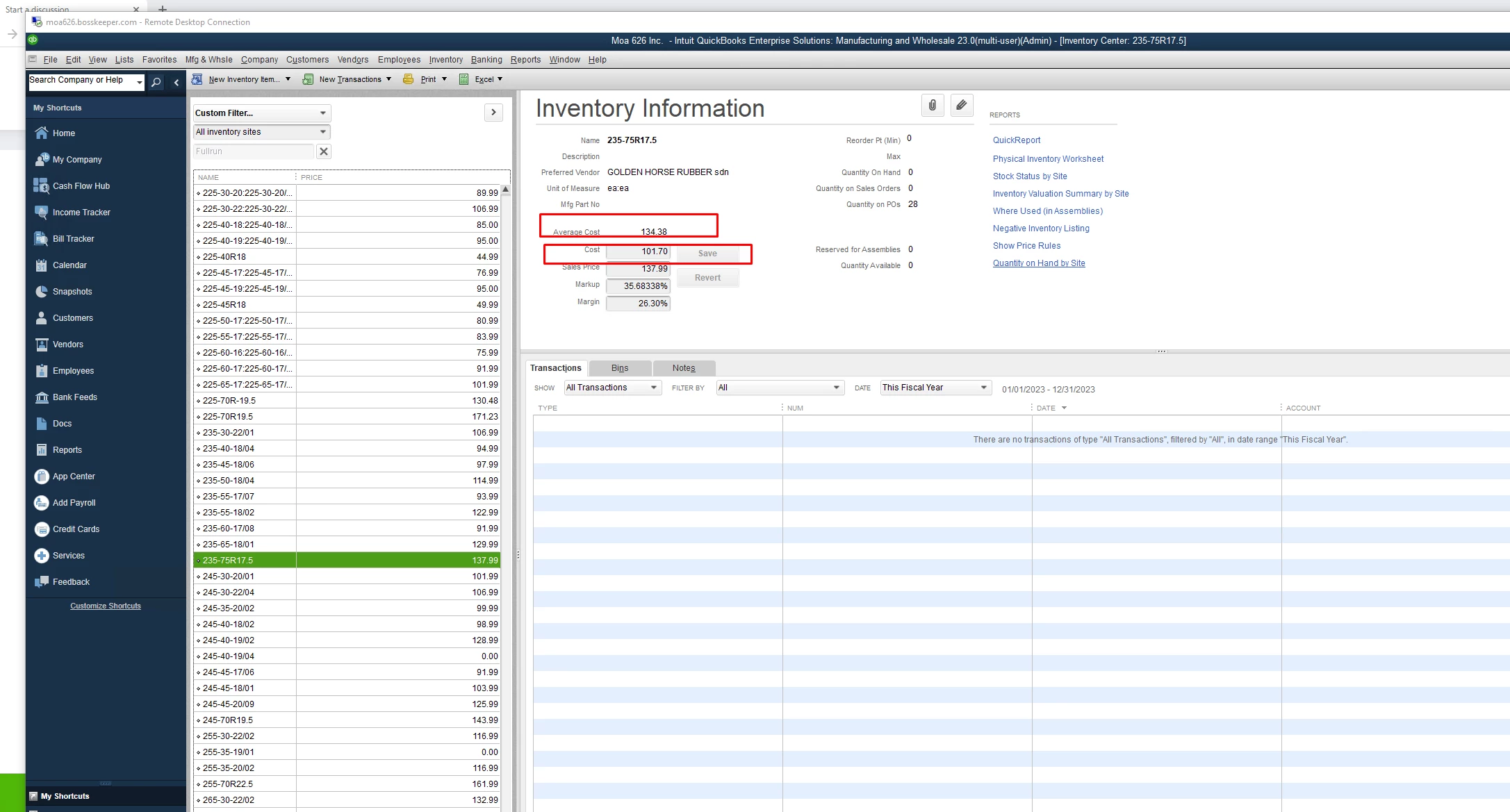


This is confusing as I am not sure if item COST field needs to be replaced with the LANDED COST.  This will be relevant  in order to get a correct picture of MARGIN and MARK UP pricing.


And at the same time, not sure what the average cost refers here.  I always considered Average cost as the average of an item in the inventory received at from possible different vendors, dates and at a different purchase prices.  But I am not sure if the COST field is mean to be replace with the calculated LANDED COST.

1 reply

JenoP
February 28, 2023

Allow me to join you here and answer your inventory-related questions, jecalderon.


Cost is the actual amount of the item when your purchased it, while Landed cost is the sum of expenses associated with shipping a product. Typically, the term refers to the costs connected with international shipping like taxes and fees.


Average cost on the other hand is the sum of the cost of all of the items in inventory divided by the number of items. To put it simply, cost is the actual amount of the item, landed cost is the amount of the item, plus the shipping and handling expenses, and average cost is the average amount you spent for of all items you have on hand. 


This also means that the AVERAGE COST is not the same as LANDED COST. This is because QuickBooks will only factor the amount in the Cost field when calculating the average cost. 


Additional details about this are discussed in the following articles: 


At the moment, there's no specific report about landed cost in QuickBooks Desktop. However, you can open your Chart of Accounts and run Quick Report for the Landed Cost account. Here's how:


  1. Go to your Chart of Accounts and look for the landed cost account.
  2. Right-click on it and select Quick Report


Let me also share these articles for additional references:


Please let me know if you have other questions about inventory-related costs. We're always here to make sure they're all taken care of.

jecalderon
February 28, 2023

Ok with the clarification. But still not sure why the is no report on LANDED COSTS and why is no  functionality to apply  Mark Ups and Margins to the LANDED COST.   Is there a reason for this?


February 28, 2023

Hello there, jecalderon.


My colleague is correct that the landed cost report and the other following features are not yet available in QuickBooks Desktop (QBDT).


Since QuickBooks is made to save accounting records, it's not specific to pulling up complex reports used by other business owners. I recommend you send feedback directly to our product engineers. This way, we can comprehend what our customer demands the application.


Here’s how:


  1. At the top, select the Help menu.
  2. Choose to Send Feedback Online then click Product Suggestion.
  3. Type in your feedback or feature request.
  4. Click the Send Feedback button.


If you have further queries about QuickBooks, let me know in the comments below. I'll be here immediately to assist you. Have a good one!