January 13, 2020
Solved

Unable to save new To Do tasks in Quickbooks (desktop PC version)

  • January 13, 2020
  • 5 replies
  • 0 views

I currently have Quickbooks Premier Professional Services Edition 2018 installed. I was previously able to create new To Do tasks, but this feature no longer works. When I attempt to save a new To Do task, an error dialog displays on screen (see attached screenshot).


I updated to the latest version of Quickbooks, but that did not fix the problem. I also tried populating the various fields on the entry form in different ways, but the same error always displayed when I tried to save the new To Do task.  


Best answer by MaryLandT

Hello there, akumar99,


Thanks for the screenshot. Great job for updating QuickBooks Desktop to the latest release. It's the first step to take in fixing the unexpected behavior in the system.


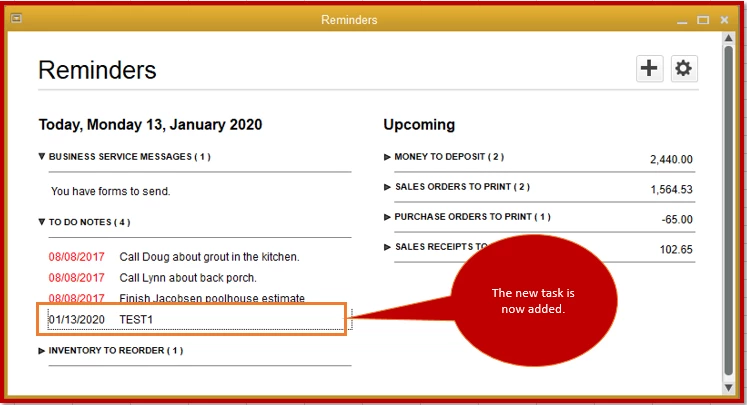
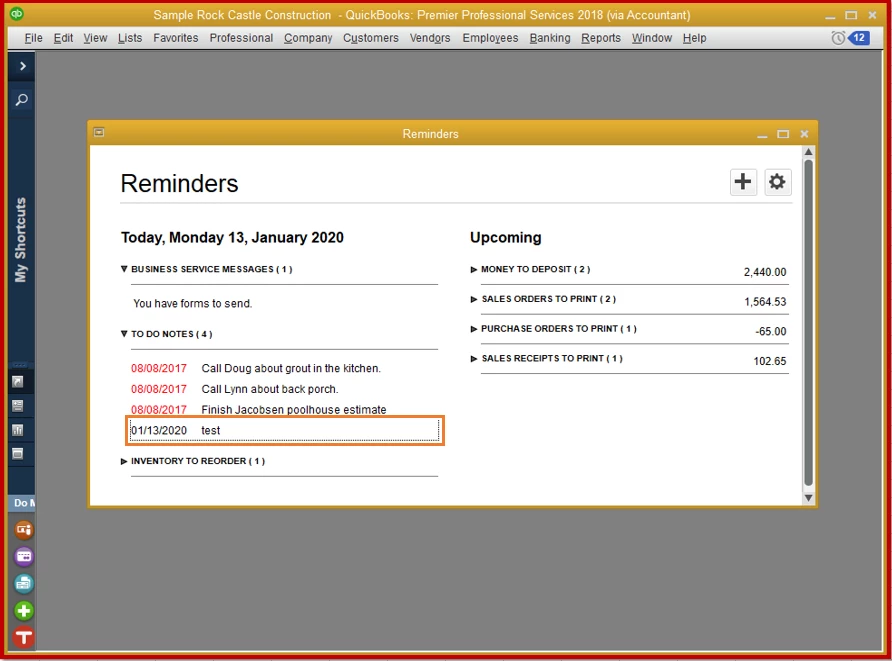
I'm able to save a to-do item in the system. The screenshot below will show the reminder I've added.
 

I've found that some customers run into this issue when they have Microsoft SQL Server 2012 installed. Some users have success uninstalling it to fix this. You can check to see if the app installed. If you do, I suggest consulting whoever maintains your computers to determine if removing the server is the right option.


If that's not the case, let's use the sample QuickBooks file and create a reminder from there. This is to test if the issue is with the data on your company file.

  1. From the File menu, select New Company.
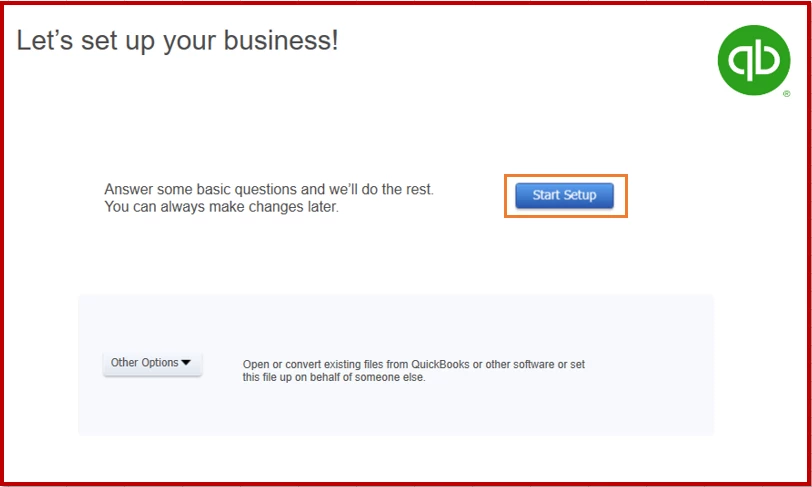
  2. Choose Start Setup and fill out the required fields.
  3. Click the reminder icon, then select the + (plus) sign.
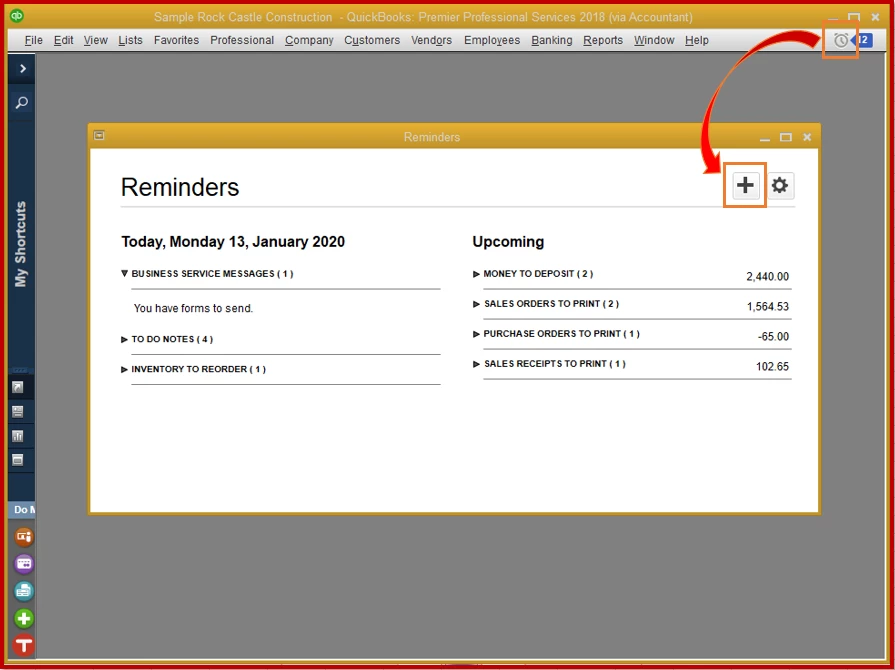
  4. Enter the necessary information to complete the task.
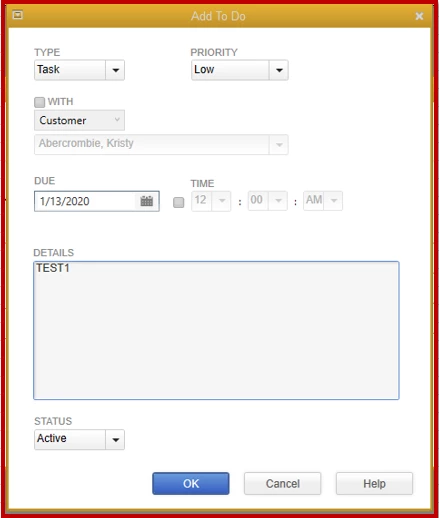
  5. Click OK.

When that works, the data on the original file may be damaged. You need to run the verify and rebuild data to fix this.


You can also refer to the System requirements for QuickBooks Desktop 2018 and Enterprise Solutions 18.0 for more details. It will show you what operating system, hardware, and software needed to run the program.


Let me know how everything turns out by leaving a comment below. I'm always around to help you out.


5 replies

MaryLandT
MaryLandTAnswer
January 13, 2020

Hello there, akumar99,


Thanks for the screenshot. Great job for updating QuickBooks Desktop to the latest release. It's the first step to take in fixing the unexpected behavior in the system.


I'm able to save a to-do item in the system. The screenshot below will show the reminder I've added.


I've found that some customers run into this issue when they have Microsoft SQL Server 2012 installed. Some users have success uninstalling it to fix this. You can check to see if the app installed. If you do, I suggest consulting whoever maintains your computers to determine if removing the server is the right option.


If that's not the case, let's use the sample QuickBooks file and create a reminder from there. This is to test if the issue is with the data on your company file.

  1. From the File menu, select New Company.
  2. Choose Start Setup and fill out the required fields.
  3. Click the reminder icon, then select the + (plus) sign.
  4. Enter the necessary information to complete the task.
  5. Click OK.

When that works, the data on the original file may be damaged. You need to run the verify and rebuild data to fix this.


You can also refer to the System requirements for QuickBooks Desktop 2018 and Enterprise Solutions 18.0 for more details. It will show you what operating system, hardware, and software needed to run the program.


Let me know how everything turns out by leaving a comment below. I'm always around to help you out.

akumar99Author
January 13, 2020

Mary,


Thanks for your quick and thorough response.


  1. As noted in my post, I've already updated to the latest version of Quickbooks, and that didn't fix the issue.
  2. As you suggested, I tried logging into a sample company to test if the issue occurs there, and I confirmed that the error also does occur when using the sample company data.
  3. I do have SQL Server 2012 ("Express" version - which is a free version commonly used by other apps) installed on my workstation, and it's being used by another application. Therefore, uninstalling it is not an option for me.

I'm disappointed about #3 as it applies to my situation. This really makes no sense. Why would all other areas of Quickbooks 2018 save data without problems, but this ONE feature breaks because SQL Server is present on my system? Is there any other solution besides uninstalling SQL Server?

April 2, 2021

I agree with all of the complaints in this thread.  I too have the same issue and feel that this bug should've been fixed long ago.  I also am a programmer and having an easily repeatable, consistent bug like this should not be difficult to resolve.


I am respectfully requesting that this bug report be escalated back to the development team for review and action.  Not only to resolve this issue but if the code contains a flaw that allows this error to be present just by having SQL installed on the same system, then the QB application risks corrupting not only it's data but also risks corrupting the external data or configurations for the SQL instance as well!!

May 10, 2021

Still looking for this to be fixed. Honestly this one should not be that hard for the devs to figure out. It's a very repeatable known issue.

May 6, 2022

I keep getting the notification when I try to save something in the reminders that it is "Unable to Save To Do."


We just upgraded from QB 2019 to QB 2022.  In the 2019 version it worked just fine, but when we upgraded to the 2022 version is when we started having problems.


I spent almost 4 and half hours on the phone trying to get this fixed only to find out that they can't do anything about it.

July 18, 2022

My company is having the same exact issue and it's crazy to me that this continues to be an unsolved issue for several YEARS now.  My company manages 20 separate company files between two users on separate computers.  Our QB files are stored on a shared network that also utilizes SQL for critically necessary programs. 


We recently upgraded to QuickBooks 2022 Accountant Desktop from the 2019 version. And right before we upgraded, I noticed that I was getting the "Unable to Save To Do due to schema changes. Please try creating a new company file." error message.  However, at the time, I assumed it had something to do with the fact that support for the 2019 version was no longer available (as of May 31, 2022).  So I didn't worry too much about it.


But when I try to create a task, save a To Do, or any other similar option, I am still getting this error message. This is highly unacceptable.  With having to manage 20 different company files in QB, we often need to utilize this function in QB to help us remember important deadlines or specific tasks or reminders that otherwise may be forgotten. 


Why are we still dealing with this issue in 2022 when QuickBooks was first notified of it back in at least 2020?  I wish I would have investigated the issue prior to upgrading to the 2022 version because I would have likely switched us to a different accounting system. 


The support for issues within QuickBooks seems to progressively get worse the more pots they dip their hands into.  It's very disappointing that a software company we've used for the last 15 years doesn't seem to priorize their customers like they used to and I don't foresee it getting any better any time soon, unfortunately. I think it's time for us to start actively looking into other accounting software options.  

July 18, 2022

Hello, amuze.


May I know what specific error you encountered? This way, I'll be able to assist you with the correct solution. 


Looking forward to your reply. Have a great day ahead.  

July 18, 2022

Useless auto reply. Look back at this thread and see what many of us have been struggling with for YEARS. The to-do feature doesn't work because your developers BROKE compatibility with SQL Server based software. Please stop making us explain this problem over and over and then just disappear when we make the effort. This is STILL an issue even with the latest versions! Unacceptable!

November 28, 2023

I had the same issue yesterday.. After multiple attempts at tech support nothing was working. I went into Quickbooks ToolHub and did a SFC Scannow. Something in Windows file needed to be repaired. That corrected the issue for me. Its working now.