

April 14, 2022
Solved

Upgrade from 2018 to 2021 QB Desktop Pro only worked for one of my companies

  • April 14, 2022
  • 1 reply
  • 0 views

I was unable to find this question in previous posts. I have upgraded from '18 - '21 desktop pro. I downloaded the upgrade. My original version was a CD (not sure if this would matter). Both companies say desktop pro '21 when I hit F2. However, only my 1st company (construction company) upgraded the bank feeds. I love the upgrade and want it on the other company as well. My 2nd company (farm company) is still using the 2018 bank feeds. Can someone help me get the upgrade to the second company? Thank you! 
Best answer by BigRedConsulting

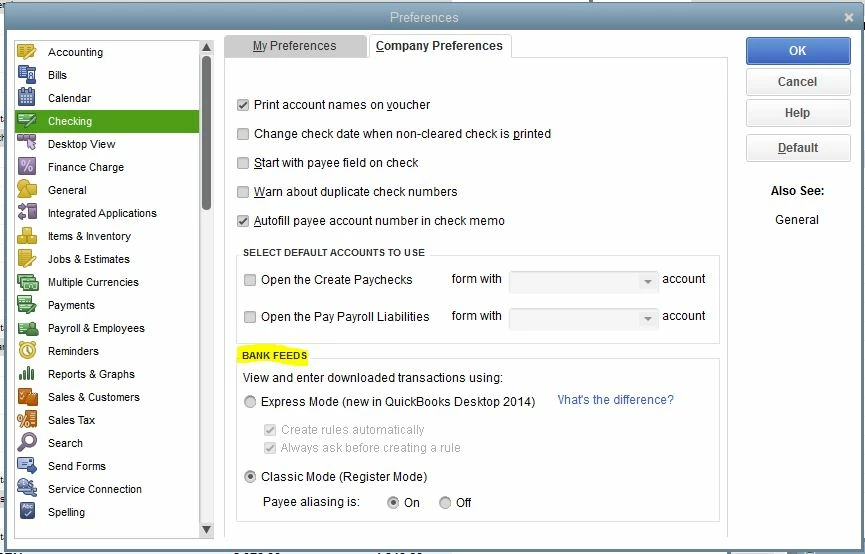
Well, there's an option to use two different bank feed styles.


To check or change it, go to Edit | Preferences | Checking | Company Preferences. See the Bank Feeds section. Here, I have the Class Mode selected:


1 reply

BigRedConsulting
April 14, 2022

Well, there's an option to use two different bank feed styles.


To check or change it, go to Edit | Preferences | Checking | Company Preferences. See the Bank Feeds section. Here, I have the Class Mode selected:


April 14, 2022

Thank you. I’ll go check that out first thing tomorrow.