November 4, 2021
Solved

Vendor Bills and payment - Cash Basis vs Accrual Basis Reports

  • November 4, 2021
  • 1 reply
  • 0 views

I have a client who has entered a Bill in October for $39.95.  They did a Bill-Payment of $39.95 in November.  When the client opens the P & L Statement (Cash Basis) for October, the expense is showing as $0.21.  When the P & L Statement (Accrual Basis) for October is generated, the report shows the expense of $39.95.  Does anyone know why this is happening and how to fix the Cash Basis report?

Best answer by Rasa-LilaM

Thanks for visiting the Community today, amelton.


Let me provide some information about running reports in the Cash and Accrual methods. Then help you fix the discrepancy showing on the statement.


The Cash Basis report only shows income when cash is received and expenses once they’re paid. Meanwhile, the Accrual Basis shows income regardless of when the money is received or paid. For more details, you can browse this article: Differentiate Cash and Accrual methods.


Since there’s a $0.21 amount showing on the expense (Cash basis), you’ll have to check the transaction history to see if there’s a credit applied to the bill. It only takes a few clicks to do this in QuickBooks.


Here’s how:


  1. In your company file, click the Vendors menu at the top and choose the Vendor Center.
  2. Go to the Vendors tab and look for the supplier you’re working on.
  3. Navigate to the Transactions tab for your vendor and right-click beside the bill to select View Transaction History.
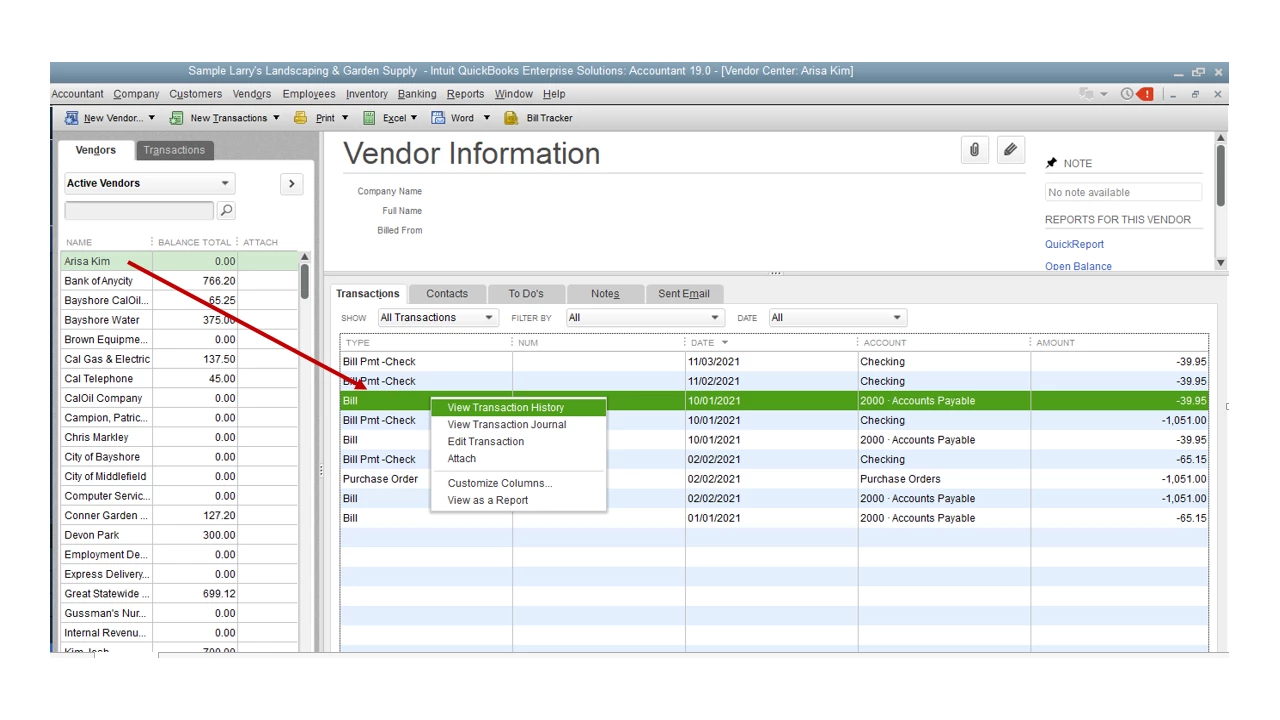
  4. This action will open the Transaction History-Bill window.
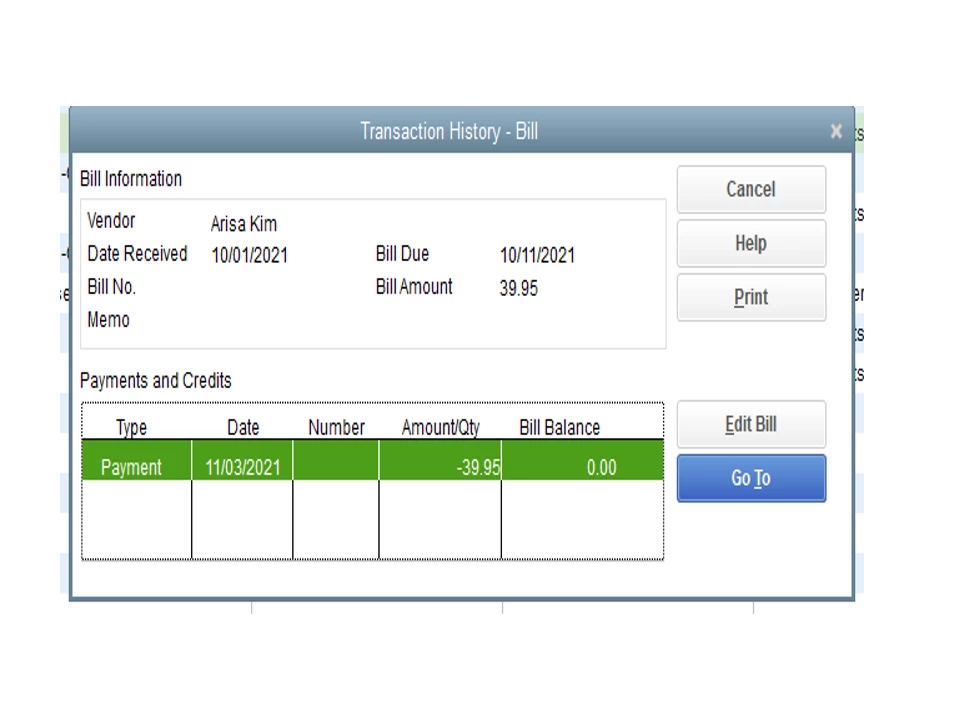
  5. From there, check if there’s a credit applied to the transaction.
  6. Click the X icon to close the window.


If there’s no credit linked to the bill, it’s a good idea to run the Rebuild and Verify Data utilities. These are built-in tools used to identify integrity issues in the company file. Before doing so, always create a backup copy of the file to prevent accidental loss.


You can bookmark this link in your browser for future reference. It outlines steps to resolve any issues with your transactions. It includes the steps on how to correct the following: Damaged link or date, transaction out-of-balance, and damaged item history.


Stay in touch if you still have other concerns or questions about running financial reports in QuickBooks. I’ll get back to help and make sure you're taken care of. Wishing you and your business continued success.


1 reply

November 4, 2021

Thanks for visiting the Community today, amelton.


Let me provide some information about running reports in the Cash and Accrual methods. Then help you fix the discrepancy showing on the statement.


The Cash Basis report only shows income when cash is received and expenses once they’re paid. Meanwhile, the Accrual Basis shows income regardless of when the money is received or paid. For more details, you can browse this article: Differentiate Cash and Accrual methods.


Since there’s a $0.21 amount showing on the expense (Cash basis), you’ll have to check the transaction history to see if there’s a credit applied to the bill. It only takes a few clicks to do this in QuickBooks.


Here’s how:


  1. In your company file, click the Vendors menu at the top and choose the Vendor Center.
  2. Go to the Vendors tab and look for the supplier you’re working on.
  3. Navigate to the Transactions tab for your vendor and right-click beside the bill to select View Transaction History.
  4. This action will open the Transaction History-Bill window.
  5. From there, check if there’s a credit applied to the transaction.
  6. Click the X icon to close the window.


If there’s no credit linked to the bill, it’s a good idea to run the Rebuild and Verify Data utilities. These are built-in tools used to identify integrity issues in the company file. Before doing so, always create a backup copy of the file to prevent accidental loss.


You can bookmark this link in your browser for future reference. It outlines steps to resolve any issues with your transactions. It includes the steps on how to correct the following: Damaged link or date, transaction out-of-balance, and damaged item history.


Stay in touch if you still have other concerns or questions about running financial reports in QuickBooks. I’ll get back to help and make sure you're taken care of. Wishing you and your business continued success.

ameltonAuthor
November 4, 2021

Thank you for your response.  I was able to figure that this was happening because of a credit in the entry.