

March 3, 2021
Solved

We would really like to be able to view all of the estimates we've generated by Product. Is there a way to view this in QB Online Pro?

  • March 3, 2021
  • 1 reply
  • 0 views

We quote airplane parts to our customer base. The parts we quote are stored under the product field in QB. Does a report exist, or is there a way to view all of the estimates we've made for a given Product. For example, we have quoted "example product A" to different customers 100 times over the last 6 months.  The price is variable per estimate, and we've received orders from some customers, but not all. We generate far more estimates than invoices. Our hit rate from estimate to invoice conversion is somewhere around 10 to 1. We want to improve that ratio so we're looking to understand the market better at a product level. We haven't yet discovered a way within QB to see all of our quotes for a given product at once. Does anyone know if it's possible to generate a report of all estimates for a given product, or potentially all products?
Best answer by SarahannC

Hello there, AirplanePartsStore.


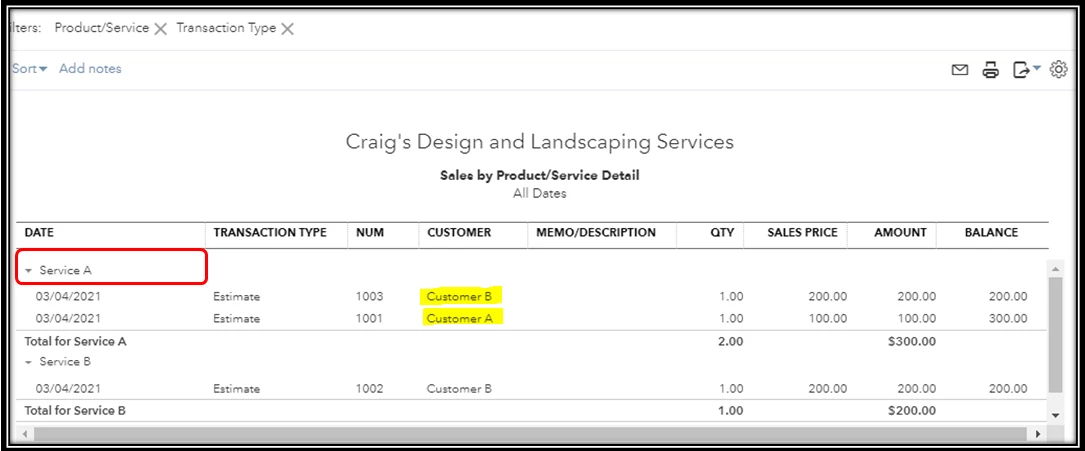
In QuickBooks Online, you can run the Sales by Product/Service Detail report to generate all the estimates for each product. Let me provide you with the complete on how you can do it. It requires a bit more effort on our part since we'll need to customize the report. This way, you'll get the necessary information that you need. Here's how:


  1. Go to the Reports menu.
  2. In the search field, enter Sales by Product/Service Detail.
  3. Click the Customize button at the upper-right corner. 
  4. Tick the Transaction Type and Product/Service.
  5. Select Estimate or Non-Posting in the Transaction Type. Then, make sure to include all the products you need. Note: You can add the information you want.
  6. Make sure the reporting period is correctly set up.
  7. Once done, click Run report.


If you would like to learn more about customizing your QuickBooks reports and save what you've customized, you can check these article anytime to get more tips on how to do it:


Please go back here if you have more questions. I'm right here together with the Community people to help you out. Hope you're well and safe.

1 reply

SarahannCAnswer
March 3, 2021

Hello there, AirplanePartsStore.


In QuickBooks Online, you can run the Sales by Product/Service Detail report to generate all the estimates for each product. Let me provide you with the complete on how you can do it. It requires a bit more effort on our part since we'll need to customize the report. This way, you'll get the necessary information that you need. Here's how:


  1. Go to the Reports menu.
  2. In the search field, enter Sales by Product/Service Detail.
  3. Click the Customize button at the upper-right corner. 
  4. Tick the Transaction Type and Product/Service.
  5. Select Estimate or Non-Posting in the Transaction Type. Then, make sure to include all the products you need. Note: You can add the information you want.
  6. Make sure the reporting period is correctly set up.
  7. Once done, click Run report.


If you would like to learn more about customizing your QuickBooks reports and save what you've customized, you can check these article anytime to get more tips on how to do it:


Please go back here if you have more questions. I'm right here together with the Community people to help you out. Hope you're well and safe.

March 4, 2021

Thank you very much!!! For some reason, it doesn't work for me unless I click on non-posting (only invoices  appear when I click "all"), but if I isolate only to non-posting, that does the trick. Thanks again!