Solved
When choosing Print and download the document opens in the same window. The only way to exit is by pressing the back button in browser. How can this open in a new window?
Original commenter did not share additional details


Thank you for your detailed response and assistance! I will elaborate in efforts to better describe my issue.
In the past, the way that you describe was the case for me, and everything was just fine. However, for the past couple months (after quickbooks started forcing the new Invoice Layout) the way that you have described is not the same on my end.
I am on a Mac using Safari.
If I create a new Invoice or choose to edit an existing Invoice, at the bottom right of the screen I am presented a green dropdown menu. By default that dropdown says "Review and send". Upon opening that menu I have the option "Print and download" (as well as "Receive payment" and "Send link".
If I click "Print and download" the Invoice will open within the same tab of the Safari browser. It is not a pop up window, nor a new tab. It merely takes over the existing Tab that I have quickbooks online open in.
Once the Invoice is displayed, I can hover over the lower part of the page and am presented with 4 icons. (Decrease size, Increase size, Open in Acrobat, Download). There is no "X" to close this page (unless I close the Tab entirely, which will thus close Quickbooks online). The only way that I can return to quickbooks online is to choose the back button in Safari. This returns to a new blank invoice. From there I am able to click the "X" at the top right corner.
What I would like to see is when I choose "Print and download" is for the Invoice to open in a pop up as you describe. Again, this was how this process worked prior to the new Invoice Layout. If I revert to the old Invoice Layout, all is well. However, quickbooks basically informs me that I had better get use to the new Invoice Layout because soon I will not have a choice. *My feelings regarding this are another topic.
Again, Thank you for your Time, Understanding, and Assistance!
I understand how important to use the the previous workflow when opening the invoice for preview, reidjwilliams.
For now, these options are unavailable. Rest assured that I'll relay this message to our team in concern here on my end and add your vote for this one.
You can also share your thoughts and ideas through your account. Our product development team reviews all the feedback we receive to ensure we’re meeting the needs of our customers.
Here's how:
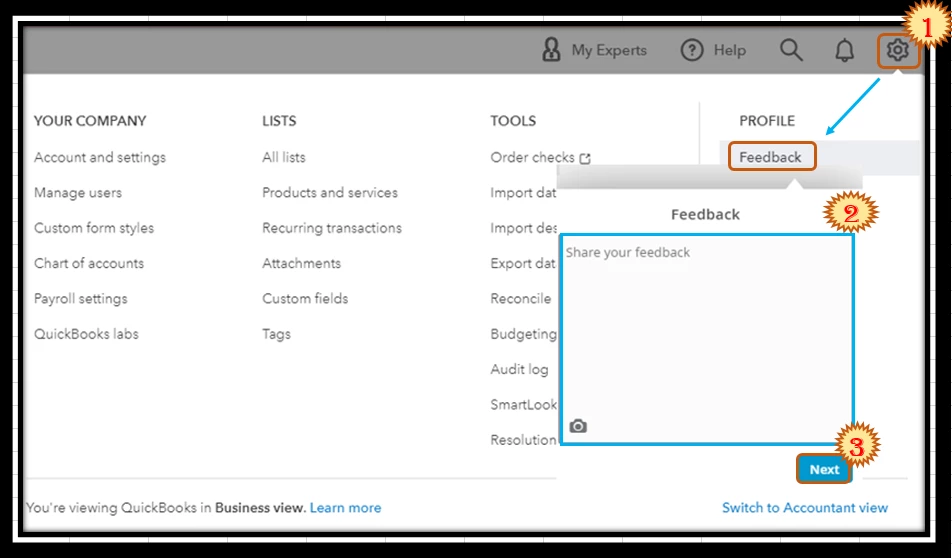
In the meantime, if you have the option to go back to the previous interface, you can utilize it to access the new tab for printing or downloading.
Also, you can modify the invoice template to decide how you want it to look when printing: Customize invoices, estimates, and sales receipts in QuickBooks Online.
Reach out to me if you have more questions about managing invoices. I'd be more than happy to help you. Have a great day.
Enter your E-mail address. We'll send you an e-mail with instructions to reset your password.