Solved
Where is the 1099 filings tab, and in particular, the Void forms button?
I can't find the Void Forms button to void 1099s rejected by the IRS. Thank you


I appreciate you for taking the time to reach out in the Community for assistance, @Rich90. I’m here to share an update and show you where the Void form option exists in QuickBooks.
The 1099 filings tab and Void forms options can be accessed under the Taxes menu. Once a form is rejected, you’ll get an email and in-product notification in the 1099 workflow where the Void forms link can be found. See the attached screenshot below for your visual reference: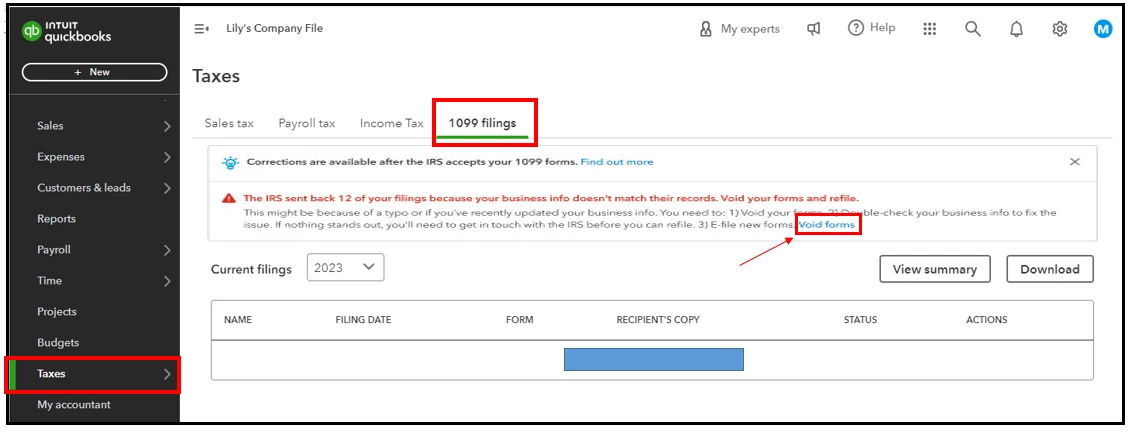
At the moment, there's an ongoing investigation about the said option. We're aware of this, and our dedicated team is diligently investigating the matter and taking all necessary steps so you can void and refile your forms.
For now, I suggest contacting our support team. This way, you’ll be added to the list of affected users and notified as soon as updates are rolled out.
Here are the steps to connect with us:
You can read these guides when you’re ready to fix and resubmit your forms rejected by the IRS:
Please don't hesitate to let me know if you have any other payroll questions or tax concerns. I'm always around to lend a hand, @Rich90.
Enter your E-mail address. We'll send you an e-mail with instructions to reset your password.