February 3, 2021
Solved

Why does QBO have the option to print checks on blank check stock under payroll settings if it isn't supported?

  • February 3, 2021
  • 1 reply
  • 0 views
Original commenter did not share additional details

Best answer by LieraMarie_A

I'm determined to ensure you can print checks on block check stock right away, @richmondsurveyin.


I'd suggest reaching out to our support team. They have the tools to expedite the process and check why you haven't received a pin yet.


Here's how:
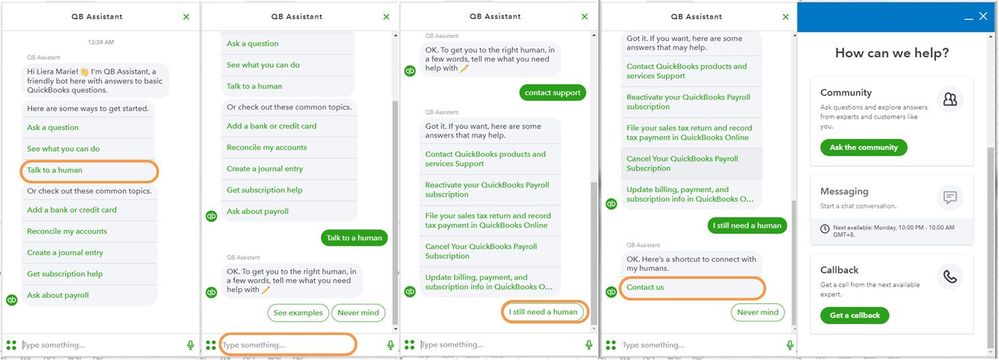
  1. Click the (?) Help icon in the upper right-hand corner of the Dashboard.
  2. Select Talk to a Human.
  3. Enter a short description of your concern and press Enter.
  4. Click I still need a human.
  5. Select Contact Us to connect with our live support.
  6. Choose Get a callback.undefined


To ensure we address your concern, our representatives are available from 6:00 AM to 6:00 PM on weekdays and 6:00 AM - 3:00 PM on Saturdays, PST. For more information, check out our support hours and types.  


Please feel free to reach out to us here with all of your questions and concerns. I'm determined to ensure your success.

1 reply

KlentB
February 3, 2021

I can shed a light on that, richmondsurveyin.


QuickBooks Online itself doesn't directly support printing checks on blank check stock. However, if you're using QBO Payroll,  you'll get the option to enable the Blank Check Stock Printing feature. Here's how to do it:
 

  1. Go to the Gear icon, then choose Payroll Settings.

  2. Under Preferences, select Paycheck Printing.
  3. Select Blank check stock, then choose the appropriate printing method.
  4. Set the number of copies and choose whether you want to print your phone number in the employee's pay stub.
  5. Select OK.
  6. Enter your company's bank information. If you set up for e-services/direct deposit, we'll use the same bank information.

Feel free to visit this page to learn more about this topic: Print checks on blank check stock. When you're ready, I recommend reading these articles to be guided in printing the checks and configuring your print settings:
 

You can always find me here if you need a hand in completing your other tasks. I'd be glad to assist you again.

February 3, 2021

I have done that and get the message saying a pin will be mailed to me within 3-5 business days and haven't received anything.  I already verified bank account with the test deposits made into it. So what can I do to get this completed to be able to print the checks?

LieraMarie_A
February 3, 2021

I'm determined to ensure you can print checks on block check stock right away, @richmondsurveyin.


I'd suggest reaching out to our support team. They have the tools to expedite the process and check why you haven't received a pin yet.


Here's how:

  1. Click the (?) Help icon in the upper right-hand corner of the Dashboard.
  2. Select Talk to a Human.
  3. Enter a short description of your concern and press Enter.
  4. Click I still need a human.
  5. Select Contact Us to connect with our live support.
  6. Choose Get a callback.undefined


To ensure we address your concern, our representatives are available from 6:00 AM to 6:00 PM on weekdays and 6:00 AM - 3:00 PM on Saturdays, PST. For more information, check out our support hours and types.  


Please feel free to reach out to us here with all of your questions and concerns. I'm determined to ensure your success.
