February 12, 2019
Solved

Why don't I have a reconcile undo option

  • February 12, 2019
  • 19 replies
  • 0 views
Original commenter did not share additional details

Best answer by Kristine Mae

Thanks for reaching out to us in the Community, @kevin-cota.


I'm here to share some information about the undoing reconciliations in QuickBooks.


Just to confirm, are you using QuickBooks Online Accountant (QBOA) version? If so, you have the option to undo a reconciliation. Here's how:


1. Go to the Gear icon at the top and pick Reconcile under Tools column.
2. On the Reconcile an account page, select History by account.
3. On the History by account page, click the Account and Report period to locate the reconciliation to undo.
4. Choose Undo on the Action column, then Yes.
5. In the final confirmation window, pick Undo and OK.


On the other hand, if you don't have this option, it's possible that you're not using QBOA. If that's the case, you need to manually edit each transaction to undo the reconciliation. Here's how:


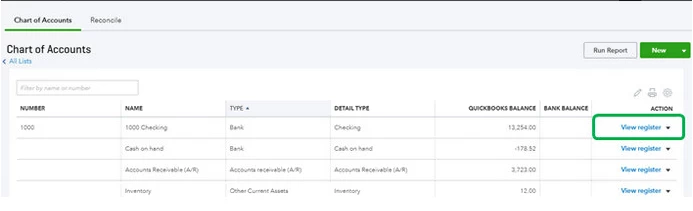
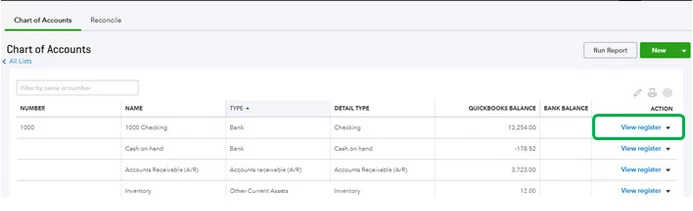
1. Go back to the Gear icon at the top, then pick Chart of Accounts under Your Company column.
2. Locate the appropriate account for the transaction and select View Register on the Action column.
3. Identify the transaction to edit.
4. In the reconcile status column (indicated by a check mark), repeatedly click the top line of the transaction to change the status, then Save.
  • C - Cleared.
  • R - Reconciled.
  • Blank - Not cleared or reconciled.


For your reference, you can also check out this article for further guidance: How to unreconcile a transaction or undo a reconciliation.


You can also get a QuickBooks-certified bookkeeper to help with reconciliations and other tasks:
Check out QuickBooks Live.


That should do it! Let me know how it goes by leaving a comment on this thread. I'd be glad to answer if you have any follow-up questions or concerns. Take care and have a good one.

19 replies

June 25, 2022

The Undo option is available to accountants only under the QBOA edition. Until Intuit adds the option to the regular QBO edition, you have two options as a solution to this dilemma: 


1. hire a real accountant to click the Undo button for you, or

2. "pretend" to start an accounting firm as a side business, sign up for QBOA trial under a different email address, and invite your brand new side business as an accountant to your primary business. 


Log in at QBOA, and voila, you get the Undo option for your company's Reconciliation. 


Sorry Intuit for all these phantom accounting firms, but you are asking for it. :-) 


June 27, 2022

@mlatzel wrote:

Sorry Intuit for all these phantom accounting firms, but you are asking for it. :-) 


I think you have revealed true purpose. We just saw Musk withdraw from his Twitter deal because of all the phony bot users. Looks like QB is gets to report to shareholders an every expanding new user base by refusing to fix a known problem.

February 1, 2023

I know this is an old post, but I'm just now feeling the pain of this obviously intentional software flaw that we all know is just another way that the QBO fat cats have found to squeeze more money from it's hard-working small-business customer base.  Anyway, stepping down from my soapbox for a min...I found a workaround.  It isn't perfect, like being able to under a past reconciliation would be, but its quicker than manually unclearing a ton of transactions.


My situation:  Our bank account in QBO was reconciled as of 12/30/22 with an uncleared deposit transaction on 12/6/22 of $150.  Upon auditing our accounts, I discovered the uncleared deposit was a JE entered in error.  I don't feel like answering a million times over in the coming year the question of 'why is there a $150 uncleared deposit for Dec?', when the deposit shouldn't have existed in the first place.  


So to fix this, I entered a JE as of 12/31/22 that credited the $150 in our bank account and debited it in the correct expense account.  


Next, I went to the Reconcile page and selected by bank account from the list of accounts I wanted to reconcile.


It brought up that blue note that says 'Last Statement ending date 12/30/22'.  I ignored it.


Dropped down below that and entered the Ending Balance amount that was the same as the Beginning Balance amount.  


Tabbed to the right and entered 12/30/22 as my Ending Date.  (Yep, you saw right.  You can totally do more than 1 reconciliation for an account on the same day!!...poof! I blew ur mind!!)


I clicked on 'Start Reconciling' and when the next screen opened up, I checked just my 12/6 deposit of $150 and my 12/31 payment of $150.  They cancelled each other out, so my Difference was $0.  I clicked 'Finish Now' and the reconciliation report now shows the 'unreconciled transactions as of 12/30/22' as $0 and my statement ending balance still matches to the actual bank statement .


If I go to the History by Account it shows both reconciliation reports dated 12/30/22 (like I said, not a perfect work-around).  This I can handle and will raise less (if any) questions from our Accountants than the unreconciled deposit would.


I hope this helps some of you!  Keep doing what you're doing and fighting the good fight!  

March 7, 2023

I completely agree.  Why is that a small business who does their own book not have access to the undo reconciliation button. On the desktop version it is available. I have used it in one or more occasions with one company. I have now started working with another company which books are a mess and there are lots of corrections that need to be made. I have reached out to the accountant to undo it as the QB online protocol is and not only does the company get changed to use QB online now they have to pay an accountant to spend time to to do something simple as this.  Not to mention the accountant is new to QB online and spent more time than necessary to figure it out. QB is supposed to be user friendly especially for small businesses. A simple task as this has turned into a 2 weeks of emails and delays making it not so quick bookkeeping.


All I can say is do better QuickBooks!

March 26, 2023

It is absolutely absurd that this has not been fixed.  We should not have to pay an accountant to undo a reconcilation. QBO should have the same features as QBD, and there is no reason for that to not be the case.

July 11, 2023

This discussion/complaint started in February of 2019.  I'm writing this in July of 2023.  More than FOUR YEARS later and there has been nothing done.  They just keep repeating the same useless non-answer.  Saying that users cannot undo a reconciliation in order to protect us from causing problems just incredible.  Hey Intuit, if you are protecting us from causing problems by undoing a reconciliation why aren't you protecting us from the problems that cause us to need to undo the reconciliation in the first place.


Come on.  Just add the feature already. 


I really wish I would have stayed with the desktop version.

JoesemM
July 11, 2023

Greetings, @billman. I understand the value of QuickBooks Online reconciliation undo feature. This can save you a lot of time to do other tasks in QuickBooks.


I recognize the inconvenience this has caused your business and entirely appreciate where you're coming from. Having the option to redo a previous reconciliation for regular QuickBooks subscriptions is a great idea to add to our program.


That said, I'd highly suggest sending feedback to our Product Development team to help improve your experience in QBO. You can track feature requests through the QuickBooks Online Feature Requests website.


To send feedback, follow the steps below:


  1. Select the Gear icon at the top, then Feedback.
  2. Enter your comments or product suggestions.
  3. Then select Next to submit feedback.


For now, you can manually undo the reconciliation by editing them. Another option is to ask your accountant to undo the reconciliation on your account. Additionally, you can also sign up for QBOA to use this feature.


Please get in touch with us again if you have any other questions regarding reconciliation or any features you wish to suggest. I'm available to help you whenever you need it. Take care.

September 10, 2023

The fact that they don't allow the ACCOUNT OWNER to undo a reconciliation is ridiculous! The Account Owner should be an administrator and have access to ALL functions. This is why I absolutely dislike Intuit, and would never recommend them for anything. Unfortunately, I am trapped in QuickBooks for my accountant. 


This is extremely POOR customer service!  There should be NO FEATURES your Accountant has that the OWNER does not!

December 18, 2023

Way to make it MOST difficult for non-accountant users, Intuit! I SO miss QB Enterprise!!! 

January 28, 2024

I can't believe that I came here to find a simple solution to changing a date on my last reconciliation and there is 4 years of it not being solved!  Everything I see says, "ask your accountant to fix it".  What?  Who is going to pay for them?  Quickbooks... you are ridiculously complicated and overpriced.

January 29, 2024

Forcing customers off the desktop version onto a more expensive, significantly less capable, less featured system is customer hostile.  Ignoring significant issues for four years is customer hostile.  Since just about nothing can be done to undo something the way you did it, it can take a day of research just to replicate a missing or broken feature.  The same is true with all the automatic functions, and they are especially error prone.  It's not a reasonable assumption that Intuit is volunteering to be seen as ever less competent for four years.  I think it's more likely they want us to start paying them for assistance to navigate their broken, maze like system for obfuscating accounting.  I've really got to redouble my efforts to find an alternate brand product.  Intuit is the worst.  The software is worse every year and the management sees us as suckers not customers.  This is a garbage relationship and I want it out of my business.

January 29, 2024

Completely agree.  I hope there is a software company out there reading this. They would have billions of instant QB customers looking for a decent product!

January 29, 2024

Why is this marked solved?  This is how I can pay an accountant to do it.  It's my data.  It's my software license, but I need to hire an accountant to access undo?  Let me guess, I can also pay Intuit for this service?  What a filthy company.  It's not your data.  Why did you lock out to undo to accountants only?  What possible rationale for this decision?

January 29, 2024

You know what the rationale is: $$$

April 11, 2024

If blocking this feature is to protect the uninformed, why not just provide a warning that requires the user to click through an acknowledgement and confirmation that the risk is understood?


Some users are CPAs without the higher-level subscription or may handle their books without a CPA and therefore do not have somebody who can do this for them. But also seems odd for quickbooks to take away control of a business from the owner. Empowering customers seems like something that will benefit Intuit more because it will show the value of their software and provide a service that does not force users to rely on others. A dependency on others does not provide a business owner with the warm and fuzzies, at least I know that's how I'm feeling!