April 18, 2022
Solved

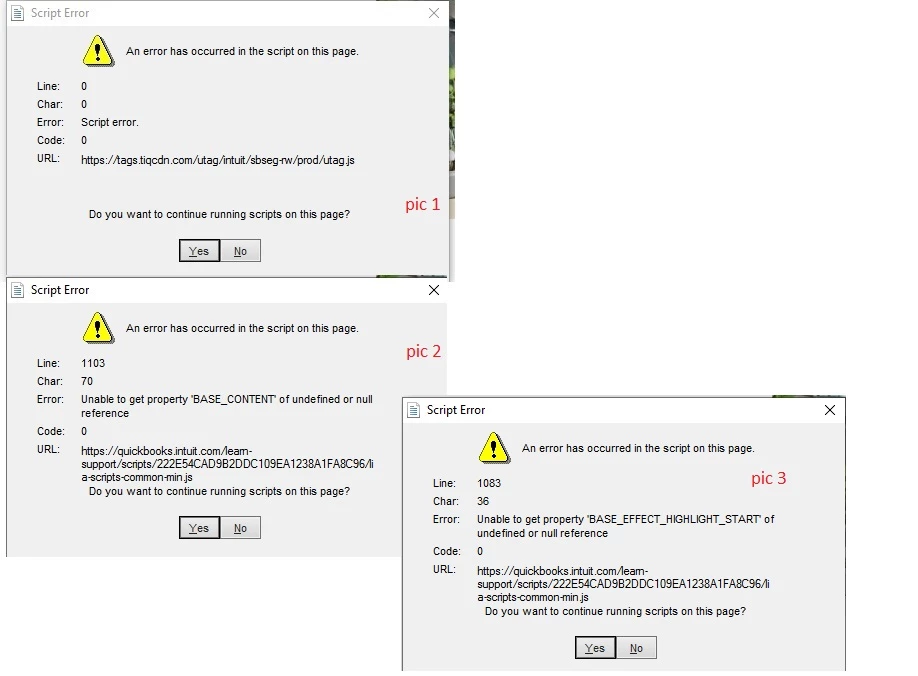
script error when QB app is launched, 3 errors appear when i clicked YES
  • April 18, 2022
  • 1 reply
  • 0 views

Best answer by ChristineJoieR

I hope you're doing well, @Iren7. I'll make sure you'll be able to launch QuickBooks Online successfully.


QuickBooks downloads updates via Internet Explorer. This also shows many of the program's windows. As a result, you'll need to use an upgraded version of Internet Explorer as your primary browser.


To get rid of the script problem, I propose following the methods provided by my colleague. Please make Internet Explorer your default browser before continuing.


Here's how to do it:


  1. Open the Internet Explorer browser.
  2. Go to the upper right corner and click the Gear icon.
  3. Select Internet Options from the dropdown menu.
  4. Select the Programs tab from the drop-down menu.
  5. Click the Make Default button under the default web browser.
  6. Select OK.


I also recommend that you check our QuickBooks Status page from time to time. This might help you figure out if there are any QuickBooks issues that need to be addressed.


If you have any further queries about QuickBooks Desktop, I'm happy to assist you. Let me know if you need help with any of your other duties, and I'll get back to you as soon as possible.

1 reply

Iren7Author
April 18, 2022

Hi , anyone can assist for these script errors ? Thank you

April 18, 2022

I hope you're doing well, @Iren7. I'll make sure you'll be able to launch QuickBooks Online successfully.


QuickBooks downloads updates via Internet Explorer. This also shows many of the program's windows. As a result, you'll need to use an upgraded version of Internet Explorer as your primary browser.


To get rid of the script problem, I propose following the methods provided by my colleague. Please make Internet Explorer your default browser before continuing.


Here's how to do it:


  1. Open the Internet Explorer browser.
  2. Go to the upper right corner and click the Gear icon.
  3. Select Internet Options from the dropdown menu.
  4. Select the Programs tab from the drop-down menu.
  5. Click the Make Default button under the default web browser.
  6. Select OK.


I also recommend that you check our QuickBooks Status page from time to time. This might help you figure out if there are any QuickBooks issues that need to be addressed.


If you have any further queries about QuickBooks Desktop, I'm happy to assist you. Let me know if you need help with any of your other duties, and I'll get back to you as soon as possible.

