July 1, 2022
Solved

Adjust Foreign Currency Vendor Balances

  • July 1, 2022
  • 2 replies
  • 0 views

I have several foreign currency vendors. I paid them up in full, but on reports I still have with them a Home Currency balance. What can I do to adjust this?


Best answer by SarahannC

Quote: Balances that show up on the Vendor Balance Summary report are unpaid amounts. Changes in exchange rates won't result to a home currency balance on the report as they're reported as Exchange Gain or Loss.

I don't see that happening.


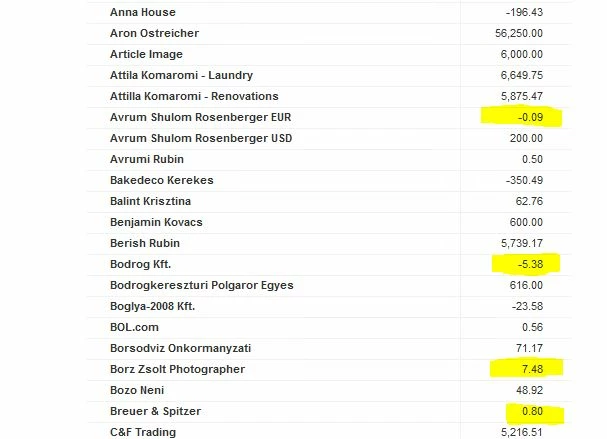
Please see snapshots below & see my issue:

Capture 1 -  This is from my Vendor Balance Summary Report
 

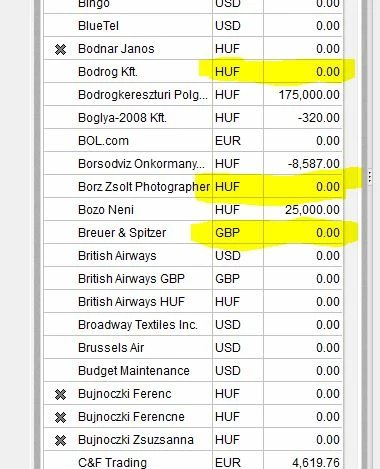
These are from my Vendor Center
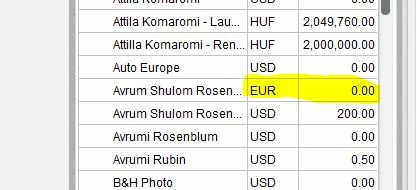
See that the vendors' balance in the vendor center are zero, that is they are paid in full, yet on the Vendor Balance Summary they show up with a balance. I only have this with foreign currency vendors, and the reason this happens is presumably, because QB calculates the Balance on the Report separately and not from the vendor center. 


Hello there, KM402.


Thanks for keeping us informed on how everything goes on your end. Also, I appreciate the screenshots you've added to this thread.


The Home Home Currency Adjustment looks for non-zero foreign balances to revalue. In QBDT, any foreign balances that are zero are ignored when home currency adjustment transaction is about to be created.


For now, you can create a journal entry to fix the balances on the report. The General Journal Entry technique comes in handy whenever you close a foreign bank account or zero out the balance from your reports. However, I highly recommend consulting your accountant to keep everything accurate and properly tracked. Here's how:


  1. Go to the Company menu and select Make General Journal Entries.
  2. Fill out the fields to create your journal entry. 
  3. Select Save or Save & Close.


For additional information, you can check this article: Create a journal entry in QuickBooks Desktop for Windows.


Still, you can read through the articles shared by my colleagues above for more tips and information about handling reports and currencies:


If you have other concerns with adjusting foreign currencies and QuickBooks reports, don't forget to stay in touch with this thread. We're all right here for you, KM402.

2 replies

July 1, 2022

Hi there, @ KM402. 


Allow me to share some information about in changing your home currency for your foreign vendors. 


Once you select the home currency during the initial setup of your QBDT software, the option to change it is currently unavailable. As a workaround, you can consider utilizing the Multicurrency feature to set US dollars (USD) as your home currency. 


Before we start, please know that you can no longer deactivate the feature once it's turned on. In this case, I'd suggest creating a backup copy of your company file before activating Multicurrency.


I'm adding this article to learn how to use the multicurrency feature in QuickBooks Desktop: Set up and use Multicurrency.


Feel free to add a comment below if you have other concerns or questions. I’ll get back to make sure you’re taken care of. Wishing your business continued success.

KM402Author
July 4, 2022

I'm sorry for not being clear enough. I have multi-currency set up in QuickBooks, and I have multiple foreign currency vendors & customers. 
My issue occurs when a foreign-currency vendor is paid in full, but because of exchange rates, it'll show up on 'Vendor Balance Summary Reports', with a home-currency balance. 

I am aware there is a way to adjust home-currency balances for foreign-currency bank accounts - is there a way to adjust home-currency balances for foreign-currency vendors?

July 4, 2022

Thanks for getting back to us, KM402. 


Allow me to chime in and share information on how multi-currency works in QuickBooks Desktop.


Reports in QuickBooks Desktop will always reflect the home currency regardless of the currency used in the transactions. The Home currency will be calculated by default.


To enter a home currency adjustment, here's how:


1. Go to the Company menu.

2. Click Manage Currency, and then click Home Currency Adjustment.

3. Select the currency you'd like to enter the adjustment for. You can make adjustments for only one currency at a time.

4. If necessary, update the currency's exchange rate. QuickBooks uses this rate to recalculate your home currency balances. By default, QuickBooks uses the latest exchange rate listed in the currency list.

5. Click the Calculate Adjustment button. QuickBooks displays the balances you have for accounts in the selected currency.

6. Click the checkmark column to select the accounts to make adjustments for and then save the transaction.


Additionally, this guide provides an overview of how to handle different currencies in QuickBooks Desktop: Set up and use Multicurrency.


Let me know how this goes and leave a reply below if you need further assistance managing currency. I'm always here to help. Have a good one.

June 19, 2023

Hi KM402! Did you ever get a satisfactory solution to this issue? I am having the same problem.