December 4, 2021
Solved

Applying a customer deposit to an invoice or sales order

  • December 4, 2021
  • 1 reply
  • 0 views

First off, I've read this help item:

https://quickbooks.intuit.com/learn-support/en-us/help-article/invoicing/manage-upfront-deposits-retainers/L7dNnFGBi_US_en_US


I've also read as many community questions about this as I can. I'm not an accountant or experienced bookkeeper by any stretch, and unfortunately my bookkeeper is off for an extended period by, you guessed it, Covid 19.


1. In the intuit help item linked above, it doesn't explain where or how to show the deposit to match my bank's deposit on my bank's online register. The credit for the deposit is showing in my online bank account register. How does that amount get entered and show up in the QB register? 


2. Why can't I do this: when I get a customer deposit on a sales order or invoice simply go to "Receive Payments" window and receive the payment and apply to the invoice? Then I could make a deposit that matches the amount that shows up in my bank's online register.

Best answer by jamespaul

Hello, Maverick2.


Give my best regards and wishes to your bookkeeper as they recover from Covid. I'll clarify and elaborate the steps in handling a deposit or a retainer in QuickBooks. 


Just to elaborate on the matching part, you would want to match the downloaded transaction with the sales receipt (the deposit).


Make sure that the recorded amount is deposited to your bank account. This ensures you'll be able to match your records correctly. 


When recording the sales receipt, set the DEPOSIT TO drop-down menu to your bank account (where you connected the bank).
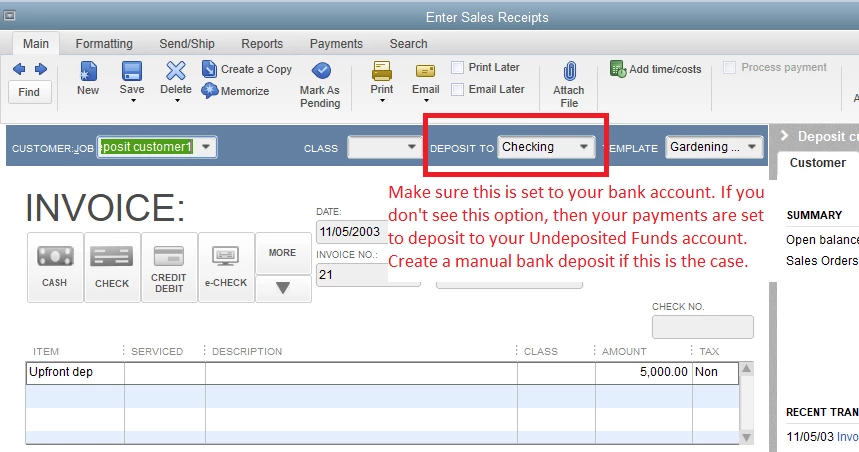


If you've already recorded the receipt, create a bank deposit:


  1. Click the Banking menu, then select Make Deposits
  2. Check the amount from the sales receipt.
  3. Set the Deposit To to your bank account. 
  4. Add any other information such as memo or transaction details. 
  5. Click Save & Close


Now, match the record with the downloaded transaction in your online bank register's list:


  1. Go to the Banking menu again, then hover on Bank Feeds.
  2. Select Bank Feeds Center.
  3. Select your bank account. 
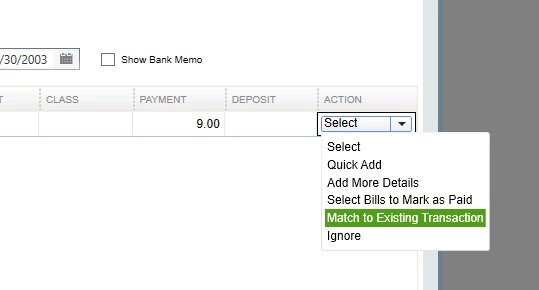
  4. Find the downloaded deposit, then open the ACTION drop-down menu and select Match to Existing Transaction
  5. Locate the downloaded deposit entry in QuickBooks, then click Confirm Match


Now for your second question, you don't actually record the deposit using a sales order or an invoice. This is done through a sales receipt, as highlighted in the help article. 


The invoice is where you would record your customer's rendered items or services. You won't have to use the Receive Payments function unless the deposit doesn't cover the full amount. 


If the deposit is just for a certain percentage of the invoice, use the Receive Payments function then record the payment from the customer normally.


You would want to match the final payment with the online bank transaction when it comes in. 


To apply the deposit (the sales receipt) to an invoice, you'll want to add it as a line item or create a credit memo for it.


Refer to Option A: Enter upfront deposits or retainers as line items or Option B: Apply upfront deposits or retainers as credits section for the steps in the help item. 


There's no matching process after applying the deposit since we've already done it through the sales receipt deposit transaction (unless the deposit amount doesn't cover the full invoice due). 


What will happen is that the Other Current Liabilities account (where you mapped the sales receipt for the deposit) will be zeroed out. 


Ready to reconcile your bank account after dealing with the deposit? Check this article out if you need a guide: Reconcile an account in QuickBooks Desktop.


Do you have any other help items you'd like me to clarify or do you have any other questions managing your customer transactions? Please let me know and I'd be more than happy to lend a hand again. 

1 reply

jamespaulAnswer
December 4, 2021

Hello, Maverick2.


Give my best regards and wishes to your bookkeeper as they recover from Covid. I'll clarify and elaborate the steps in handling a deposit or a retainer in QuickBooks. 


Just to elaborate on the matching part, you would want to match the downloaded transaction with the sales receipt (the deposit).


Make sure that the recorded amount is deposited to your bank account. This ensures you'll be able to match your records correctly. 


When recording the sales receipt, set the DEPOSIT TO drop-down menu to your bank account (where you connected the bank).


If you've already recorded the receipt, create a bank deposit:


  1. Click the Banking menu, then select Make Deposits
  2. Check the amount from the sales receipt.
  3. Set the Deposit To to your bank account. 
  4. Add any other information such as memo or transaction details. 
  5. Click Save & Close


Now, match the record with the downloaded transaction in your online bank register's list:


  1. Go to the Banking menu again, then hover on Bank Feeds.
  2. Select Bank Feeds Center.
  3. Select your bank account. 
  4. Find the downloaded deposit, then open the ACTION drop-down menu and select Match to Existing Transaction
  5. Locate the downloaded deposit entry in QuickBooks, then click Confirm Match


Now for your second question, you don't actually record the deposit using a sales order or an invoice. This is done through a sales receipt, as highlighted in the help article. 


The invoice is where you would record your customer's rendered items or services. You won't have to use the Receive Payments function unless the deposit doesn't cover the full amount. 


If the deposit is just for a certain percentage of the invoice, use the Receive Payments function then record the payment from the customer normally.


You would want to match the final payment with the online bank transaction when it comes in. 


To apply the deposit (the sales receipt) to an invoice, you'll want to add it as a line item or create a credit memo for it.


Refer to Option A: Enter upfront deposits or retainers as line items or Option B: Apply upfront deposits or retainers as credits section for the steps in the help item. 


There's no matching process after applying the deposit since we've already done it through the sales receipt deposit transaction (unless the deposit amount doesn't cover the full invoice due). 


What will happen is that the Other Current Liabilities account (where you mapped the sales receipt for the deposit) will be zeroed out. 


Ready to reconcile your bank account after dealing with the deposit? Check this article out if you need a guide: Reconcile an account in QuickBooks Desktop.


Do you have any other help items you'd like me to clarify or do you have any other questions managing your customer transactions? Please let me know and I'd be more than happy to lend a hand again. 

Maverick2Author
December 5, 2021

Ok, I'm getting there. Also, I was not clear in my original post. I do not have bank feeds set up.


So far I understand I need to:

1. Have an Other Currently Liability Account

2. Have a Customer Deposit item

3. Create a Sales Receipt for the deposit which is $250 (it goes to Undeposited Funds) 

****Question: Let's say the customer paid the deposit by ACH. Those funds are already in my actual bank account and shows up as a $250 line item. To match the $250 deposit in my QB register to my bank register, can I at this point do a Make Deposit so the $250 shows up as a credit in my QB register? Now I would have a $250 line item credit showing in my real bank register (the one on my bank's online website), and I would also have a matching $250 line item credit in my QB register. Is this correct?

4. When I create the invoice for $1000, I add the Customer Deposit Item on the invoice as a negative number, reducing the balance owed by $250.

5. When the balance of the invoice is paid off ($750), I can then Receive Payment on the invoice and Make Deposit. The balance on the invoice is now $0.00 and again, the $750 line item in the QB register matches the $750 line item in my real bank account's register. 

6. When I get my bank statement at the end of the month, it will show 2 credits because I got 2 payments, and my QB register will also show the same 2 credits, making reconciliation easer.


Do I have this all figured out yet? Thank you for your excellent help!