Hi,
I have done everything requested and received email reading;
| Congratulations! | | Get ready to save time and get paid faster. Now customers can pay your invoices online by credit card or bank transfer. You can also process payments yourself in QuickBooks Desktop or on your mobile device. |
|
|
| Activate your account in a few simple steps | - First, create or confirm your
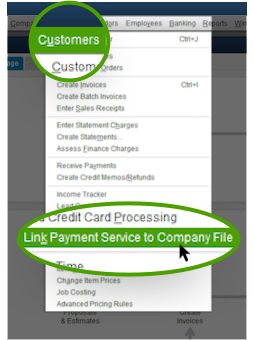
- In QuickBooks, select Customers > Link Payment Service to Company File
- Enter your sign in details
- Restart QuickBooks
| | That's it. Now you are ready to get paid faster. | | In QuickBooks Desktop, create an invoice, enable Online Payment, and click Save. Email the invoice to your customer. Your customer will receive the invoice and can pay you immediately with the click of a link. | | To get a preview of what your customers will see, send a test invoice to your email address, open it, and click Pay Now to take a look. | | You'll also want to know | | • | Your Account ID is: xxxxx . Please keep this for your reference. | | • | Credit card payments usually reach your bank account in 2-3 days. | | • | The check processing capability will be activated within 48 hours. | | • | To see payment status and history, log in with your QuickBooks Desktop User ID and password. | | • | To take payments on your mobile device, download our GoPayment app. | | • | Questions? Get answers or contact us from the |
| | Welcome aboard! |
|
Please advise..