January 31, 2025
Solved

Cannot connect to Quickbooks Payments in Desktop

  • January 31, 2025
  • 1 reply
  • 0 views

I cannot get my Desktop connected to QB Payments.  I followed the directions to link payment service to company file.  It tells me I need admin approval.  I AM the admin. 

I also cannot log in to my merchant account.  It says there is not one associated with my account.  

Best answer by ShangY

I appreciate the efforts you've put in to link your QuickBooks Desktop to QuickBooks Payments. Rest assured, I'll help you verify your credentials by logging into the Merchant Service Center using the web. I will also provide troubleshooting steps and recommendations to ensure a successful connection.


Let's start by making sure you’re signed in as an admin in your company file. Alternatively, you can access the Merchant Service Center on the website. Ensure to enter the correct Intuit ID and password.


Once you have successfully logged in, follow the steps below to troubleshoot the connection issues in QuickBooks Desktop.

First, let's clear the Authentication ID from your company file. Here's how to do that:

  1. With your company file open, press F2, then Ctrl + A.
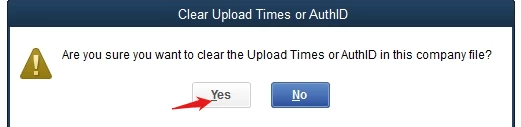
  2. When you see the prompt to clear your Authentication ID, click Yes.

Next, you'll need to reset your Intuit ID settings:

  1. Select Help from the menu.
  2. Navigate to Reset Intuit ID settings.
  3. When prompted, confirm by clicking Yes, and then hit OK.

Finally, close your QuickBooks account and reopen it. After doing that, try linking your payments again.

In addition to this, I’m sharing a resource that explains when your deposits will show up in QuickBooks Payments: Take and Process Payments in QuickBooks Desktop. This guide gives you tips on handling payments as you manage transactions in the future.


If you have questions or need further clarifications about linking your QuickBooks Payments to Desktop or accessing your Merchant account, feel free to drop a comment below. I’ll make sure to keep this thread open so my team and I can get back to you as soon as possible. Have a great day!


1 reply

February 2, 2025

Make sure you are signed in as admin in the company file. Also, try signing in on the web using your Intuit payment merchant id. If un-successful speak with the merchant service team they will help you.

ShangYAnswer
February 2, 2025

I appreciate the efforts you've put in to link your QuickBooks Desktop to QuickBooks Payments. Rest assured, I'll help you verify your credentials by logging into the Merchant Service Center using the web. I will also provide troubleshooting steps and recommendations to ensure a successful connection.


Let's start by making sure you’re signed in as an admin in your company file. Alternatively, you can access the Merchant Service Center on the website. Ensure to enter the correct Intuit ID and password.


Once you have successfully logged in, follow the steps below to troubleshoot the connection issues in QuickBooks Desktop.

First, let's clear the Authentication ID from your company file. Here's how to do that:

  1. With your company file open, press F2, then Ctrl + A.
  2. When you see the prompt to clear your Authentication ID, click Yes.


Next, you'll need to reset your Intuit ID settings:

  1. Select Help from the menu.
  2. Navigate to Reset Intuit ID settings.
  3. When prompted, confirm by clicking Yes, and then hit OK.

Finally, close your QuickBooks account and reopen it. After doing that, try linking your payments again.

In addition to this, I’m sharing a resource that explains when your deposits will show up in QuickBooks Payments: Take and Process Payments in QuickBooks Desktop. This guide gives you tips on handling payments as you manage transactions in the future.


If you have questions or need further clarifications about linking your QuickBooks Payments to Desktop or accessing your Merchant account, feel free to drop a comment below. I’ll make sure to keep this thread open so my team and I can get back to you as soon as possible. Have a great day!

savAMAuthor
February 3, 2025

Thanks for the reply.  When I go to reset my ID, it tells me by resetting I am going to lose access to my intuit users & their associated roles.  What does this mean?  As admin, I can't lose anything!


Also, I cannot log in to the merchant account website because it keeps telling me I dont have an account.