December 19, 2022
Solved

Change downloaded transaction from debit to deposit

  • December 19, 2022
  • 1 reply
  • 0 views

I requested a stop payment from my bank on a lost paycheck. Bank charged a fee, but then waived it. The two transactions downloaded to QBO as debits, even though one of them says (waived) and is actually a deposit. How can I change this in QB from two debits to one debit and one deposit?


Many thanks,


Rip

Best answer by ReymondO

Good day, @Ripper T.


I'll help you correct your downloaded bank transactions in QuickBooks Online (QBO). 


The way transactions are being classified on the Banking page depends on your financial institution. Thus, changing the way they are downloaded is unavailable in the program. 


As a workaround, we can exclude them and manually import the correct ones using CVS file to QuickBooks. 


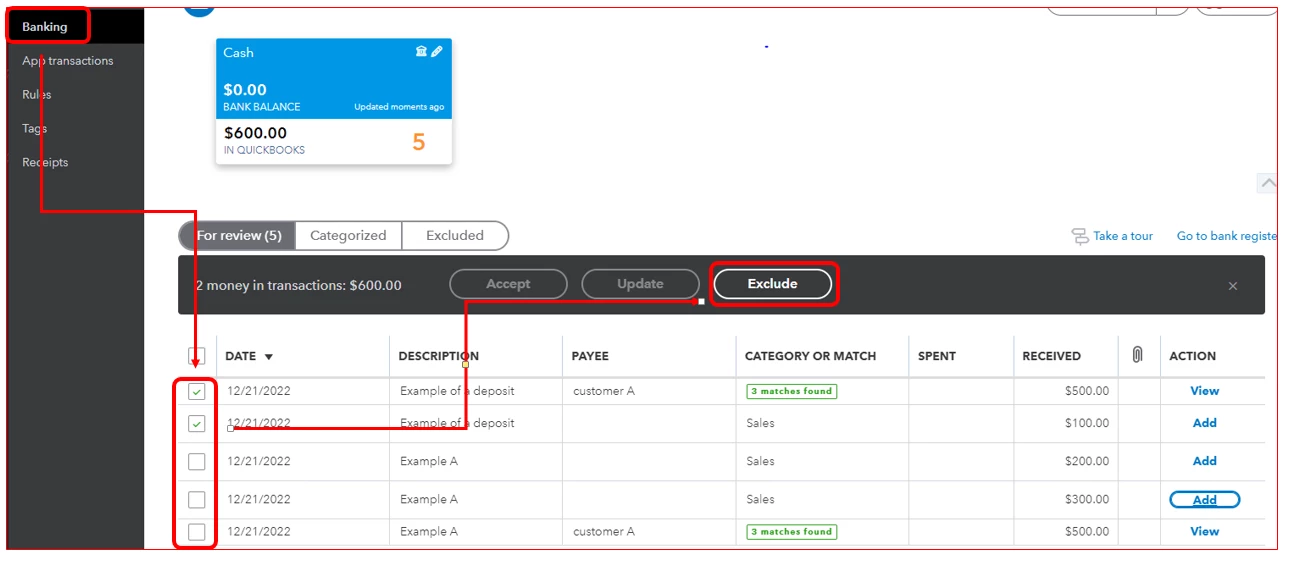
Here's how to exclude bank transactions:


  1. Go to Bookkeeping and select Transactions.
  2. Click Bank transactions 
  3. Select the For Review tab and check the box of the transactions to exclude.
  4. Click Exclude.

Once done, you can now manually import bank transactions into QBO. Let's also make sure it's in the correct format before you upload them.


Now that your transactions are in QuickBooks, it's time to match and categorize them. They will go into your accounts after you review them.


Please let me know if you need further assistance in handling your bank accounts in QuickBooks. Just add them to this thread and I'll be happy to help you out. 

1 reply

ReymondOAnswer
December 19, 2022

Good day, @Ripper T.


I'll help you correct your downloaded bank transactions in QuickBooks Online (QBO). 


The way transactions are being classified on the Banking page depends on your financial institution. Thus, changing the way they are downloaded is unavailable in the program. 


As a workaround, we can exclude them and manually import the correct ones using CVS file to QuickBooks. 


Here's how to exclude bank transactions:


  1. Go to Bookkeeping and select Transactions.
  2. Click Bank transactions 
  3. Select the For Review tab and check the box of the transactions to exclude.
  4. Click Exclude.

Once done, you can now manually import bank transactions into QBO. Let's also make sure it's in the correct format before you upload them.


Now that your transactions are in QuickBooks, it's time to match and categorize them. They will go into your accounts after you review them.


Please let me know if you need further assistance in handling your bank accounts in QuickBooks. Just add them to this thread and I'll be happy to help you out.