

July 19, 2022
Question

Duplicated Credit memo

  • July 19, 2022
  • 1 reply
  • 0 views

Hello !


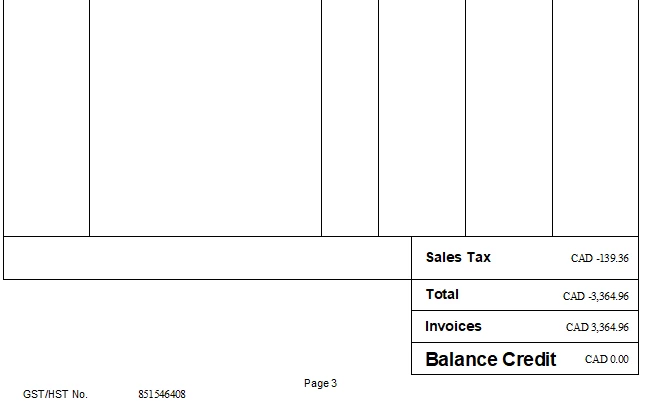
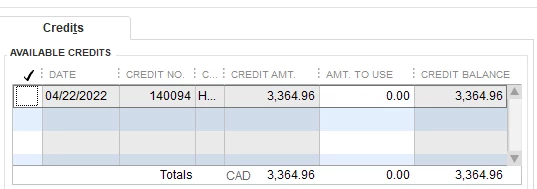
I am having an issue with a credit memo on a customer's account.  The credit memo was for $3364.96, and has been used up on a number of invoices, so there is no remaining balance.  The problem I have, is that when we go to invoice that customer, and we hit " Apply Credits" the Full credit amount is available.


Does anyone know how to fix this issue, or could provide insight into how this happened?


Thank you !!


Lindsay
 

1 reply

Rubielyn_J
July 19, 2022

I'm here to help fix a duplicated credit memo in QuickBooks, @LindsayB1.


To start, run the Audit Trail report to check if another user created the credit memo with the same amount. To proceed, here's how:


  1. Click Reports at the top menu bar and choose Account & Taxes.
  2. Select Audit Trail.
  3. On the report screen, click Customize Report.
  4. Go to the Filter tab and search for Transaction type.
  5. Choose Invoice, Credit memo and hit OK.
  6. Filter the dates.


Once verified, we can simply remove a credit memo from an invoice if it is wrongly applied.


  1. To display the transaction history, click Ctrl + H.
  2. Double-click the invoice and choose Apply Credits.
  3. On the Previously Applied Credits window, clear the selection for credit.
  4. On the Apply Credits window, select Done.
  5. On the invoice, click Save and Close.


Otherwise, check the credit memo if this is for another user that was applied mistakenly to the invoice that cause the full credits available. Then, you can make the necessary changes if necessary. 


I'm also adding these links to help manage your invoices and sales transactions in QuickBooks:


Should you have other questions or concerns with duplicate credit memo, you can always get back to us anytime. I'd be glad to help you and resolve it right away. Have a great day, and take care!