

October 18, 2020
Solved

Email Payment Notifications

  • October 18, 2020
  • 2 replies
  • 0 views

Using Quickbooks Merchant Center, we were receiving emails about payments being received when a customer payed an invoice. For about 1 week we have not received those notifications at all either our clients after the pay the invoice online. I've searched the community database and I can't find a valid answer on how to fix this issue.

It states that you need to:

  1. Choose Account from the Online Service Center page.
  2. Select Settings & Alerts.
  3. In the Email Alerts section, choose Yes for each notification you've like to receive.
  4. Enter the email address where you'd like to receive this notifications. 
  5. Click on Save Changes"

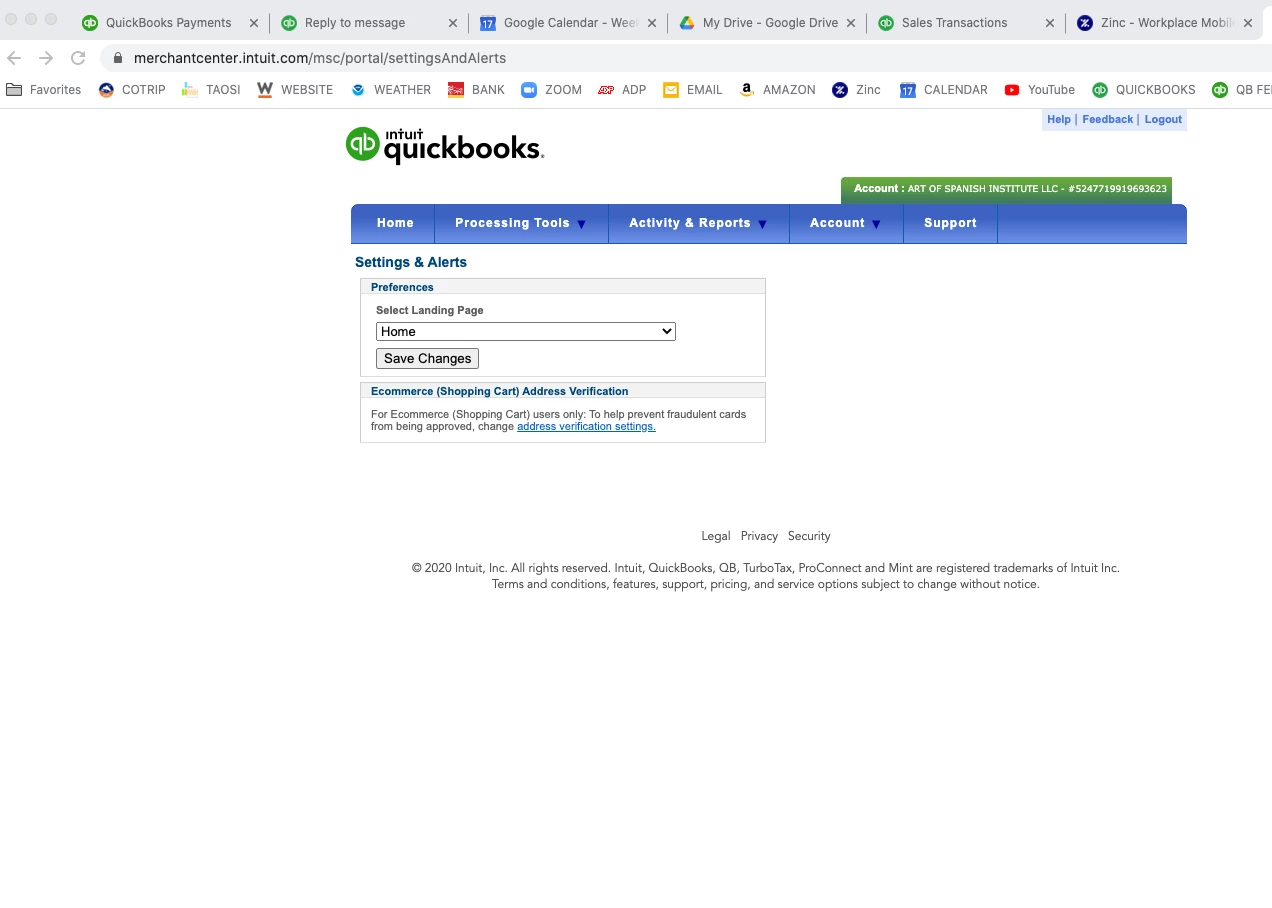
Except that those options have been removed and the information isn't able to be used, you can only choose a landing page and that is it.. Can someone please help me figure out how to get emails for payments to invoices (Note. They are NOT recurring payments, just normal payments from invoices.


Here is a screen picture. There should be the option "Email Alerts", but there isn't. 
Best answer by IamjuViel

I appreciate the complete details you've shared, @Javy.


You'd want to make sure that your payment notification email delivery is set in the Account and Settings page within QuickBooks. Let me guide you on how it works.

  1. Login to your QuickBooks Online account.
  2. Go to the Gear icon.
  3. Choose Account and Settings.
  4. Select the Company menu.
  5. Scroll down to the Contact info section.
  6. Click the Pencil icon to edit your email address. 
  7. Pick the Save button.
  8. Hit Done.

If your email address is entered correctly, you'd want to make sure that your email is configured properly. Let's access your email and review your Spam and Junk folders to see if these notification are being routed to the wrong folder when they reach you. You can read through this article for more detailed steps: Unable to receive Intuit email.


Always feel free to leave your comments below if you have other questions about receiving email notifications from Intuit. I'm always here to help.

2 replies

IamjuViel
IamjuVielAnswer
October 18, 2020

I appreciate the complete details you've shared, @Javy.


You'd want to make sure that your payment notification email delivery is set in the Account and Settings page within QuickBooks. Let me guide you on how it works.

  1. Login to your QuickBooks Online account.
  2. Go to the Gear icon.
  3. Choose Account and Settings.
  4. Select the Company menu.
  5. Scroll down to the Contact info section.
  6. Click the Pencil icon to edit your email address. 
  7. Pick the Save button.
  8. Hit Done.

If your email address is entered correctly, you'd want to make sure that your email is configured properly. Let's access your email and review your Spam and Junk folders to see if these notification are being routed to the wrong folder when they reach you. You can read through this article for more detailed steps: Unable to receive Intuit email.


Always feel free to leave your comments below if you have other questions about receiving email notifications from Intuit. I'm always here to help.

IamjuViel
October 19, 2020

Greetings, @Javy.


I want to make sure you're able to receive emails every time your customers pay you. Were you able to set your payment notification email address using the steps I shared?


Know that the Community and I are always here to address your concerns. Wishing you continued success!

JavyAuthor
October 19, 2020

Yes, I'm receiving the payments notifications now.


Thanks a lot!!

September 20, 2023

Were having the same problem. Using QuickBooks Desktop, in setting and alerts, there is only select home landing page?   

There are two notifications, the fist when the customer makes a payment, and the second when the Monies are going to be deposited in our Bank.  The first notification is going to the wrong email address, the second is coming correctly to me.  

We did not make any changes?   How do I change the first notification address?

JenoP
September 20, 2023

Thank you for informing us in advance that you've already checked the Settings and alerts section, PoolDesign.


Just to clarify, do you mean that you can only see one option when you clicked on the drop-down list? All notifications are usually sent to the email address that is saved in your QuickBooks Payments account.


In this case, I would recommend reaching out to our support team for QuickBooks Payments. They can take a closer look at your account and help you further with this.


Please go to this article to get their contact details: Contact Payments or Point of Sale Support.


To provide further assistance in managing accounts and receiving notifications, allow me to share these articles with you: 


As usual, please don't hesitate to contact us if you require assistance while working with QuickBooks. Our forum is accessible and prepared to provide guidance and support whenever you need it.