BoatdockOCPP
August 30, 2017
Solved

Error when I try to attach a document to an bill or invoice.

  • August 30, 2017
  • 4 replies
  • 0 views

I am using QB 2015 Pro and last week I started getting an error message when I try to attach a document to a bill or invoice.

I have not had any problems until last week, I am up to date on all updates and patches.


Has anyone else ran into this problem or does anyone have a solution?

    Best answer by lynda11_2

    When I try to attach the file I get a box in the middle of the screen. 

    The only thing that has changed is that I upgraded to Office 2016 from Office 2010.
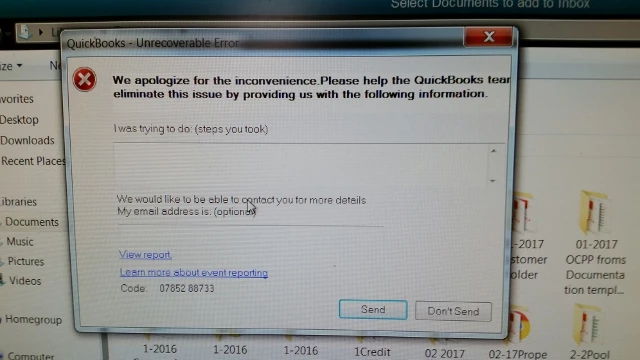


    I just found this article on Accountex, a very good source of qb info.  At the bottom, it says office 2016 is not compatible with qb.  The article is older, so I am not sure if that is the issue.  Basically, this is what it says:


    Intuit’s system requirements websites don’t list any version of QuickBooks as being compatible with Microsoft Office 2016 at this time, even the recently released QuickBooks 2016 product. That isn’t surprising, as Intuit usually starts final testing with any new Microsoft product after the public release (since Microsoft tends to make changes right up to the last moment). It can take time for them to make adjustments. 


    My recommendation is that unless there is a strong reason for you to move up to Office 2016, don’t rush into it now if you are using QuickBooks. If you need to, though, everything should work fine other than Microsoft Outlook, in general as long as you have up-to-date software (including QuickBooks 2016). If you have older software, you may have problems. Looking at specific versions of QuickBooks:


    QuickBooks 2016: Everything should work other than although you might have problems with Microsoft Outlook.
    QuickBooks 2015: Everything should work (other than although you may have trouble with Microsoft Outlook), but you will need to patch your system if you want to use QuickBooks Statement Writer.


    So perhaps it is fixed by now.  Every article on the help/support area I could find had dead links.  I would try going to help>update qb and do a full update and see if that helps.

    4 replies

    lynda11_2
    August 31, 2017

    What kind of document are you trying to attach?  If it is an excel spreadsheet, it won't attach (security issue).  Here is a link to FAQ's on attaching doc in QB.  If it doesn't help, provide us with more info and perhaps an error message.

    BoatdockOCPP
    August 31, 2017

    The documents are PDF files. They are either downloaded from my email from the vendor or I scan them to my system as a PDF. I have been doing this for over a year and just started to experience the problem. It really makes no sense at all.


    lynda11_2
    August 31, 2017

    what error code message are you receiving?

    April 17, 2018

    Were you ever able to resolve this problem, because I am currently experiencing this same issue, we aren ot using Word 2016. Please advise. I cannot attach pdf's to invoices i have to drag the item twice the first time it will not attach. 

    April 18, 2018

    Hey @SDV207,


    Happy to help! Are you unable to attach .doc files as well as .pdf files? Have you checked your Document Center in QuickBooks Desktop to see if documents are being saved to the program?

    April 18, 2018

    Documents are being saved. But when I am processing billing scanning invoices to be attached, when I try to drag the invoice or attach it. It will not allow me to do so unless it is done twice. 


    it has to be dragged twice. 

    September 14, 2018

    I am having a problem attaching a PDF to an invoice. It will shut down Quickbooks. It was fine yesterday. I used it and didn't have a problem, but today I have tried everything but it just shuts Quickbooks down.

    September 14, 2018

    Hey @greenwellmfg,


    Are you having the same problem with QuickBooks Desktop, or QuickBooks Online.


    If it's the prior, I would do the following:

    1. Make sure your software is up to date.

    2. Try adding an attachment again.

    3.  If that still doesn't work,  Backup your system file so you always have a save point. Then,  download File Doctor and let it do a diagnostic of your software. This should automatically correct most problems.


    Let us know if that does the trick. 

    November 5, 2018

    I am currently experiencing this same issue and have done for a few months now. It did work fine and now i get the security messages whenever I try and attach any type of file! Its getting frustrating!


    I cannot bring in .xls .csv .xlsm .pdf . doc you name it I have tried. I keep getting the same message:


    For security reasons, we do not allow you to upload this type of file
    Oct Exps.docx (17.3 kb)
     
    For security reasons, we do not allow you to upload this type of file
    Oct Exps.xls (30.5 kb)


    And so on, I have reported this as an issue, the other person at Quickbooks tried the files with no problem whatsoever, re-sent it back to me and hey presto it attached with no issue. Am puzzled as to what is the issue with my pc as everything is up to date?

    May 28, 2020

    Same thing happened to me.  I went through  all the reinstall too.  It was a simple fix, rename the folder you are attaching your .pdfs from.  I had a folder I used on my desktop named Temp.  I changed it to Stuff and it is working fine now.