

November 20, 2019
Solved

How do I change the default shipping address on purchase orders? - Desktop

  • November 20, 2019
  • 2 replies
  • 0 views

2019 Quickbook Premier Retail


We have checked Company > My Company > Company information.  That is correct address in Contact name & Address.


We have checked by creating a new Purchase Order > Formatting > Custom Data Layout > Basic Customization > Update Information TAB > The contact information is correct.


However in the Purchase Order Ship To Address, it auto populate address is a different address.  This address auto populates in different vendors.  All the same.  Please help, and advice on how we can change this.  Thank you!
Best answer by RaymondJayO

Let's perform additional steps so you can change the default shipping address on purchase orders, @Erss


Based on your details provided above, it seems the Ship To Address isn't matched with your Company Information window. That's why your purchase orders automatically populate a different address.


To help fix this, let's go to your purchase order template and change its Ship To Address information. This lets you save a default shipping address. Let me guide you how. 

  1. Go to Lists from the top menu. 
  2. Select Templates
  3. Find your purchase order template and double click it. 
  4. Under the Company & Transaction Information section, click Update Information
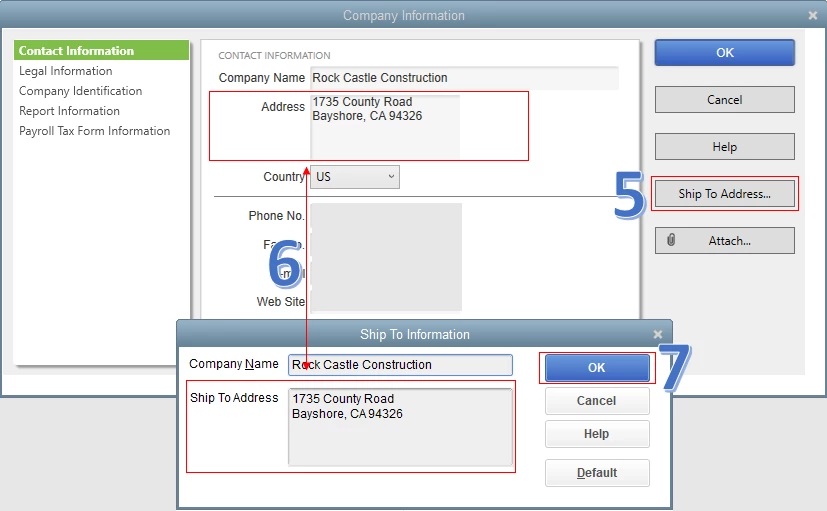
  5. Choose Ship To Address
  6. Make sure the Ship To Address information matches your Company Information window. If necessary, update it. 
  7. Click OK


The screenshot below shows you the last three steps. 


After creating your purchase orders, you can receive inventory either with or without recording bills. To learn more about this process, check out this article: Receive Inventory


Please let me know if there's anything else you need. I'll gladly help, @Erss

2 replies

November 20, 2019

Let's perform additional steps so you can change the default shipping address on purchase orders, @Erss


Based on your details provided above, it seems the Ship To Address isn't matched with your Company Information window. That's why your purchase orders automatically populate a different address.


To help fix this, let's go to your purchase order template and change its Ship To Address information. This lets you save a default shipping address. Let me guide you how. 

  1. Go to Lists from the top menu. 
  2. Select Templates
  3. Find your purchase order template and double click it. 
  4. Under the Company & Transaction Information section, click Update Information
  5. Choose Ship To Address
  6. Make sure the Ship To Address information matches your Company Information window. If necessary, update it. 
  7. Click OK


The screenshot below shows you the last three steps. 


After creating your purchase orders, you can receive inventory either with or without recording bills. To learn more about this process, check out this article: Receive Inventory


Please let me know if there's anything else you need. I'll gladly help, @Erss

ErssAuthor
November 21, 2019

Thank you!


For others that if by doing this it does not solve the issue.  This QB post have more steps that you may take to check on your file, and other options.


https://quickbooks.intuit.com/learn-support/en-us/reports-and-accounting/re-how-do-i-change-the-default-shipping-address-on-my-purchase/01/415803#M44313

November 21, 2019

Thanks for providing me a link on checking your file and other options to help resolve your issue, @Erss


I'm glad that you're able to change the default shipping address on your purchase orders by performing the steps I provided above. 


I'd suggest visiting this website: Expenses and VendorsThis link provides you numerous articles on how you can effectively manage your vendor transactions, such as your purchase orders. 


Please know that the Community is always available for you if you need further assistance. Take care always, @Erss

August 13, 2022

how do I change the purchase order ship to address on quickbooks online? I cant find it anywhere. Every time I search for it, I end up back to this desktop answer. can anyone help me out find the quickbooks online answer? thank you

Rubielyn_J
August 13, 2022

Thanks for joining this thread, @Sam12324.


I can see that it's a duplicate post. My colleague Charies_M already shared his answer to your concern about changing the shipping address in QuickBooks Online. You can check out his response through this link: https://quickbooks.intuit.com/learn-support/en-us/reports-and-accounting/re-how-do-i-change-my-ship-to-address-on-my-po-s/01/1127636#M164383


The QuickBooks Community team is always here to help if you have any other concerns or follow-up questions. Have a good day!