Hello there, @MEARESPLUMBING.
You'll have to make sure that the Print Later option is checked when memorizing check transactions. This way, QuickBooks will stop entering check numbers automatically.
To get started, let's first delete the memorized check, then recreate it to turn on the Print Later option.
Here's how to delete the memorized check:
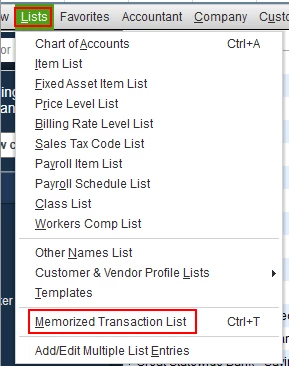
- Go to the Lists menu, then select Memorized Transaction List.
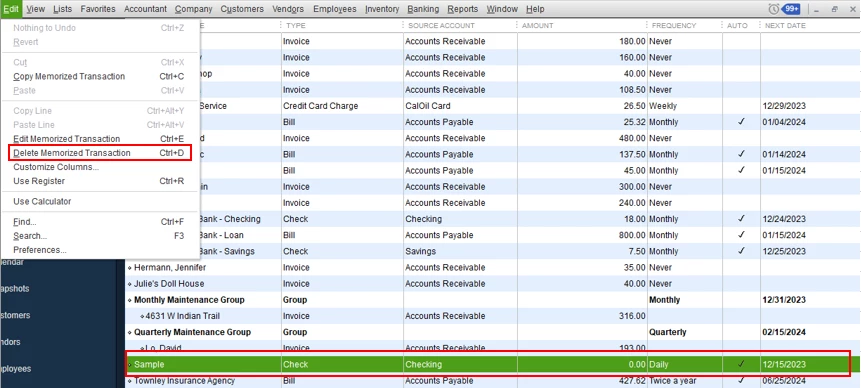
- Choose the memorized check from the list.
- Click the Edit menu, then choose Delete Memorized Transaction.
- Hit OK to confirm.
Once deleted, you can now recreate and memorize a check transaction. Let me show you how.
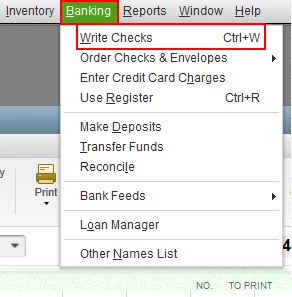
- Go to the Banking menu, then select Write Checks.
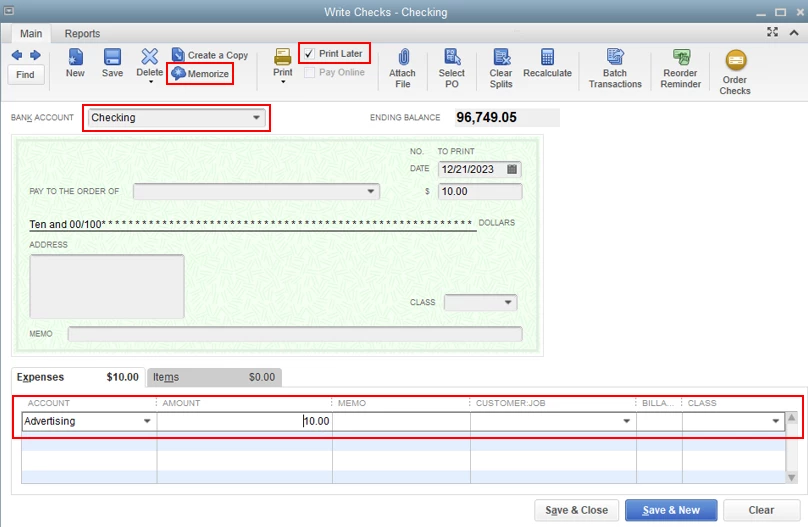
- Enter the necessary information on the check.
- Make sure to put a check-mark in the Print Later option.
- Then, click the Memorize button.
- In the Memorize Transaction window, fill out the required details, then click OK once done.
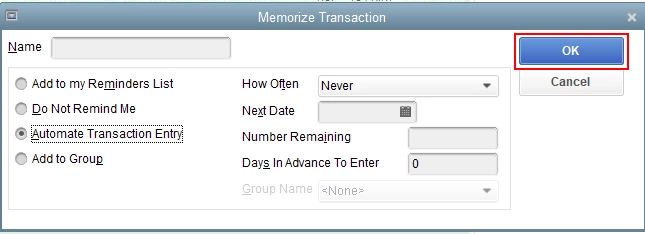
- Click Save & Close to save your memorize check transaction.
Here's an article you can read for more details: Memorize the check.
As always, you can visit our QuickBooks Community help website if you need tips and related articles in the future.
Please touch base with me here for all of your QuickBooks needs, I'm always happy to help. Wishing you all the best.

