VNAFL
September 8, 2020
Solved

How do I undo an old bad debt write off and apply a new payment in current Year?

  • September 8, 2020
  • 1 reply
  • 0 views

After a few years of trying to collect on an invoice from 2015, I received permission from my boss to write off the bad debt in 2019. Today, out of the blue, the customer made a payment for the full amount of the original invoice. Our company accountant has closed our books through 2019. How do I undo the old write off and apply today's payment (2020) to the old invoice without altering the books from previous years?

TYIA for your help!

Best answer by ReymondO

Hi there, @VNAFL.


You can delete the bad debt that you've created. This way, you can apply your customer's new payment to the invoice. Since you've already reconciled this account, then you need to reopen your book and undo your reconciliation. 


Just perform a mini-reconciliation in QuickBooks Desktop to create this adjustment. Please take note that before you proceed, please ask your accountant for further guidance. This will make sure that your book is accurate before creating any changes.


After opening your books, you can proceed to these steps to delete the bad debt:


  1. Go to the Customers menu and select Customer Center.
  2. Select the customer and find the bad debt transaction (shown as a discount), then click it to open.
  3. In the upper section, click the Delete icon and select Save & Close.
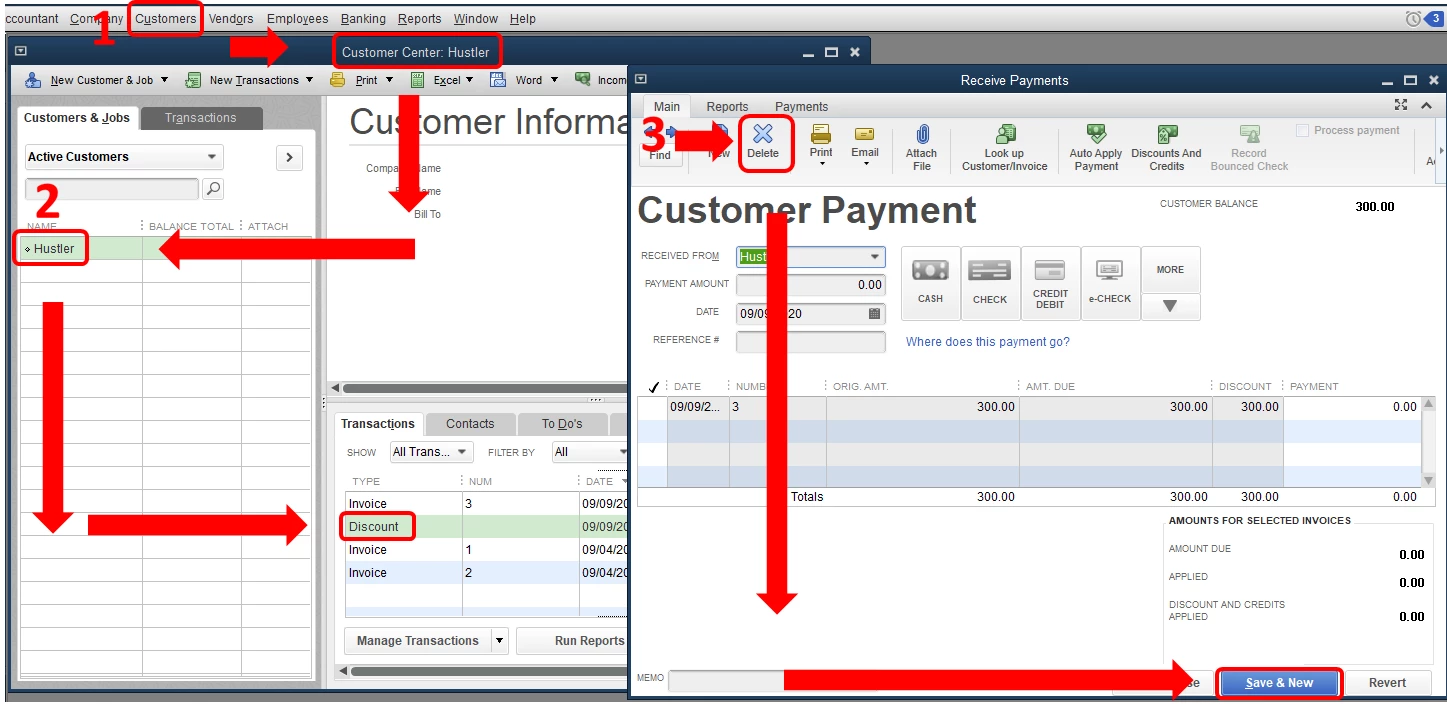
Once done, you can now apply your customer's payment to the invoice.


When everything is fixed, you can finish reconciling your account and close your books.


In case you need to review your reconciliation report, you can follow these steps:


  1. Go to the Reports menu and click Reports Center.
  2. Search for and open a Previous Reconciliation report.
  3. Select the account you reconciled, choose either DetailSummary, or Both.


Don't hesitate to tag my name in the comment section below if you have other concerns or questions. I'm always ready to help.

1 reply

ReymondOAnswer
September 8, 2020

Hi there, @VNAFL.


You can delete the bad debt that you've created. This way, you can apply your customer's new payment to the invoice. Since you've already reconciled this account, then you need to reopen your book and undo your reconciliation. 


Just perform a mini-reconciliation in QuickBooks Desktop to create this adjustment. Please take note that before you proceed, please ask your accountant for further guidance. This will make sure that your book is accurate before creating any changes.


After opening your books, you can proceed to these steps to delete the bad debt:


  1. Go to the Customers menu and select Customer Center.
  2. Select the customer and find the bad debt transaction (shown as a discount), then click it to open.
  3. In the upper section, click the Delete icon and select Save & Close.

Once done, you can now apply your customer's payment to the invoice.


When everything is fixed, you can finish reconciling your account and close your books.


In case you need to review your reconciliation report, you can follow these steps:


  1. Go to the Reports menu and click Reports Center.
  2. Search for and open a Previous Reconciliation report.
  3. Select the account you reconciled, choose either DetailSummary, or Both.


Don't hesitate to tag my name in the comment section below if you have other concerns or questions. I'm always ready to help.

VNAFL
VNAFLAuthor
September 9, 2020

Thank you!

MorganB
September 9, 2020

It's great to see you received the assistance you were looking for, VNAFL. You can always count on the Community to have your back if you ever need a hand again in the future!