


EPANCHAM
March 1, 2019
Question

How to add "Shipping" charge to the invoice template, in the summary, not as line-item?

  • March 1, 2019
  • 3 replies
  • 0 views

Hi, we need to charge customer the shipping cost. I'd like to customize the invoice template to show shipping charges in the "summary" section, a layout like shown below:
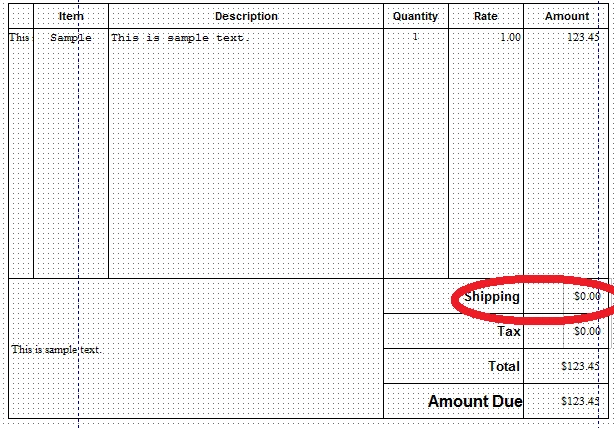
 

I googled around, seems that everybody is talking about creating an item, call it "Shipping", and add it to the item list section instead. 


Just wondering is there a way to add this NOT as a line item?


Any comments/suggestions are appreciated!


3 replies

March 1, 2019

I checked around and this doesn't appear to be an option.

EPANCHAM
EPANCHAMAuthor
March 1, 2019

Seems that this is do-able in QBO, but not in QB Desktop, sad... :smileysad:


Anyway, thanks for confirming this.

EPANCHAM
EPANCHAMAuthor
March 8, 2019

Just chat with QB Tech Support, and got confirmed that this is a "NO WAY".


Can't believe this is something implemented in QBO, but got disregarded in QB Desktop. Feels that INTUIT is trying to push everyone of us onto QBO?


March 8, 2019

RE: Just chat with QB Tech Support, and got confirmed that this is a "NO WAY".


Right.


RE: Can't believe this is something implemented in QBO, but got disregarded in QB Desktop. 


It didn't really happen that way.  QB Desktop was around for years before QB Online.  QB Online implemented invoices differently in many ways, and in most aspects with less functionality, not more.  You like this particular difference, but others either don't care or like the way desktop does it just fine.


RE: Feels that INTUIT is trying to push everyone of us onto QBO?


At one point they were, but I have heard that has changed as they've finally realized that a 1) matching the feature set for desktop in a browser based app is a herculean task that'll never happen, 2)  there is a huge percentage of the potential customer base that wants to keep their accounting in house, not online, and has very good reasons for that.


Given the relatively expensive QB Online pricing (easily 3 - 5x the cost of desktop, sometimes much more), it's hard to accuse them of really trying to move the existing desktop customers.  If they were that hell-bent, online would be better and cheaper in most ways.  It's neither.

March 3, 2021

This is 2021 and I hoped that there would be an update to this conversation. After setting up shipping charges as an "other charge" item, and making endless attempts with various templates to add it to the footer, it just won't happen. I spent time in a Quickbooks chat and he said this feature is simply not available in Quickbooks. 

My only alternative will be to design a decent invoice in Excel or Word, create a invoice in QB simple for accounting purposes that will keep the books straight. 

EPANCHAM
EPANCHAMAuthor
March 3, 2021

"My only alternative will be to design a decent invoice in Excel or Word, create a invoice in QB simple for accounting purposes that will keep the books straight." -- that's exactly what I've been doing in the past 2 years... :P