February 18, 2019
Solved

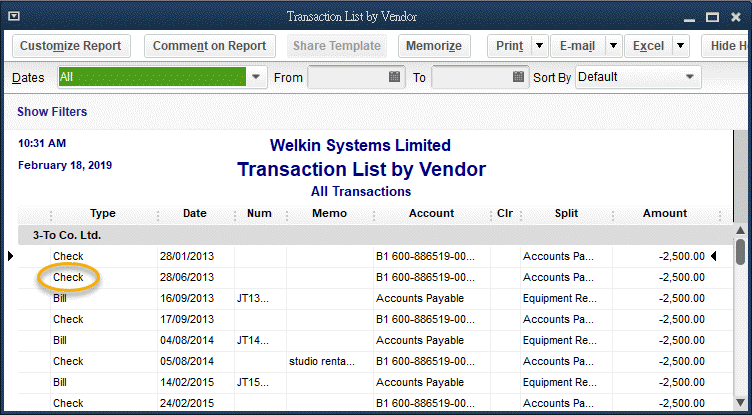
How to convert "check" to "payment"?

  • February 18, 2019
  • 2 replies
  • 0 views

Is there any way to convert "Check" to "Bill-Pmt" (bill payment)?

TIA
 

Best answer by ShiellaGraceA

You'll want to delete and re-create the check to show it as Bill-Pmt-Check, BenTam.


Just double-click the check to delete. Make sure the transaction has a bill. 


To pay the bill, click the Pay Bills icon on your Home Page. You can also go to Vendors, and then Pay Bills to do so.


Once done, you can check the Transaction List by Vendors report again.


You might also want to check out this article for your reference: Pay bills in QuickBooks Desktop.


I'm here if you have more questions. Please don't hesitate to reach out. Thanks.


2 replies

BenTamAuthor
February 18, 2019

I've found the way now: "right click on the page".

BenTamAuthor
February 26, 2019

I made a mistake that right-clicking on the check and select "pay bill" will create a new "Pmt-Check" entry.


Thus, I repeat my question 'does anyone know how to convert a "check" to a "payment"'.


TIA

February 26, 2019

You'll want to delete and re-create the check to show it as Bill-Pmt-Check, BenTam.


Just double-click the check to delete. Make sure the transaction has a bill. 


To pay the bill, click the Pay Bills icon on your Home Page. You can also go to Vendors, and then Pay Bills to do so.


Once done, you can check the Transaction List by Vendors report again.


You might also want to check out this article for your reference: Pay bills in QuickBooks Desktop.


I'm here if you have more questions. Please don't hesitate to reach out. Thanks.


February 5, 2021

Hi - were you able to resolve this issue - converting a check to a bill payment?  I've been struggling trying to find an answer.  I'd appreciate any assistance!  TIA

February 5, 2021

Thanks for checking in with us, Cindilou.


I've check here on our and there's no reported case where customers encounter a problem when converting a check to bill payment. We can try deleting and re-creating the check to show it as Bill-Pmt-Check. Just double-click the check to delete and make sure the transaction has a bill. Then, pay the bill in QucikBooks. If the transaction is already reconciled, you can still delete and recreate the check to show it as a Bill Payment Check. Just do a mini reconciliation or special reconciliation to re-reconcile the transaction. See the Reconcile previously deleted and re-entered checking or credit card transactions article for more details.


Just in case you don't want to delete the reconciled check, re-open it and add a description in the Memo field that it is a Bill Payment one. If you need further assistance in converting check to bill payments, feel free to reach out to our Technical Support Team. From there, they'll pull up your account in a secure environment and help you with this one. You may send a message via chat, call us at a time convenient to you, or we’ll get in touch with you instead. To ensure we address your concern, our representatives are available from 6:00 AM to 6:00 PM on weekdays and 6:00 AM - 3:00 PM on Saturdays, PST. See our support hours and types for more details about this one. Here's how to reach them: 

  1. Click the Help icon on the top menu. 
  2. Choose QuickBooks Desktop Help
  3. Tap Contact us.
  4. Select Search for something else and enter your concern in the Tell us more about your question: field. 
  5. Tap Search
  6. Choose Start a Message or Get Phone Number to connect with our support. 

Feel free to visit our Expenses and vendors page for more insights about managing your vendor transactions.


I'd like to know how things going after trying the steps, as I want to ensure this is resolved for you. Please reply to this post and I'll get back to you. You have a good one.

