January 18, 2025
Solved

in quickbooks pro 2008 when i recieve payments it goes to my bank account also into undeposited funds

  • January 18, 2025
  • 2 replies
  • 0 views
Original commenter did not share additional details

Best answer by BigRedConsulting

This is based on a preference.  Intuit changed the default some years ago in an apparent effort save you from yourself.


To make it so you can choose between Undeposited Funds and your bank accounts, start on the QuickBooks menu at Edit | Preferences | Payments | Company Preferences.


Then de-select the you'd-never-guess-what-this-does ineptly named option Use Undeposited as a default deposit to account. 


A better label would be Make all Payments use only the Undeposited Funds Account even if that's a counterproductive waste of time. 


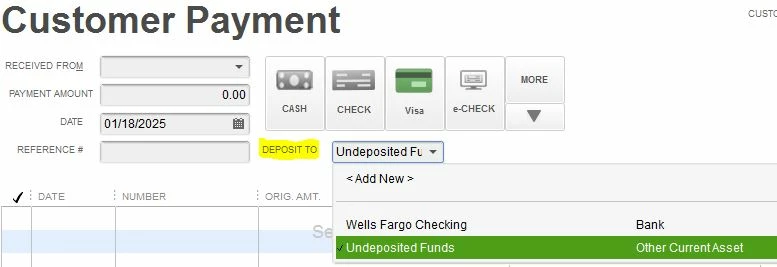
Once you make that change, when you receive an A/R customer Payment, you'll see an account drop down on the form:
 

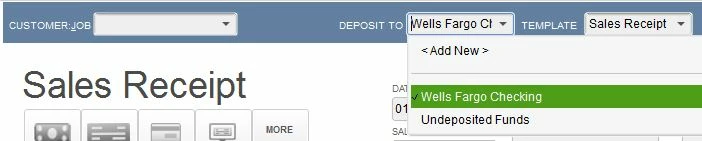
You'll also see it on the Sales Receipt form:
 

Also, your selected will 'stick' like a preference, and so once you pick the bank account you want to use it'll become the default.

2 replies

January 18, 2025

The setup of your payments affects how they're recorded, Al252. I'm here to provide you with more information.


Before anything else, know that the payment feature in your QuickBooks Desktop is no longer available due to product discontinuation. Furthermore, I'd like to ask for further clarification regarding your payment. Did it go directly to your bank account or the undeposited funds? Did you have the option to choose which account to record it? Providing more information will enable me to develop a solution tailored to your inquiry.


Moreover, if Undeposited Funds is your default deposit account, payments will be automatically directed to it. To prevent this and have the flexibility to choose an account in recording, you can navigate to your account's Payment Preferences and review the options.


Additionally, run QBDT reports to get a financial overview of the status of your business. To do so, refer to this article: How to run and customize reports in QuickBooks Desktop.


The comment section is always open for further questions about received payments in QBDT. I'm here to provide assistance whenever you need it.

al252Author
January 18, 2025

Hi

I am using Quick Books Pro 2008 Desktop , How can I just stop my payments going directly into Bank Account

January 18, 2025

Hello,al252.


In QuickBooks, you can utilize the Undeposited Funds account to temporarily hold customer payments. This prevents the payments from being directly deposited into your actual bank account.


To help you through this, I will provide some useful steps:


  1. Go to Edit
  2. Click Preferences.
  3.  On the left side of the screen, select Payments
  4. In the company preferences, make sure to select the Use Undeposited Funds as the Default Deposit Account.
  5. Then click OK.


I will include an article to assist you on how to properly allocate payments on the Undeposited Funds in your QuickBooks account: Deposit payments into the Undeposited Funds account in QuickBooks Desktop.


When you're prepared to deposit customer payments, navigate to the Record Deposits / Make Deposits page and log them there. Refer to this article for guidance: Record and make bank deposits in QuickBooks Desktop.


In Community, we aim to address all your concerns thoroughly. If you have any other concerns, simply click Reply, and we will assist you promptly.

BigRedConsulting
January 18, 2025

This is based on a preference.  Intuit changed the default some years ago in an apparent effort save you from yourself.


To make it so you can choose between Undeposited Funds and your bank accounts, start on the QuickBooks menu at Edit | Preferences | Payments | Company Preferences.


Then de-select the you'd-never-guess-what-this-does ineptly named option Use Undeposited as a default deposit to account. 


A better label would be Make all Payments use only the Undeposited Funds Account even if that's a counterproductive waste of time. 


Once you make that change, when you receive an A/R customer Payment, you'll see an account drop down on the form:


You'll also see it on the Sales Receipt form:


Also, your selected will 'stick' like a preference, and so once you pick the bank account you want to use it'll become the default.
