

November 2, 2022
Solved

Invoice payment made through a payment link created a sales receipt instead of crediting to outstanding invoice

  • November 2, 2022
  • 1 reply
  • 0 views

One of my customers had a credit memo and invoice due on their account.  I created a payment link for the amount of the invoice less the amount of the credit memo to send to my customer in order to avoid any confusion regarding the total amount due.  When the customer paid the amount through the payment link I provided, Quickbooks Online created a sales receipt.  I am unable to edit the sales receipt to credit the balance due.  The invoice still shows as open and past due despite having been paid.  Can you please tell me how to fix this so that my customer's account and statement reflect that they have a $0.00 balance?
Best answer by JenoP

Allow to share details and help with your question about receiving payments, Samanthajj82.


QBO will record the transaction from the payment link as a sales receipt. This feature is recommend to use if you don't need to invoice the customer or if the payment was immediately when the sale was made. At the moment, it can't be linked to a previously sent transaction or used as a payment to an open invoice.


You'll want to delete the invoice and keep the sales receipt as it is. This way, the balance will turn back to zero. At the same time, your income is already recorded since the system has recorded a sales receipt. Here's how to delete an invoice:


  1. Go to the Sales menu and proceed to the Invoices tab.
  2. Look for the invoice and click on it to open the transaction.
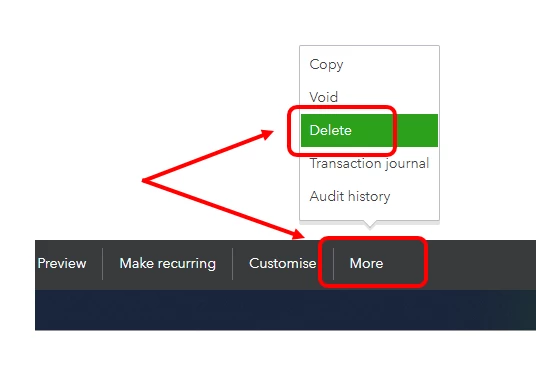
  3. Click More at the bottom of the transaction and select Delete.
  4. Confirm that you want to delete it by clicking Yes.


Let me share these articles for additional guidance and references: 


Don't hesitate to keep me posted if you're able to sort out the balance. You can also ask more questions if you need anything else.

1 reply

JenoP
JenoPAnswer
November 2, 2022

Allow to share details and help with your question about receiving payments, Samanthajj82.


QBO will record the transaction from the payment link as a sales receipt. This feature is recommend to use if you don't need to invoice the customer or if the payment was immediately when the sale was made. At the moment, it can't be linked to a previously sent transaction or used as a payment to an open invoice.


You'll want to delete the invoice and keep the sales receipt as it is. This way, the balance will turn back to zero. At the same time, your income is already recorded since the system has recorded a sales receipt. Here's how to delete an invoice:


  1. Go to the Sales menu and proceed to the Invoices tab.
  2. Look for the invoice and click on it to open the transaction.
  3. Click More at the bottom of the transaction and select Delete.
  4. Confirm that you want to delete it by clicking Yes.


Let me share these articles for additional guidance and references: 


Don't hesitate to keep me posted if you're able to sort out the balance. You can also ask more questions if you need anything else.

January 9, 2025

Is there a way to send out a payment link for our customers to pay multiple invoices at once, where the payment is automatically applied to the invoices, and we do not have to delete the invoices? We have some customers who may have 20 invoices in a day and they do not want to get 20 separate payment links to deal with. 

January 9, 2025
Original commenter did not share additional details